01-DC Transmission Error
Diagnostic trouble codes · Vehicles built from Jul 2010
DESCRIPTION
| DTC No. |
DTC Detection Condition |
Trouble Area |
| 01-DC |
Transmission to component shown by sub-code failed (Detecting this DTC does not always mean actual failure). |
If the same sub-code is stored in other components, check power source circuit and communication system of all components shown by sub-code |
- HINT:
- If the ignition switch is turned off after idling for 60 seconds, this DTC may be stored when the engine is started again (key type ignition switch only).
- NOTICE:
- Before starting troubleshooting, be sure to clear the DTCs stored due to the reason described in the Hint above. Then, check for DTCs and troubleshoot according to the output DTCs.
- The radio receiver is the master unit.
- Be sure to clear and recheck for DTCs after the inspection is completed to confirm that no DTCs are output.
- Before starting troubleshooting, be sure to clear the DTCs stored due to the reason described in the Hint above. Then, check for DTCs and troubleshoot according to the output DTCs.
INSPECTION PROCEDURE
- NOTICE:
- Be sure to read Description before performing the following procedure.
| 1. CHECK FOR DTC OF OTHER COMPONENTS |

Check if the component shown by the sub-code is displayed in the check result of the other components.
Check if DTC 01-DC is output for the other components.
- HINT:
- If DTC 01-DC is output for any other components, check if the same physical address is displayed.
- Result:
Result
Proceed to
DTC 01-DC is output and the same physical address is displayed
A
DTC 01-DC is not output or the same physical address is not displayed
B
- HINT:
- For the list of the components shown by sub-codes, refer to the table in step 2.
|
|
||||

| A | |
 |
| 2. IDENTIFY COMPONENT WHICH HAS STORED THIS CODE |
Enter diagnostic mode.
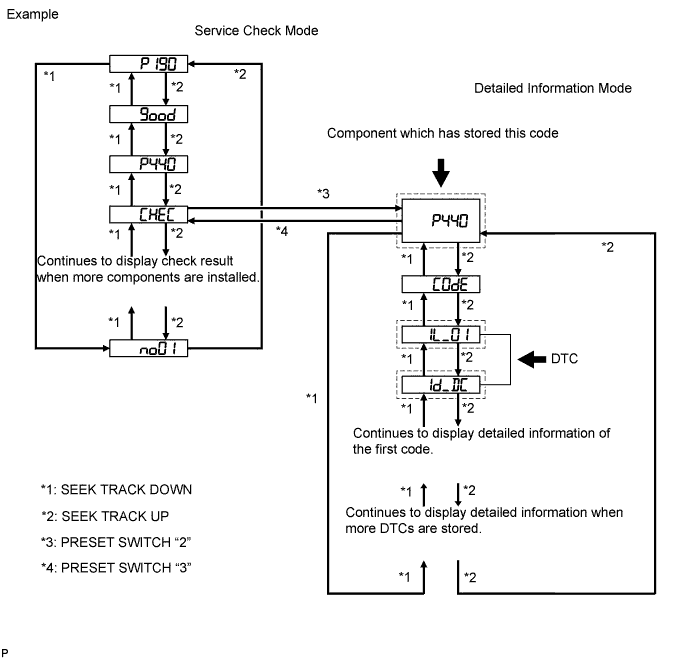

Press preset switch "2" to change the mode to "Detailed Information Mode".
Identify the component which has stored this code.
Component Table Component
Physical Address
Radio receiver
190
Multi-media interface ECU
388
- HINT:
- The physical address "P440" shown in the above example indicates the stereo component amplifier.
- For details of the DTC display, refer to DTC Check/Clear (Click here).
- The physical address "P440" shown in the above example indicates the stereo component amplifier.
| NEXT | |
|
| 3. CHECK COMPONENT WHICH HAS STORED THIS CODE |
Select the component which has stored this code.
Component Table Component
Proceed to
Radio receiver
Radio receiver communication error (Click here)
Multi-media interface ECU
Multi-media interface ECU communication error (Click here)
| NEXT | ||
 |
||
| ||
| 4. CLEAR DTC |
Clear the DTCs (Click here).
- HINT:
- If "01-DC" is output for only one component, this may not indicate a malfunction.
| NEXT | |
|
| 5. RECHECK FOR DTC |
Recheck for DTCs and check if the same DTC is output again.
- OK:
- No DTCs are output.
|
|
||||
| OK | ||
|
||
| ||
| 6. CHECK COMPONENT WHICH HAS STORED THIS CODE |
Select the component which has stored this code.
Component Table Component
Proceed to
Radio receiver
Radio receiver communication error (Click here)
Multi-media interface ECU
Multi-media interface ECU communication error (Click here)
| NEXT | ||
|
||
| ||