Downhill Assist Control Indicator Light Remains ON
Circuit diagnosis · Vehicles built Aug 2008 – Jun 2010
Versions by build date: May 2007 – Jul 2008 Aug 2008 – Jun 2010 Jul 2010 – Jun 2012 from Jul 2012
DESCRIPTION
The skid control ECU is connected to the combination meter via CAN communication.The downhill assist control indicator light comes on when the downhill assist control is ready.
Even if the downhill assist control switch is pressed, the downhill assist control indicator light will blink and the downhill assist control will not be activated under the following conditions:
- ABS is malfunctioning.
- Temperature of the brake actuator increases and the downhill assist control is temporarily canceled.
- HINT:
- For vehicles with the multi-information display, the master caution indicator light will come on and a warning message will be displayed on the multi-information display if the downhill assist control cannot be performed.
- If any of the following conditions is met with the downhill assist control switch on, a message will be displayed on the multi-information display to inform that the downhill assist control cannot be performed:
- The shift lever is in any position other that S1 or R.
- The vehicle speed is 25 km/h (16 mph) or more.
- The shift lever is in any position other that S1 or R.
WIRING DIAGRAM
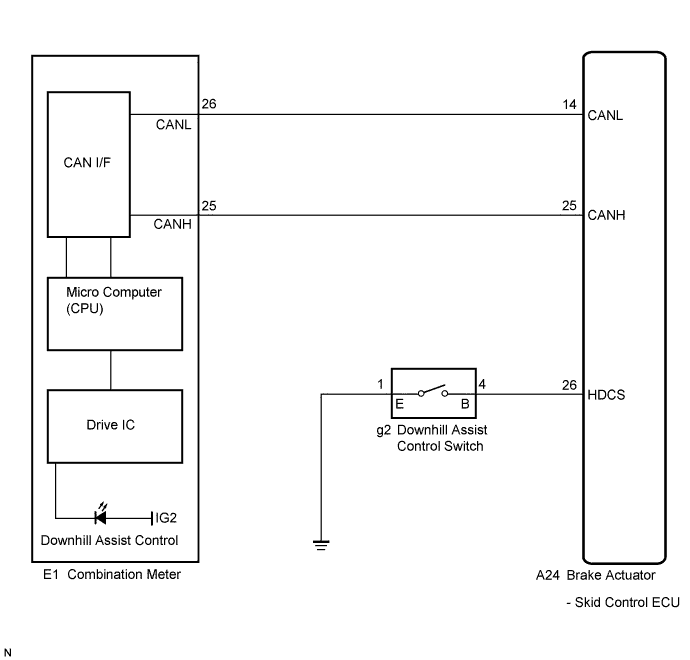

INSPECTION PROCEDURE
- NOTICE:
- When replacing the brake actuator assembly, perform zero point calibration (Click here).
| 1. CHECK CAN COMMUNICATION SYSTEM |

Check if a CAN communication system DTC is output (Click here).
- Result:
Result
Proceed to
DTC is not output
A
DTC is output
B
|
|
||||

| A | |
 |
| 2. CHECK IF SKID CONTROL ECU CONNECTOR IS SECURELY CONNECTED |
Check if the skid control ECU connector is securely connected.
- OK:
- The connector is securely connected.
|
|
||||
| OK | |
|
| 3. CHECK BATTERY |
Check the battery voltage.
- Standard voltage:
- 11 to 14 V
|
|
||||
| OK | |
|
| 4. READ VALUE ON INTELLIGENT TESTER (DOWNHILL ASSIST CONTROL SWITCH) |
Connect the intelligent tester to the DLC3.
Turn the ignition switch on (IG).
Select the Data List mode on the intelligent tester (Click here).
ABS / VSC / TRC: Tester Display
Measurement Item/Range
Normal Condition
Diagnostic Note
Downhill Assist Control Switch
Downhill assist control switch / ON or OFF
ON: Switch ON
OFF: Switch OFF
-
Using the intelligent tester, check the switch condition on the intelligent tester changes according to downhill assist control switch operation.
- OK:
- The intelligent tester display changes according to downhill assist control switch operation.
|
|
||||

| OK | |
|
| 5. INSPECT COMBINATION METER ASSEMBLY |
Turn the ignition switch off.
Perform the Active Test of the combination meter (meter CPU) using the intelligent tester (Click here).
Check the combination meter.
- OK:
- The downhill assist control indicator light turns on or off in accordance with the intelligent tester operation.
- HINT:
- If troubleshooting has been carried out according to the Problem Symptoms Table, refer back to the table and proceed to the next step (Click here).
|
|
||||
| OK | ||
 |
||
| ||
| 6. INSPECT DOWNHILL ASSIST CONTROL SWITCH |
Turn the ignition switch off.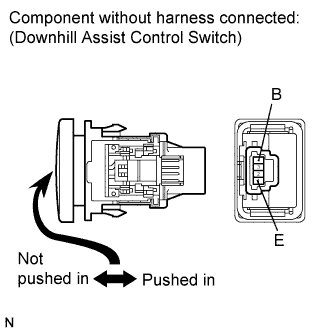
Disconnect the downhill assist control switch connector.
Measure the resistance according to the value(s) in the table below.
- Standard resistance:
Tester Connection
Switch Condition
Specified Condition
4 (B) - 1 (E)
Switch is pushed in
Below 1 Ω
4 (B) - 1 (E)
Switch is not pushed in
10 kΩ or higher
- NOTICE:
- Check the downhill assist control switch signal after replacement (Click here).
|
|
||||
| OK | |
|
| 7. CHECK HARNESS AND CONNECTOR (SKID CONTROL ECU - DOWNHILL ASSIST CONTROL SWITCH) |
Disconnect the skid control ECU connector.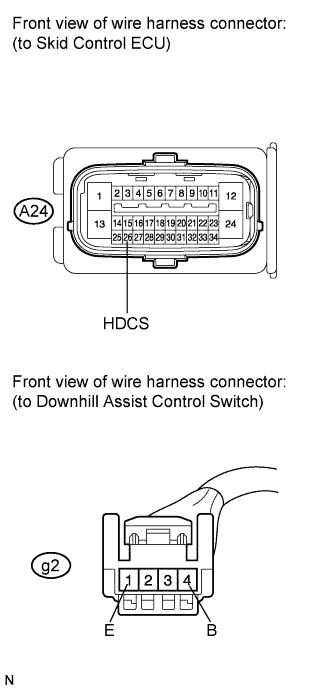
Measure the resistance according to the value(s) in the table below.
- Standard resistance:
Tester Connection
Condition
Specified Condition
A24-26 (HDCS) - g2-4 (B)
Always
Below 1 Ω
A24-26 (HDCS) - Body ground
Always
10 kΩ or higher
g2-1 (E) - Body ground
Always
Below 1 Ω
- HINT:
- If troubleshooting has been carried out according to the Problem Symptoms Table, refer back to the table and proceed to the next step (Click here).
|
|
||||
| OK | ||
|
||
| ||