Screen Flicker or Color Distortion
Circuit diagnosis · Vehicles built Jun 2011 – Jul 2012
Versions by build date: Jun 2011 – Jul 2012 Aug 2012 – Jul 2013 from Aug 2013
INSPECTION PROCEDURE
| 1. CHECK DISPLAY SETTING |
 |
Push the "SETUP" button and select the "Display" switch.
Select the "Camera" button and enter the "Display (Camera)" screen.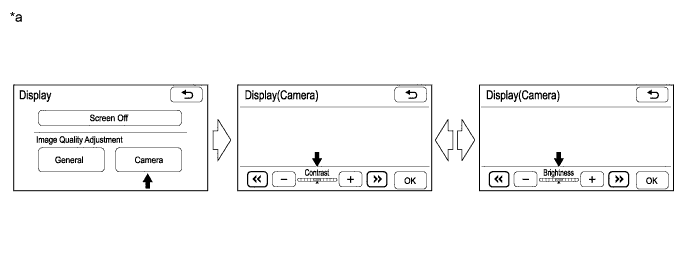

Text in Illustration
*a
|
Example
|
-
|
-
|
Reset the display settings (contrast and brightness) and check that the screen appears normal.
- OK:
- The display returns to normal.
|
NG |
 |
|
|
|
| OK |
|
 |
|
|
| 2. CHECK CABIN TEMPERATURE
|
|
Check that the cabin temperature is higher than -20°C (-4.0°F).
- OK:
- The cabin temperature is higher than -20°C (-4.0°F).
|
NG |
 |
|
| HEAT CABIN AND RECHECK TEMPERATURE |
|
|
| OK |
|
 |
|
| 3. CHECK COLOR BAR
|
|
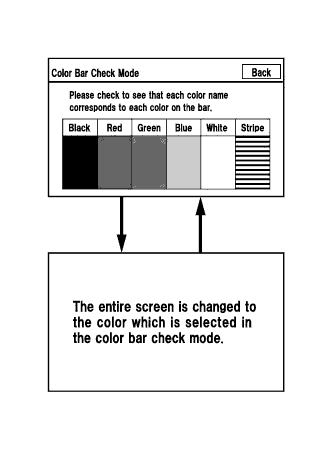
- Enter the "Color Bar Check Mode" screen (Click here).
Check that the color bars match the displayed names.
- OK:
- Color bars match the displayed names.
|
NG |
|
|
| REPLACE RADIO AND DISPLAY RECEIVER ASSEMBLY (Click here)
|
|
|
| OK |
|
|
|
| PROCEED TO NEXT SUSPECTED AREA SHOWN IN PROBLEM SYMPTOMS TABLE (Click here)
|
|