TELEMATICS TELEMATICS SYSTEM B1583 GPS Signal Unreceived
DESCRIPTION
This DTC is stored when GNSS satellite signals is not received for 30 km.
| DTC No. | Detection Item | DTC Detection Condition | Trouble Area |
|---|---|---|---|
| B1583 | GPS Signal Unreceived | GNSS signals are not received for 30 km. | ·
Telematics transceiver ·
Telephone antenna assembly ·
No. 2 antenna cord sub-assembly ·
Telephone antenna cord sub-assembly ·
Harness or connector |
WIRING DIAGRAM
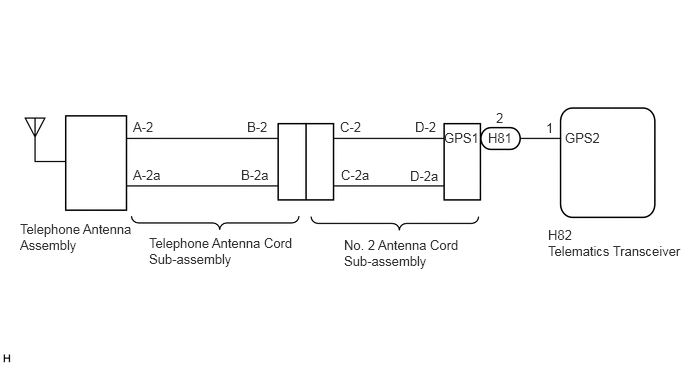
CAUTION / NOTICE / HINT
- NOTICE:
-
Depending on the parts that are replaced during vehicle inspection or maintenance, performing initialization, registration or calibration may be needed. Refer to Registration for Telematics System.
-
Click hereAudio / Visual / Telematics>TELEMATICS>TELEMATICS SYSTEM>REGISTRATION
PROCEDURE
If the vehicle is outside the communication service area, move the vehicle into a communication service area, wait for a while and perform the operation again.
- Result:
Proceed to NEXT
NEXT
Turn the ignition switch off.
Connect the GTS to the DLC3.
Turn the ignition switch to ON and wait for 20 seconds.
Turn the GTS on.
Check for DTCs and check that no DTCs are output.
Click hereAudio / Visual / Telematics>TELEMATICS>TELEMATICS SYSTEM>DTC CHECK / CLEAR
- OK:
No DTCs are output.
- Result:
Proceed to OK NG
OK
Click hereGeneral>INTRODUCTION>HOW TO TROUBLESHOOT ECU CONTROLLED SYSTEMS>HOW TO PROCEED WITH TROUBLESHOOTING
NG
Check if any optional components that may decrease reception capacity, such as sunshade film or a telephone antenna, are installed.
- Result:
Result Proceed to Optional components are not installed A Optional components are installed B
- NOTICE:
-
Do not remove optional components without the permission of the customer.
A
B
Clear the DTCs.
Click hereAudio / Visual / Telematics>TELEMATICS>TELEMATICS SYSTEM>DTC CHECK / CLEAR
Recheck for DTCs and check if the same DTC is output again.
- Result:
Result Proceed to No DTCs are output. A DTC B1583 is output. B
A
Click hereGeneral>INTRODUCTION>HOW TO TROUBLESHOOT ECU CONTROLLED SYSTEMS>HOW TO PROCEED WITH TROUBLESHOOTING
B
OK
NG
OK
NG
OK
NG
Replace the telephone antenna assembly with a new or known good one.
Click hereAudio / Visual / Telematics>TELEMATICS>TELEPHONE ANTENNA>REMOVAL
Clear the DTCs.
Click hereAudio / Visual / Telematics>TELEMATICS>TELEMATICS SYSTEM>DTC CHECK / CLEAR
Recheck for DTCs and check that no DTCs are output.
- OK:
No DTCs are output.
- Result:
Proceed to OK NG
OK
NG
Replace the telematics transceiver with a new one.
Click hereAudio / Visual / Telematics>TELEMATICS>TELEMATICS TRANSCEIVER>REMOVAL
- Result:
Proceed to NEXT
NEXT