AUDIO / VIDEO INSTRUMENT PANEL SPEAKER REMOVAL
CAUTION / NOTICE / HINT
- HINT:
- ·
Use the same procedure for the RH and LH sides.
·The procedure listed below is for the LH side.
PROCEDURE

 1. PRECAUTION
- NOTICE:
-
After turning the ignition switch off, waiting time may be required before disconnecting the cable from the negative (-) battery terminal.
-
Click hereGeneral>INTRODUCTION>REPAIR INSTRUCTION>PRECAUTION
2.DISCONNECT CABLE FROM NEGATIVE BATTERY TERMINAL
74616C
3.REMOVE FRONT NO. 1 ASSIST GRIP PLUG LH
74611F
4.REMOVE NO. 1 ASSIST GRIP
62212
5.REMOVE FRONT PILLAR GARNISH LH
55408F
6.REMOVE NO. 1 INSTRUMENT PANEL SPEAKER PANEL SUB-ASSEMBLY
86160P
7.REMOVE FRONT NO. 2 SPEAKER ASSEMBLY
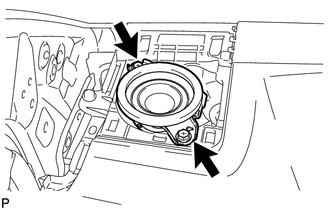
Remove the 2 screws.
Disconnect the connector and remove the front No. 2 speaker assembly.
- NOTICE:
-
Do not touch the cone of the speaker.
86140A
8.REMOVE RADIO AND DISPLAY RECEIVER ASSEMBLY (for Radio and Display Type)
55421B
9.REMOVE UPPER INSTRUMENT CLUSTER FINISH PANEL
86160L
10.REMOVE FRONT NO. 4 SPEAKER ASSEMBLY
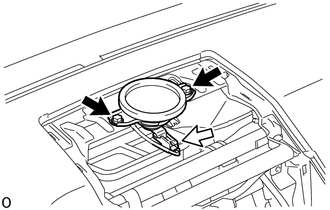

|
Screw |

|
Connector |
Remove the 2 screws.
Disconnect the connector and remove the front No. 4 speaker assembly.
- NOTICE:
-
Do not touch the cone of the speaker.