Display does not Dim when Light Control Switch is Turned ON
Circuit diagnosis · Vehicles built from Jan 2012
INSPECTION PROCEDURE
| 1. CHECK IMAGE QUALITY SETTING |

Display the "Display" screen.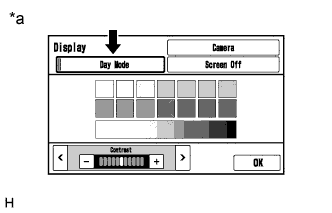

Turn the light control switch to the tail or head position.
Check if "Day Mode" on the display adjustment screen is on.
Text in Illustration *a
Example
Result Result
Proceed to
"Day Mode" setting is on.
A
"Day Mode" setting is off.
B
|
|
||||

| A | ||
 |
||
| ||
| 2. CHECK VEHICLE SIGNAL (OPERATION CHECK) |
Enter the "Vehicle Signal Check Mode" screen. Refer to Check Vehicle Signal in Operation Check (Click here).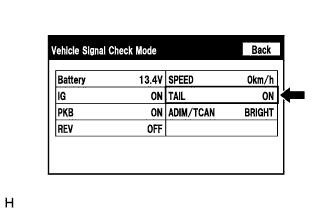
Check that the display changes between ON and OFF according to the light control switch operation.
- OK:
Light Control Switch
Display
Tail or head
ON
Off
OFF
- HINT:
- The display is updated once per second. It is normal for the display to lag behind the actual switch operation.
|
|
||||

| OK | ||
|
||
| ||