Brake Warning Light does not Come ON
Circuit diagnosis · Vehicles built Sep 2011 – Dec 2011
Versions by build date: Sep 2011 – Dec 2011 from Jan 2012
DESCRIPTION
The BRAKE warning light comes on when brake fluid is insufficient, the parking brake is applied or the EBD is defective.WIRING DIAGRAM
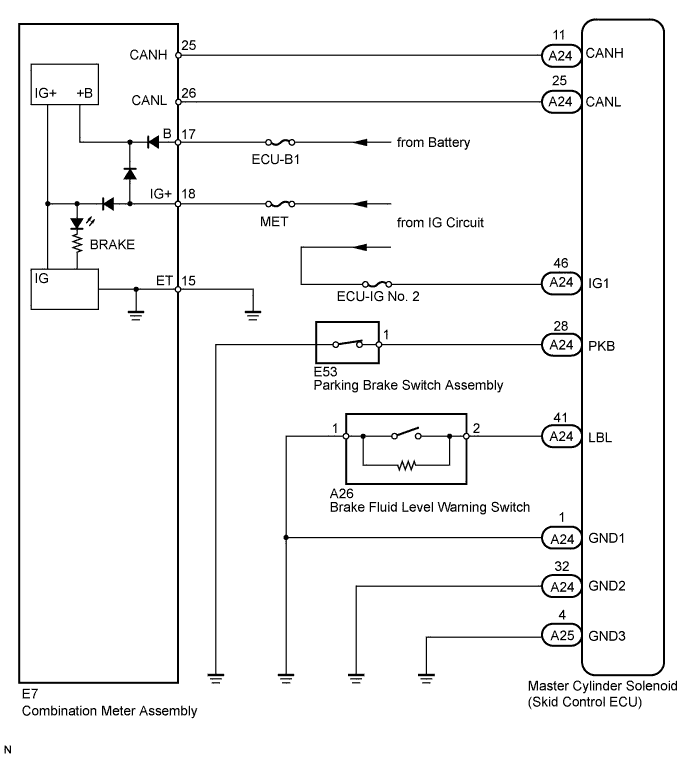

INSPECTION PROCEDURE
- NOTICE:
- When replacing the master cylinder solenoid, perform zero point calibration (Click here).
| 1. INSPECT BRAKE WARNING LIGHT |
 |
Disconnect the A24 skid control ECU connector.
Turn the ignition switch to ON.
Check that the BRAKE warning light comes on.
- OK:
- BRAKE warning light comes on.
Result
Result
|
Proceed to
|
NG
|
A
|
OK
|
for LHD
|
B
|
for RHD
|
C
|
|
B |
 |
|
|
|
|
C |
|
|
|
|
| A |
|
 |
|
| 2. CHECK CAN COMMUNICATION LINE |
|
Turn the ignition switch off.
Connect the intelligent tester to the DLC3.
Turn the ignition switch to ON and the intelligent tester on.
Select "Bus Check" from the System Selection Menu screen, and follow the prompts on the screen to inspect the CAN Bus.
Result
Result
|
Proceed to
|
"Bus Check" indicates no malfunctions in CAN communication
|
A
|
"Bus Check" indicates malfunctions in CAN communication
|
for LHD
|
B
|
for RHD
|
C
|
- OK:
- "Bus Check" indicates no malfunctions in CAN communication.
|
B |
|
|
| GO TO CAN COMMUNICATION SYSTEM (HOW TO PROCEED WITH TROUBLESHOOTING) (Click here)
|
|
|
|
C |
|
|
| GO TO CAN COMMUNICATION SYSTEM (HOW TO PROCEED WITH TROUBLESHOOTING) (Click here)
|
|
|
| A |
|
|
|
| 3. CHECK DTC (CAN COMMUNICATION SYSTEM) |
|
Turn the ignition switch off.
Connect the intelligent tester to the DLC3.
Turn the ignition switch to ON and the intelligent tester on.
Check for DTCs (for LHD: Click here/ for RHD: Click here).
Result
Result
|
Proceed to
|
CAN system DTC is not output
|
A
|
CAN system DTC is output
|
for LHD
|
B
|
for RHD
|
C
|
|
B |
|
|
| GO TO CAN COMMUNICATION SYSTEM (HOW TO PROCEED WITH TROUBLESHOOTING) (Click here)
|
|
|
|
C |
|
|
| GO TO CAN COMMUNICATION SYSTEM (HOW TO PROCEED WITH TROUBLESHOOTING) (Click here)
|
|
|
| A |
|
|
|
| 4. CHECK OPERATION OF BRAKE WARNING LIGHT (ACTIVE TEST) |
|
Turn the ignition switch off.
Connect the intelligent tester to the DLC3.
Turn the ignition switch to ON and the intelligent tester on.
Enter the following menus: Body Electrical / Combination Meter / Active Test.
Check the condition of the brake warning light by operating the intelligent tester.
Combination Meter
Tester Display
|
Test Part
|
Control Range
|
Diagnostic Note
|
Indicat. Lamp Brake
|
Brake Warning Light
|
Warning light ON/OFF
|
-
|
- OK:
- The warning light turns on when operating the intelligent tester.
Result
Result
|
Proceed to
|
OK
|
A
|
NG
|
w/ Multi-information Display
|
B
|
w/o Multi-information Display
|
C
|
|
B |
|
|
|
|
|
C |
|
|
|
|
| A |
|
 |
|
|