BRAKE CONTROL / DYNAMIC CONTROL SYSTEMS VEHICLE STABILITY CONTROL SYSTEM Slip Indicator Light Remains ON
DESCRIPTION
The slip indicator light blinks during VSC, A-TRC, Crawl Control and hill-start assist control operation.
When the system fails, the slip indicator light comes on to warn the driver.
WIRING DIAGRAM
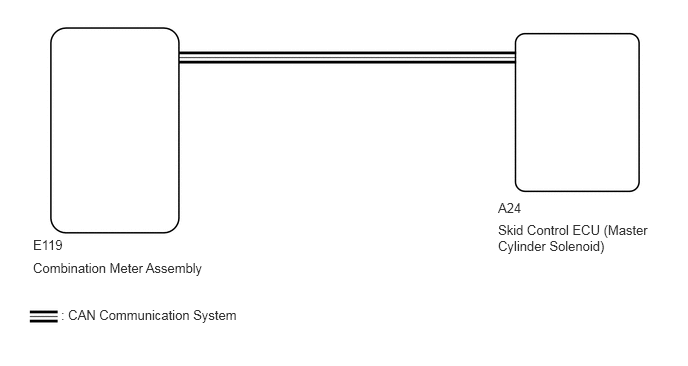
CAUTION / NOTICE / HINT
- NOTICE:
-
After replacing the master cylinder solenoid, perform zero point calibration and store the system information (See page Brake>BRAKE CONTROL / DYNAMIC CONTROL SYSTEMS>VEHICLE STABILITY CONTROL SYSTEM>CALIBRATION).
PROCEDURE
Check for DTCs (See page Brake>BRAKE CONTROL / DYNAMIC CONTROL SYSTEMS>VEHICLE STABILITY CONTROL SYSTEM>DTC CHECK / CLEAR).
| Result | Proceed to |
|---|---|
| DTC is not output | A |
| DTC is output | B |
A
B
OK
NG
A
B
C
D
E
A
B
C
D
E
A
B
C
D
E
Turn the ignition switch off.
Connect the GTS to the DLC3.
Turn the ignition switch to ON.
Turn the GTS on.
Enter the following menus: Chassis / ABS/VSC/TRC / Active Test.
| Tester Display | Test Part | Control Range | Diagnostic Note |
|---|---|---|---|
| Slip Indicator Light | Slip indicator light | Indicator light ON/OFF | Observe the combination meter assembly. |
When performing the Slip Indicator Light Active Test, check Slip Indicator Light in the Data List.
| Tester Display | Measurement Item/Range | Normal Condition | Diagnostic Note |
|---|---|---|---|
| Slip Indicator Light | Slip indicator light/ ON or OFF | ON: Indicator light on
OFF: Indicator light off |
- |
| Result | Proceed to | |
|---|---|---|
| Data List Display | Data List Display when Performing Active Test ON/OFF Operation | |
| ON | Changes between ON and OFF | A |
| Does not change between ON and OFF (for LHD) | B | |
| Does not change between ON and OFF (for RHD) | C | |
| OFF | Changes between ON and OFF | A |
| Does not change between ON and OFF (for LHD) | B | |
| Does not change between ON and OFF (for RHD) | C | |
A
(See pageVehicle Interior>METER / GAUGE / DISPLAY>METER / GAUGE SYSTEM>HOW TO PROCEED WITH TROUBLESHOOTING)
B
C