RM2660E
_56
Audio / Visual / Telematics
_052829
NAVIGATION / MULTI INFO DISPLAY
_0255494
NAVIGATION SYSTEM
J
NAVIGATION / MULTI INFO DISPLAY NAVIGATION SYSTEM Voice Guidance does not Function
PROCEDURE
1.CHECK NAVIGATION SETTING
a.
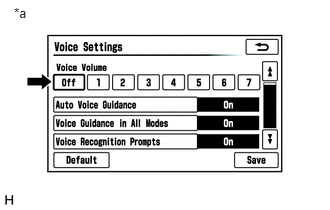
Display the "Voice Settings" screen.
b.
0.147,0.055 0.349,0.244
0.202,0.188
10
*a
Check that "Off" is not selected.
- OK:
"Off" is not selected.
| *a | Example |
OK
2.CHECK NAVIGATION SETTING
NG
SELECT VOICE VOLUME SETTING OTHER THAN "Off"
2.CHECK NAVIGATION SETTING
a.
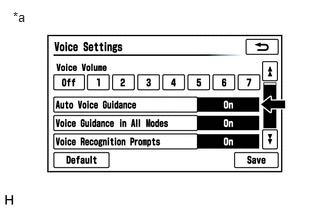
Display the "Voice Settings" screen.
b.
0.135,0.098 0.312,0.282
0.177,0.184
10
*a
Check that "Auto Voice Guidance" is not "Off".
- OK:
"Auto Voice Guidance" is not "Off".
| *a | Example |
OK
3.CHECK NAVIGATION SETTING
NG
TURN AUTO VOICE GUIDANCE "On"
3.CHECK NAVIGATION SETTING
a.
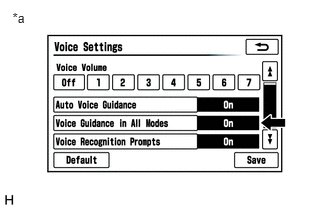
Display the "Voice Settings" screen.
b.
0.13,0.101 0.309,0.280
0.179,0.179
10
*a
Check that "Voice Guidance in All Modes" is not "Off".
- OK:
"Voice Guidance in All Modes" is not "Off".
| *a | Example |
OK
4.CHECK AUDIO FUNCTION
NG
TURN VOICE GUIDANCE IN ALL MODES "On"
4.CHECK AUDIO FUNCTION
a.
Check that sound can be heard from a front speaker.
- OK:
Sound can be heard.
OK
REPLACE MULTI-MEDIA MODULE RECEIVER ASSEMBLY
NG
PROCEED TO NEXT SUSPECTED AREA SHOWN IN PROBLEM SYMPTOMS TABLE
(See pageAudio / Visual / Telematics>NAVIGATION / MULTI INFO DISPLAY>NAVIGATION SYSTEM>PROBLEM SYMPTOMS TABLE)