PARK ASSIST / MONITORING ULTRASONIC SENSOR(for Front) INSTALLATION
PROCEDURE

 89348A
1.INSTALL NO. 2 ULTRASONIC SENSOR RETAINER
- HINT:
-
Use the same procedure to install the No. 2 ultrasonic sensor retainer on the other side.
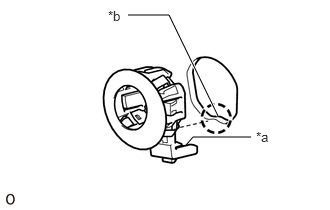
Temporarily install the No. 2 ultrasonic sensor retainer to the front bumper.
| *a | Protrusion |
| *b | Keyhole |
- NOTICE:
- ·
Do not damage the bumper with the protrusion when installing the retainer.
·Securely install the No. 2 ultrasonic sensor retainer so that there are no gaps between the retainer and surface of the front bumper.
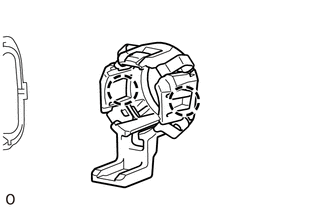
Attach the 2 claws to install the No. 2 ultra sonic sensor retainer.
89341A
2.INSTALL NO. 1 ULTRASONIC SENSOR
- HINT:
-
Use the same procedure to install the No. 1 ultrasonic sensor on the other side.
Attach the 2 claws to install the ultrasonic sensor.
- NOTICE:
-
Push the No. 2 ultrasonic sensor retainer from the outside of the bumper when there is a gap between the retainer and the bumper surface. In this case, do not push on the No. 1 ultrasonic sensor.
89348D
3.INSTALL ULTRASONIC SENSOR CLIP
Attach the 4 claws to install the ultrasonic sensor clip.
- NOTICE:
-
Hold the No. 1 ultrasonic sensor in place so that the No. 2 ultrasonic sensor retainer does not come out when installing the ultrasonic sensor clip.
82114
4.INSTALL NO. 4 ENGINE ROOM WIRE
52119A
5.INSTALL FRONT BUMPER COVER