SUPPLEMENTAL RESTRAINT SYSTEMS REAR SEAT SIDE AIRBAG ASSEMBLY(for RH Side) INSTALLATION
CAUTION / NOTICE / HINT
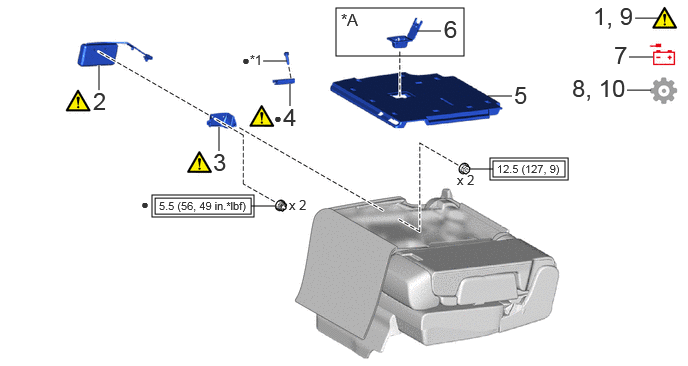
| Procedure | Part Name Code |

|

|

|
|
|---|---|---|---|---|---|
| 1 | PRECAUTION | - | ( ) |
- | - |
| 2 | REAR SEAT AIRBAG ASSEMBLY RH | 73930A | () |
- | - |
| 3 | REAR SEATBACK FRAME RH | 71251 | () |
- | - |
| 4 | REAR SEAT COVER HANGER | 71751D | () |
- | - |
| 5 | REAR SEATBACK BOARD SUB-ASSEMBLY RH | 71701A | - | - | - |
| 6 | REAR SEATBACK COVER | 72996H | - | - | - |
| 7 | CONNECT CABLE TO NEGATIVE BATTERY TERMINAL | - | () |
- | - |
| 8 | PERFORM DIAGNOSTIC SYSTEM CHECK | - | - | - | () |
| 9 | CHECK SRS WARNING LIGHT | - | () |
- | - |
| 10 | INITIALIZATION AFTER RECONNECTING BATTERY TERMINAL | - | - | - | () |
| *A | w/ Child Restraint System Guide | - | - |
| *1 | RIVET | - | - |

|
Tightening torque for "Major areas involving basic vehicle performance such as moving/turning/stopping": N*m (kgf*cm, ft.*lbf) | ● | Non-reusable part |
PROCEDURE

 1. PRECAUTION
|
|
|
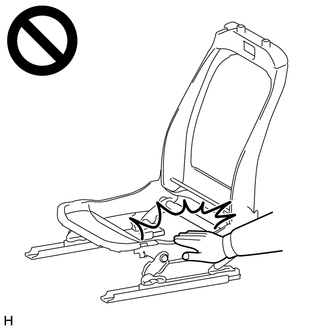
73930A 2.INSTALL REAR SEAT AIRBAG ASSEMBLY RH

Install the rear seat airbag assembly RH with 2 new nuts.
- Torque:
- 5.5 N*m (56 kgf*cm, 49 in.*lbf)
- CAUTION:
-
·
Do not reuse the nut.
·If the installation surface or surrounding area of the rear seat airbag assembly RH is deformed or damaged, replace the rear seatback frame RH, No. 1 seatback pad RH and No. 1 seatback cover sub-assembly RH.
71251 3.INSTALL REAR SEATBACK FRAME RH
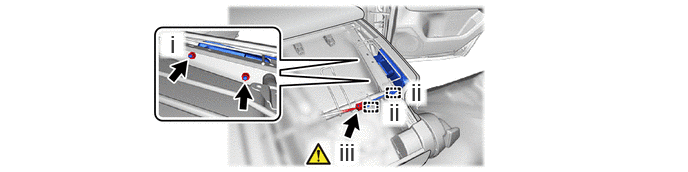
Install the rear seatback frame RH with the 2 nuts.
- Torque:
- 12.5 N*m (127 kgf*cm, 9 ft.*lbf)
Engage the clamp.
Connect the airbag connector.
- NOTICE:
-
When connecting any airbag connector, take care not to damage the airbag wire harness.
- HINT:
-
Refer to How to Connect or Disconnect Airbag Connector: Click hereVehicle Interior>SUPPLEMENTAL RESTRAINT SYSTEMS>AIRBAG SYSTEM>HOW TO CONNECT OR DISCONNECT AIRBAG CONNECTOR
71751D 4.INSTALL REAR SEAT COVER HANGER
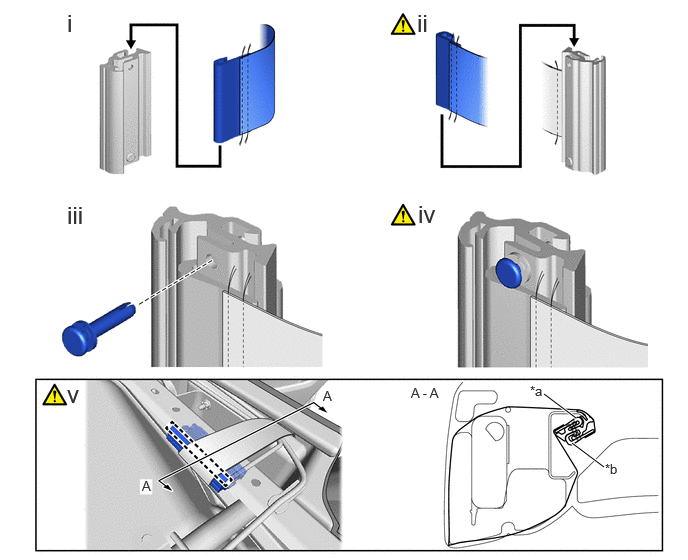
| *a | J Hook A | *b | J Hook B |
Install the J hook A.
Install the J hook B.
- NOTICE:
-
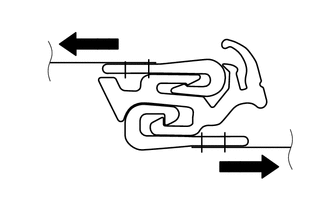
-
Pull at strap to check that the assembly part is not coming off.
Install a new rivet.
Pull the rivet head.
- NOTICE:
-
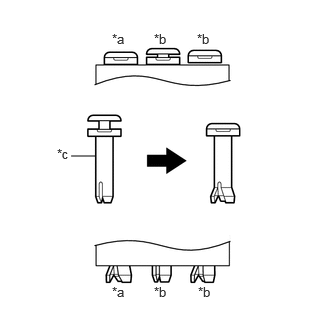 0.74,1.625 0.99,1.625 false 1.167,0.323 1.479,0.521 0.313,0.198 10 false *a 1.604,0.323 1.917,0.521 0.313,0.198 10 false *b 2.052,0.323 2.365,0.521 0.313,0.198 10 false *b 0.594,1.521 0.906,1.719 0.313,0.198 10 false *c 1.167,2.958 1.479,3.156 0.313,0.198 10 false *a 1.604,2.958 1.917,3.156 0.313,0.198 10 false *b 2.063,2.958 2.375,3.156 0.313,0.198 10 false *b
*a Correct *b Incorrect *c Rivet
-
Check that the rivet head is pressed in and the rivet end is completely open.
Engage the clamp to install a new rear seat cover hanger.
- NOTICE:
-
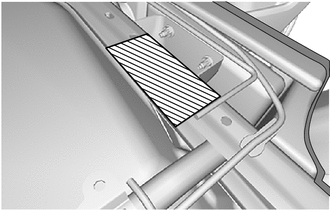 0,0 0,0 false

Installation Range
-
Install the rear seat cover hanger within the range shown in the illustration.
71701A 5.INSTALL REAR SEATBACK BOARD SUB-ASSEMBLY RH
72996H 6.INSTALL REAR SEATBACK COVER (w/ Child Restraint System Guide)
7.CONNECT CABLE TO NEGATIVE BATTERY TERMINAL
for 1GR-FE:
for V35A-FTS:
8. PERFORM DIAGNOSTIC SYSTEM CHECK
9.CHECK SRS WARNING LIGHT
10. INITIALIZATION AFTER RECONNECTING BATTERY TERMINAL
Click hereGeneral>SETUP>WHEN DISCONNECTING OR RECONNECTING BATTERY TERMINAL>WORK PROCEDURE
- HINT:
-
When disconnecting and reconnecting the battery, there is an automatic learning function that completes learning when the respective system is used.
-
Click hereGeneral>SETUP>WHEN DISCONNECTING OR RECONNECTING BATTERY TERMINAL>AUTOMATIC LEARNING CHART