EXTERIOR PANELS / TRIM REAR BUMPER(for Aero Type) INSTALLATION
CAUTION / NOTICE / HINT
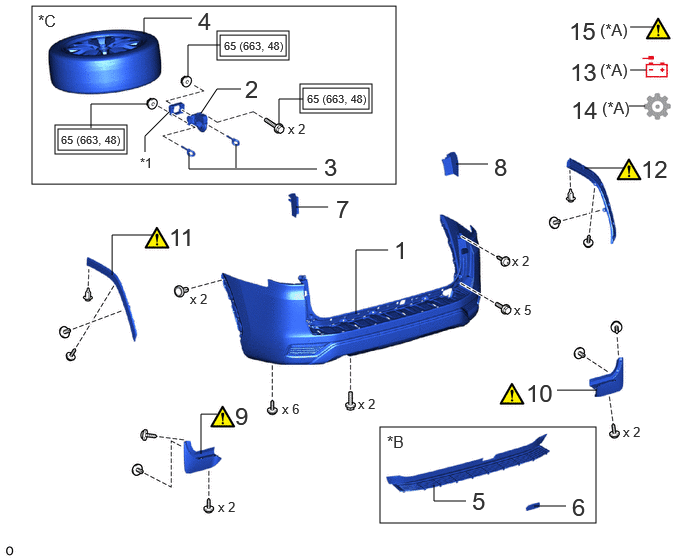
| Procedure | Part Name Code |

|

|

|
|
|---|---|---|---|---|---|
| 1 | REAR BUMPER ASSEMBLY | - | - | - | - |
| 2 | PINTLE HOOK ASSEMBLY | 51980A | - | - | - |
| 3 | EYELET PINTLE HOOK | 51985A | - | - | - |
| 4 | SPARE TIRE | - | - | - | - |
| 5 | REAR BUMPER NO. 1 PLATE | 52162B | - | - | - |
| 6 | REAR BUMPER PLATE RH | 52163A | - | - | - |
| 7 | REAR COMBINATION LIGHT COVER LH | 81498 | - | - | - |
| 8 | REAR COMBINATION LIGHT COVER RH | 81497 | - | - | - |
| 9 | QUARTER PANEL REAR MUDGUARD LH | 76626E | ( ) |
- | - |
| 10 | QUARTER PANEL REAR MUDGUARD RH | 76625G | () |
- | - |
| 11 | QUARTER OUTSIDE MOULDING SUB-ASSEMBLY LH | 75606B | () |
- | - |
| 12 | QUARTER OUTSIDE MOULDING SUB-ASSEMBLY RH | 75605B | () |
- | - |
| 13 | CONNECT CABLE TO NEGATIVE BATTERY TERMINAL | - | - | - | - |
| 14 | INITIALIZATION AFTER RECONNECTING BATTERY TERMINAL | - | - | - | () |
| 15 | INSPECT KICK DOOR CONTROL SENSOR | 891B0 | () |
- | - |
| *A | w/ Hands Free Power Back Door | *B | for Step |
| *C | w/ Pintle Hook | - | - |
| *1 | PINTLE HOOK BRACKET | - | - |

|
Tightening torque for "Major areas involving basic vehicle performance such as moving/turning/stopping": N*m (kgf*cm, ft.*lbf) | - | - |
CAUTION / NOTICE / HINT
- HINT:
-
·
If the bumper is damaged, there is a possibility that the installation area of the blind spot monitor sensor may be deformed and the blind spot monitor system may not operate correctly, so visually inspect the blind spot monitor sensor installation area (frame, stud bolt) to make sure it is not dented or bent.
Click hereAudio / Visual / Telematics>PARK ASSIST / MONITORING>BLIND SPOT MONITOR SENSOR>ADJUSTMENT
·If the visual inspection finds a problem, check the installation condition of the blind spot monitor sensor, and adjust the installation position of the blind spot monitor sensor as necessary.
·When the rear bumper is damaged or deformed due to an accident or contact with other objects, etc., or the bumper installation area on the body is repaired, it is necessary to perform ultrasonic sensor detection angle measurement.
Click hereAudio / Visual / Telematics>PARK ASSIST / MONITORING>PARKING SUPPORT BRAKE SYSTEM>CALIBRATION
·A bolt without a torque specification is shown in the standard bolt chart.
Click hereGeneral>SPECIFICATIONS>STANDARD BOLT>SPECIFIED TORQUE FOR STANDARD BOLTS
PROCEDURE

 1.INSTALL REAR BUMPER ASSEMBLY
51980A 2.INSTALL PINTLE HOOK ASSEMBLY (w/ Pintle Hook)
- Torque:
- 65 N*m (663 kgf*cm, 48 ft.*lbf)
51985A 3.INSTALL EYELET PINTLE HOOK (w/ Pintle Hook)
- Torque:
- 65 N*m (663 kgf*cm, 48 ft.*lbf)
4.INSTALL SPARE TIRE (w/ Pintle Hook)
52162B 5.INSTALL REAR BUMPER NO. 1 PLATE (for Step)
52163A 6.INSTALL REAR BUMPER PLATE RH (for Step)
81498 7.INSTALL REAR COMBINATION LIGHT COVER LH
81497 8.INSTALL REAR COMBINATION LIGHT COVER RH
76626E 9.INSTALL QUARTER PANEL REAR MUDGUARD LH
|
|
Click here() |
76625G 10.INSTALL QUARTER PANEL REAR MUDGUARD RH
Use the same procedure described for the LH side.
75606B 11.INSTALL QUARTER OUTSIDE MOULDING SUB-ASSEMBLY LH
|
|
Click here() |
75605B 12.INSTALL QUARTER OUTSIDE MOULDING SUB-ASSEMBLY RH
Use the same procedure described for the LH side.
13.CONNECT CABLE TO NEGATIVE BATTERY TERMINAL (w/ Hands Free Power Back Door)
1GR-FE:
V35A-FTS:
14. INITIALIZATION AFTER RECONNECTING BATTERY TERMINAL (w/ Hands Free Power Back Door)
Click hereGeneral>SETUP>WHEN DISCONNECTING OR RECONNECTING BATTERY TERMINAL>WORK PROCEDURE
- HINT:
-
When disconnecting and reconnecting the battery, there is an automatic learning function that completes learning when the respective system is used.
-
Click hereGeneral>SETUP>WHEN DISCONNECTING OR RECONNECTING BATTERY TERMINAL>AUTOMATIC LEARNING CHART
891B0 15.INSPECT KICK DOOR CONTROL SENSOR (w/ Hands Free Power Back Door)