EXTERIOR PANELS / TRIM FRONT BUMPER INSTALLATION
CAUTION / NOTICE / HINT
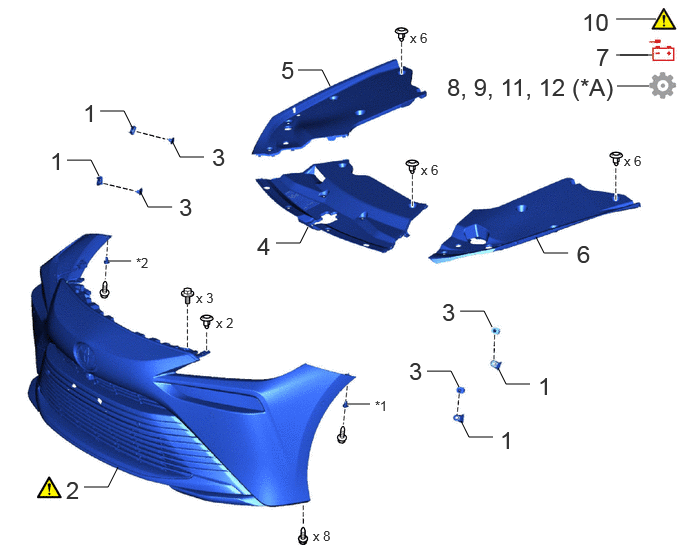
| Procedure | Part Name Code | 
|

|

|
|
|---|---|---|---|---|---|
| 1 | FRONT FENDER LINER RETAINER | 53879H | - | - | - |
| 2 | FRONT BUMPER ASSEMBLY | - | ( ) |
- | - |
| 3 | PIN HOLD CLIP | 47749F | - | - | - |
| 4 | LOWER RADIATOR AIR DEFLECTOR | 53295 | - | - | - |
| 5 | RADIATOR COVER PLATE | 53291B | - | - | - |
| 6 | UPPER RADIATOR SUPPORT SEAL | 53292A | - | - | - |
| 7 | CONNECT CABLE TO NEGATIVE AUXILIARY BATTERY TERMINAL | - | - | - | - |
| 8 | INITIALIZATION AFTER RECONNECTING AUXILIARY BATTERY TERMINAL | - | - | - | ()
|
| 9 | PERFORM DIAGNOSTIC SYSTEM CHECK | - | - | - | ()
|
| 10 | CHECK SRS WARNING LIGHT | - | ()
|
- | - |
| 11 | PERFORM CALIBRATION | - | - | - | ()
|
| 12 | ADJUST FRONT TELEVISION CAMERA ASSEMBLY | 86790B | - | - | ()
|
| *A | w/ Panoramic View Monitor System | - | - |
| *1 | FRONT BUMPER SIDE MOUNTING BRACKET LH | *2 | FRONT BUMPER SIDE MOUNTING BRACKET RH |
|
|
|
PROCEDURE

 53879H
1.INSTALL FRONT FENDER LINER RETAINER
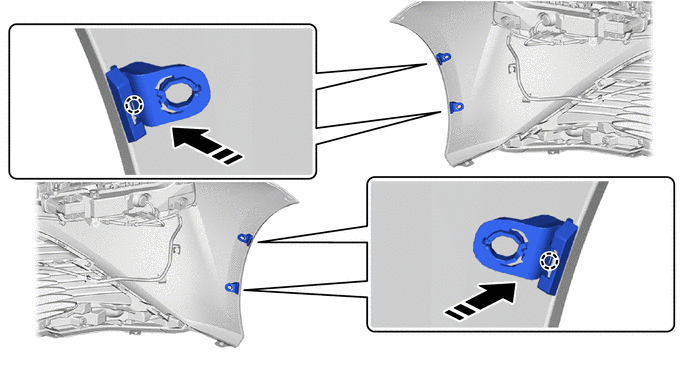

|
Install in this Direction | - | - |
2.INSTALL FRONT BUMPER ASSEMBLY
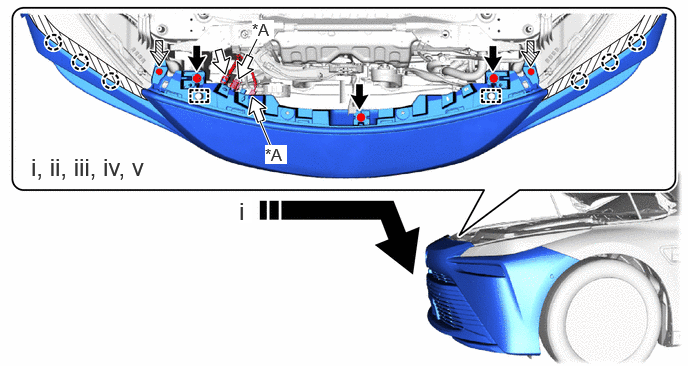
| *A | w/ Panoramic View Monitor System | - | - |
|
|
Install in this Direction | 
|
Bolt |

|
Connector | 
|
Clip |
Attach the guide to temporarily install the front bumper assembly as shown in the illustration.
Attach the claw to install the front bumper assembly.
Install the 2 clips.
Install the 3 bolts.
Connect each connector.
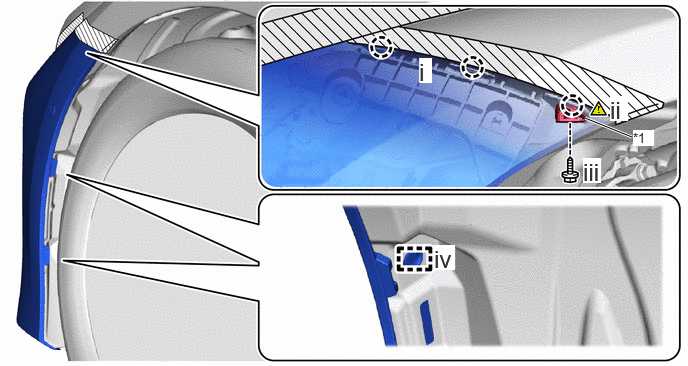
| *1 | Front Bumper Side Mounting Bracket LH | - | - |
Attach the claw.
Fold back the front fender splash shield sub-assembly LH and attach the claw and install the front bumper side mounting bracket LH.
Install the screw.
Attach the guide.
Use the same procedure for the other side.
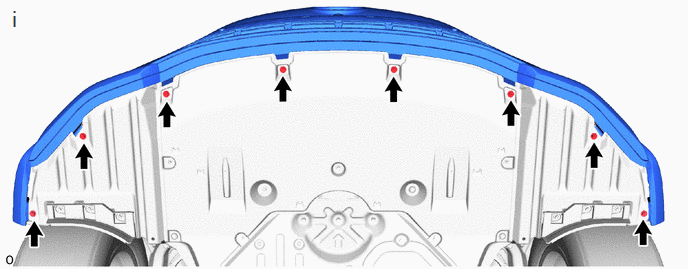
Install the 8 screws.
47749F
3.INSTALL PIN HOLD CLIP
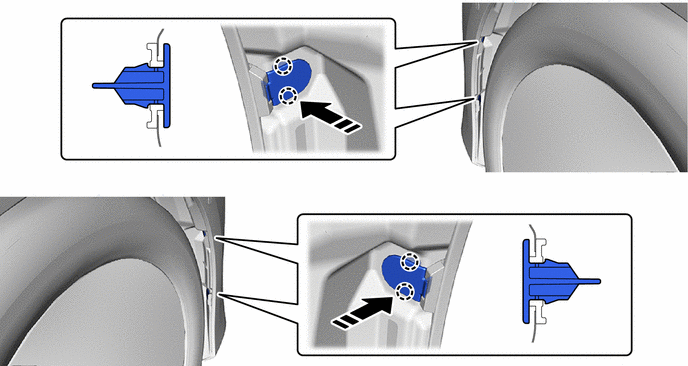
|
|
Install in this Direction | - | - |
53295
4.INSTALL LOWER RADIATOR AIR DEFLECTOR
53291B
5.INSTALL RADIATOR COVER PLATE
53292A
6.INSTALL UPPER RADIATOR SUPPORT SEAL
7.CONNECT CABLE TO NEGATIVE AUXILIARY BATTERY TERMINAL
8. INITIALIZATION AFTER RECONNECTING AUXILIARY BATTERY TERMINAL
Click hereGeneral>SETUP>WHEN DISCONNECTING OR RECONNECTING BATTERY TERMINAL>WORK PROCEDURE
- HINT:
-
When disconnecting and reconnecting the auxiliary battery, there is an automatic learning function that completes learning when the respective system is used.
-
Click hereGeneral>SETUP>WHEN DISCONNECTING OR RECONNECTING BATTERY TERMINAL>AUTOMATIC LEARNING CHART
9. PERFORM DIAGNOSTIC SYSTEM CHECK
10.CHECK SRS WARNING LIGHT
|
|
Click here()
|
11.PERFORM CALIBRATION
w/ Advanced Park:
w/o Advanced Park, w/ Parking Support Brake System:
Click hereAudio / Visual / Telematics>PARK ASSIST / MONITORING>PARKING SUPPORT BRAKE SYSTEM>CALIBRATION
86790B
12.ADJUST FRONT TELEVISION CAMERA ASSEMBLY (w/ Panoramic View Monitor System)