WIRELESS DOOR LOCK CONTROL SYSTEM (w/o Smart Key System) > No Answer-Back |
| 1.READ VALUE USING TECHSTREAM (ANSWER-BACK OPERATION) |
Connect the Techstream to the DLC3.
Turn the ignition switch ON (IG).
Turn the Techstream on.
Enter the following menus: Customize Setting / Wireless Door Lock.
Select the setting by referring to the table below.
| Display | Default | Content | Setting | Relevant ECU |
| Hazard Answer Back | ON | When the doors are locked by wireless operation, the hazard warning lights flash once. When the doors are unlocked by wireless operation, the hazard warning lights flash twice. | OFF or ON | Main body ECU (Multiplex network body ECU) |
| Result | Proceed to |
| Customize setting is ON | A |
| Customize setting is OFF | B |
|
| ||||
| A | |
 |
| 2.CHECK WIRELESS DOOR LOCK CONTROL FUNCTIONS |
Check the wireless door lock control function using the door control transmitter module set sub-assembly.
| Result | Proceed to |
| Wireless door lock/unlock operates normally. | A |
| Wireless door lock/unlock does not operate normally. | B |
|
| ||||
| A | |
|
| 3.READ VALUE USING TECHSTREAM (DOOR UNLOCK DETECTION SWITCH) |
Connect the Techstream to the DLC3.
Turn the ignition switch ON (IG).
Turn the Techstream on.
Enter the following menus: Body Electrical / Main Body / Data List.
Read the Data List according to the display on the Techstream.
| Tester Display | Measurement Item/Range | Normal Condition | Diagnostic Note |
| FR Door Lock Pos | Front door RH unlock detection switch signal/LOCK or UNLOCK | LOCK: Front door RH locked UNLOCK: Front door RH unlocked | - |
| FL Door Lock Pos | Front door LH unlock detection switch signal/LOCK or UNLOCK | LOCK: Front door LH locked UNLOCK: Front door LH unlocked | - |
| Result | Proceed to |
| OK | A |
| NG (for Driver door) | B |
| NG (for Front Passenger door) | C |
|
| ||||
|
| ||||
| A | |
|
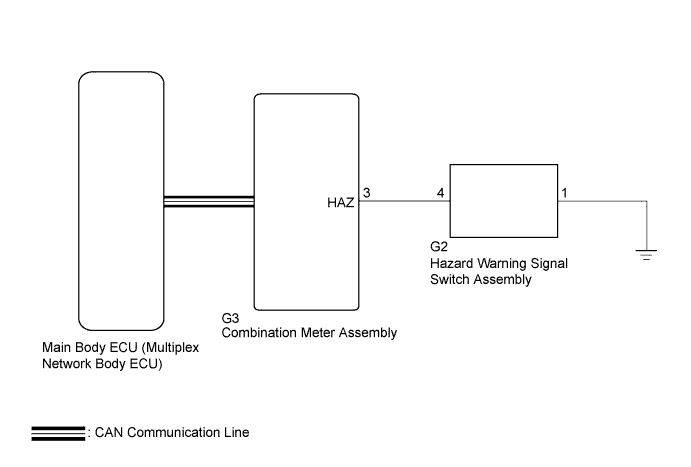
| 4.HAZARD WARNING LIGHTS OPERATION |
Check that the hazard warning light blinks when the hazard warning signal switch is pressed.
|
| ||||
| OK | ||
 | ||
| ||
