DIAGNOSIS SYSTEM
Troubleshooting · Vehicles built from Nov 2005
| CHECK DLC3 |
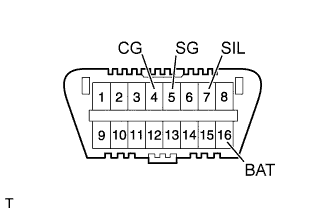  |
| Symbols (Terminals No.) |
Terminal Description |
Condition |
Specified Condition |
| SIL (7) - SG (5) |
Bus '+' line |
During transmission |
Pulse generation |
| CG (4) - Body ground |
Chassis ground |
Always |
Below 1 Ω |
| SG (5) - Body ground |
Signal ground |
Always |
Below 1 Ω |
| BAT (16) - Body ground |
Battery ground |
Always |
11 to 14 V |
-
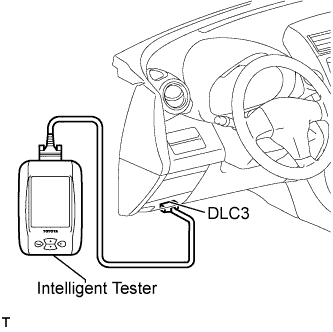
- If the result is not as specified, the DLC3 may have a malfunction. Repair or replace the harness and connector.
- HINT:
- Connect the cable of the intelligent tester to the DLC3, turn the ignition switch on (IG) and attempt to use the tester. If the display indicates that a communication error has occurred, there is a problem wither with the vehicle or with the tester.
- If communication is normal when the tester is connected to another vehicle, inspect the DLC3 on the original vehicle.
- If communication is normal when the tester is connected to another vehicle, inspect the DLC3 on the original vehicle.
- If communication is still not possible when the tool is connected to another vehicle, the problem is probably in the tester itself. So consult the Service Department listed in the tester's instruction manual.
- If communication is still not possible when the tool is connected to another vehicle, the problem is probably in the tester itself. So consult the Service Department listed in the tester's instruction manual.
| DIAGNOSIS SYSTEM |
Warning light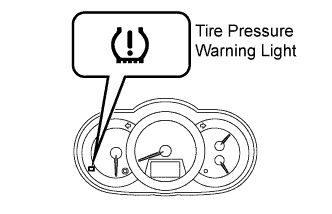
The tire pressure warning light blinks when there is a malfunction in the tire pressure warning system.
- NOTICE:
- When the malfunction has been corrected, the tire pressure warning light does not turn on.
DTCs (Normal mode)
DTCs are memorized in the tire pressure warning ECU and receiver. These DTCs can be read by checking the blinks of the tire pressure warning light or by using the intelligent tester (Click here).
Test mode
By switching from normal mode to test mode (input signal check), you can inspect the tire pressure monitor antenna, each tire pressure monitor valve and vehicle speed sensor (Click here).
| CHECK WARNING LIGHT |
Turn the ignition switch on (IG).
Check that the tire pressure warning light turns on for 3 seconds.
If the warning check result is not normal, proceed to the troubleshooting for the tire pressure warning light circuit.Trouble Area
See page
Tire pressure warning light circuit
Click here
| TIRE PRESSURE WARNING LIGHT CHART |
- HINT:
- The table below indicates the state of the tire pressure warning light after turning the ignition switch on (IG).
| Immediately after turning the ignition switch on (IG) |
Always |
||||||
| Warning light output pattern | |||||||
| Turns on for 3 seconds |
Turns off |
Turns on |
Flashes for 1 minute and then illuminates (*1) |
Blinks (*2) |
Blinks (*3) |
Output DTC |
|
| Normal |
○ |
○ |
|||||
| Low tire pressure |
○ |
○ |
|||||
| System fail |
○ |
○ |
|||||
| Test mode |
○ |
○ |
|||||
| ECU connector poorly connected |
○ |
○ |
|||||
| TC ground (DTC is output) |
○ |
○ |
|||||
| TC ground (DTC is not output) |
○ |
○ |
|||||
-
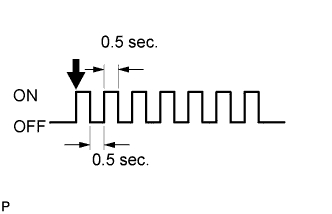
- *1: Turns on and turns off repeatedly at 0.5 second intervals.
-
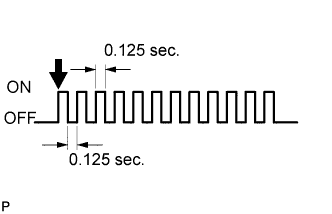
- *2: Turns on and turns off repeatedly at 0.125 second intervals.
-
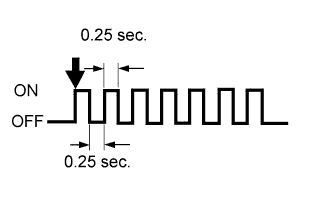
- *3: Turns on and turns off repeatedly at 0.25 second intervals.