BLUETOOTH TEL CHECK MODE
Troubleshooting · Vehicles built from Nov 2005
- HINT:
- Illustrations may differ from the actual vehicle depending on the device settings and options. Therefore, some detailed areas may not be exactly the same as on the actual vehicle.
| ENTER DIAGNOSTIC MODE (Click here) |
| BLUETOOTH TEL CHECK |
Select "Bluetooth TEL Check" from the "Diagnosis MENU" screen.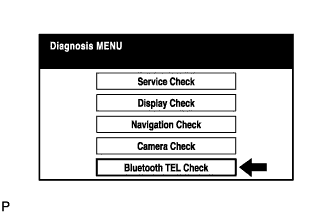

| BLUETOOTH CHECK |
Select "Bluetooth Check" from the "Bluetooth Handsfree Check Menu" screen.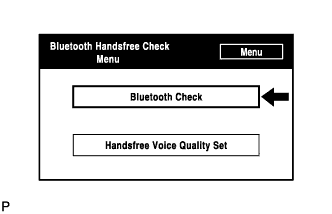
Select "Serial Communication Log" from the "Bluetooth Check Menu" screen.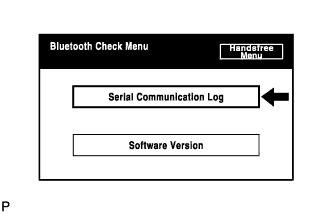
This screen displays the communication log information of the display.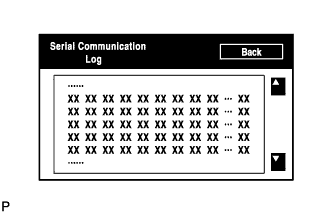
- HINT:
- This is a reference function.
Select "Software version" from the "Bluetooth Check Menu" screen.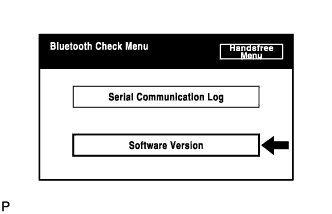
Check the Bluetooth module's software version.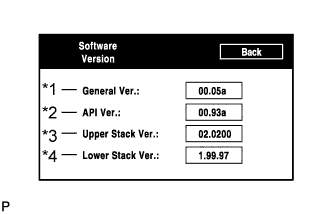
Screen description Display
Contents
General version / *1
- The Bluetooth module's software version is shown.
- If the API Software version, Upper Stack version or Low Stack version is updated, this version number is updated as well.
API version / *2
API Software version is shown.
Upper Stack version / *3
Upper Stack version is shown.
Lower Stack version / *4
Lower Stack version is shown.
- The Bluetooth module's software version is shown.
| HANDSFREE VOICE QUALITY SET |
Select "Handsfree Voice Quality Set" from the "Bluetooth Handsfree Check Menu" screen.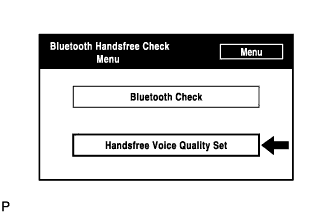
Check the handsfree voice levels.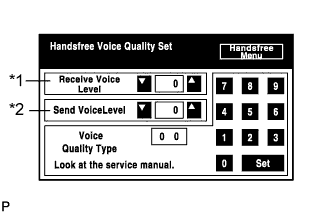
Screen description Display
Contents
Receive voice level adjustment item / *1
Set the voice level of calls received through Bluetooth receiver.
Send voice level adjustment item / *2
Set the voice level of calls sent through Bluetooth receiver.
- HINT:
- This screen is produced by the multi-display.
- NOTICE:
- Do not change the "Voice Quality Type" item.