5.
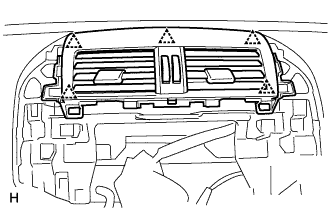
INSTALL INSTRUMENT PANEL REGISTER ASSEMBLY CENTER
Attach the 5 clips to install the instrument panel register.
6.
INSTALL GLOVE COMPARTMENT DOOR ASSEMBLY
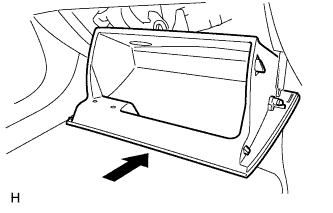
Attach the 2 hinges to install the door.
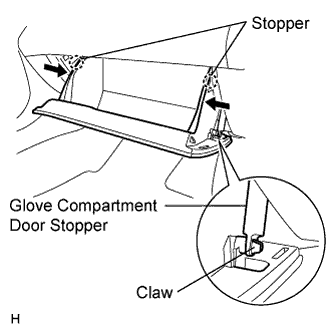
Attach the claw to the glove compartment door stopper.
While pushing in the sides of the glove compartment door as indicated by the arrows in the illustration, close the door to engage it to the 2 stoppers.
7.
INSTALL NAVIGATION RECEIVER ASSEMBLY
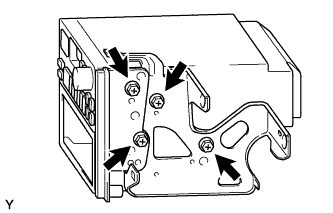
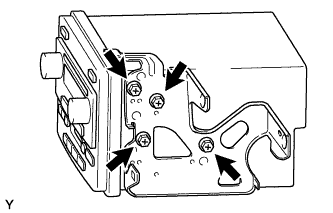
w/ Stereo Opening Cover: Install the No. 1 radio bracket and radio receiver panel RH to the radio receiver with the 4 bolts.
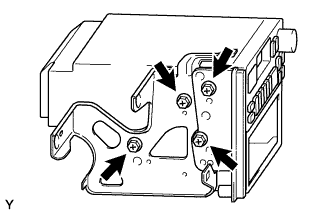
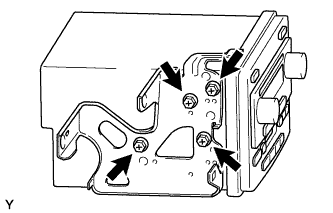
w/ Stereo Opening Cover: Install the No. 2 radio bracket and radio receiver panel LH to the radio receiver with the 4 bolts.
w/o Stereo Opening Cover: Install the No. 1 radio bracket to the radio receiver with the 4 bolts.
w/o Stereo Opening Cover: Install the No. 2 radio bracket to the radio receiver with the 4 bolts.
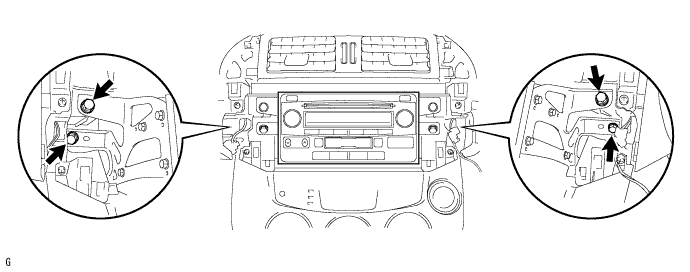
Connect all the connectors and install the radio receiver.
Install the 4 bolts.
8.
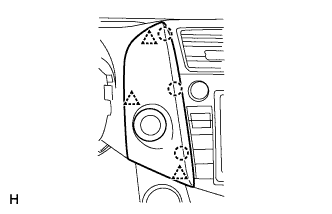
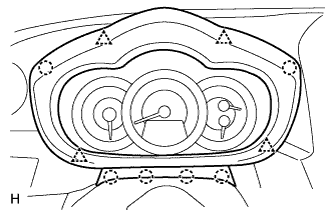
INSTALL NO. 1 INSTRUMENT CLUSTER FINISH PANEL CENTER
Connect the connector.
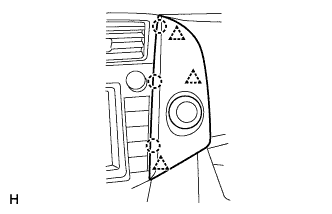
Attach the 3 clips and 3 claws to install the cluster finish panel.
9.
INSTALL NO. 2 INSTRUMENT CLUSTER FINISH PANEL CENTER
Connect the connector.
Attach the 3 clips and 3 claws to install the cluster finish panel.
10.
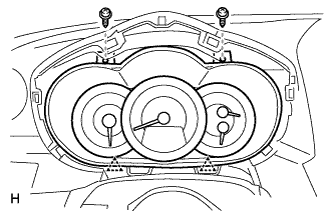
INSTALL COMBINATION METER ASSEMBLY
Connect the connector.
Attach the 2 clips to install the combination meter.