AUDIO / VIDEO TELEVISION DISPLAY INSTALLATION
PROCEDURE

 86291
1.INSTALL TELEVISION DISPLAY BRACKET
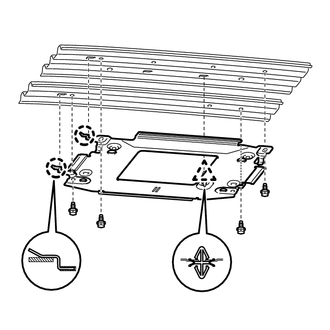
Attach the clip and 2 claws to install the bracket.
Install the 4 bolts.
- Torque:
- 7.0 N*m (71 kgf*cm, 62 in.*lbf)
- HINT:
-
Install the bolts in the order shown in the illustration.
63310
2.INSTALL ROOF HEADLINING ASSEMBLY
Install the roof headlining (See page Vehicle Interior>INTERIOR PANELS / TRIM>ROOF HEADLINING>INSTALLATION).
86680A
3.INSTALL TELEVISION DISPLAY ASSEMBLY
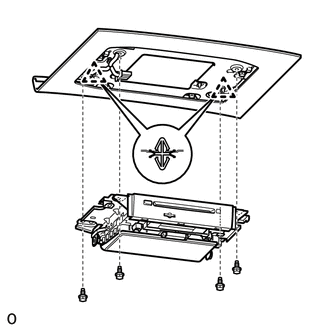
Attach the 2 clips to install the television display.
Install the 4 bolts.
- Torque:
- 7.0 N*m (71 kgf*cm, 62 in.*lbf)
- HINT:
-
Install the bolts in the order shown in the illustration.
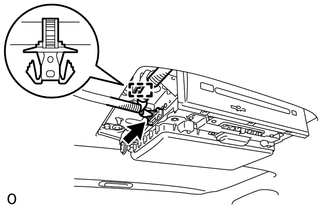
Connect the connector.
Attach the clamp.
81240
4.INSTALL ROOM NO. 1 LIGHT ASSEMBLY
5.CONNECT CABLE TO NEGATIVE BATTERY TERMINAL
- NOTICE:
-
When disconnecting the cable some systems need to be initialized after the cable is reconnected (See page General>INTRODUCTION>REPAIR INSTRUCTION>INITIALIZATION).
- Torque:
- 5.4 N*m (55 kgf*cm, 48 in.*lbf)
6.CHECK SRS WARNING LIGHT