TIRE / WHEEL TIRE AND WHEEL SYSTEM INSPECTION
PROCEDURE

 1.INSPECT TIRES
Inspect the wear of the tires.
- HINT:
-
If the wear level of a tire exceeds the limit, replace the tire.
Inspect the tire inflation pressure.
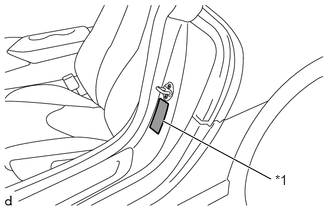
| *1 | Tire Pressure Information Label |
Inspect the tire inflation pressure based on the values specified on the tire pressure information label located on the driver seat door pillar.
- HINT:
-
The values specified on the tire pressure information label are only applicable for a tire that is cold or at ambient temperature.
Inspect the tire inflation pressure based on the recommended pressure on the tire pressure monitor of the multi-display.
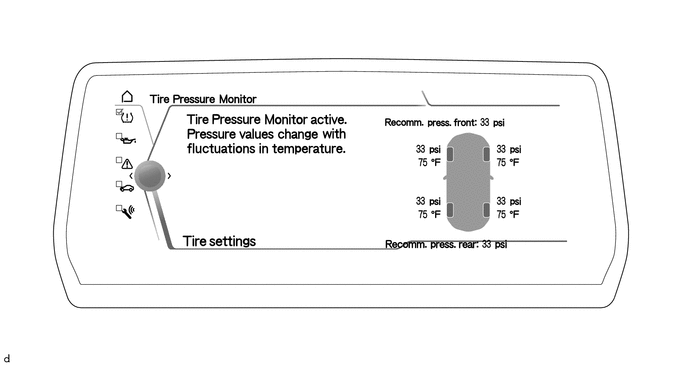
- HINT:
- ·
To display the tire pressure monitor, use Toyota Supra Command to enter the following menus: "My vehicle" / "Vehicle status" / "Tire Pressure Monitor".
·The recommended pressure of the tire pressure monitor that are displayed are appropriate values which take into account the effects of driving conditions and ambient temperature, so they may not match the values from the tire pressure information label on the driver seat door pillar.
If any of the following procedures have been performed, initialize the tire pressure monitor.
Click hereSuspension>TIRE PRESSURE MONITORING>TIRE PRESSURE WARNING SYSTEM>INITIALIZATION
Changed tire inflation pressure
Rotated the tires
Changed between summer tires and winter tires
Changed the vehicle load state
Replaced a tire or disc wheel
Replaced a tire pressure warning valve and transmitter
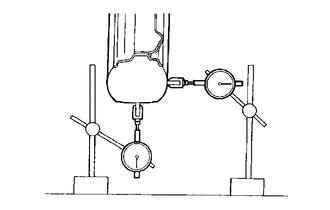
Using a dial indicator, check the runout of the tires.
- Maximum Tire Runout:
Vertical 1.1 mm (0.0433 in.) or less Lateral 1.3 mm (0.0512 in.) or less
- HINT:
-
Remove the wheel assembly from the vehicle, and measure the wheel assembly alone.
2. ROTATE TIRES
Remove the wheel assembly.
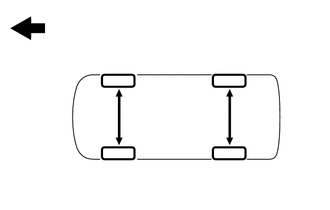

|
Front |
Rotate the tires as shown in the illustration.
Install the wheel assembly.
Initialize the tire pressure monitor.
Click hereSuspension>TIRE PRESSURE MONITORING>TIRE PRESSURE WARNING SYSTEM>INITIALIZATION
3.INSPECT AND ADJUST WHEEL BALANCE
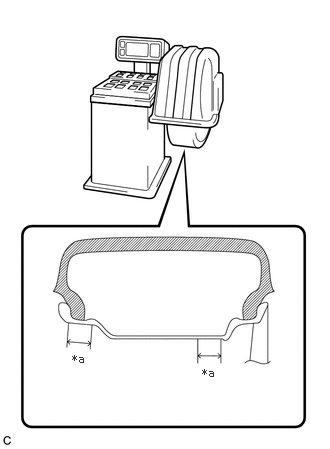
| *a | 25 mm (0.984 in.) |
Inspect and adjust the off-the-car balance.
- Maximum Wheel Imbalance:
4.0 g (0.0088 lb)
- NOTICE:
- ·
Use a cleaning detergent to remove dirt, oil and water from the surface where the balance weight is to be adhered.
·Do not touch the adhesive surface of the balance weight.
·Adhere a stick-on type balance weight to the flat surface*a shown in the illustration.
·Push the balance weight with your finger to securely adhere it to the desired position.
·Do not reuse balance weights.
·Please use the genuine stick-on type balance weight.
- HINT:
- ·
Use stick-on type balance weights for both the inner and outer side.
·If the tires vibrate even after off-the-car balance adjustment, adjust the wheel balance with on-the-car balancing as necessary.