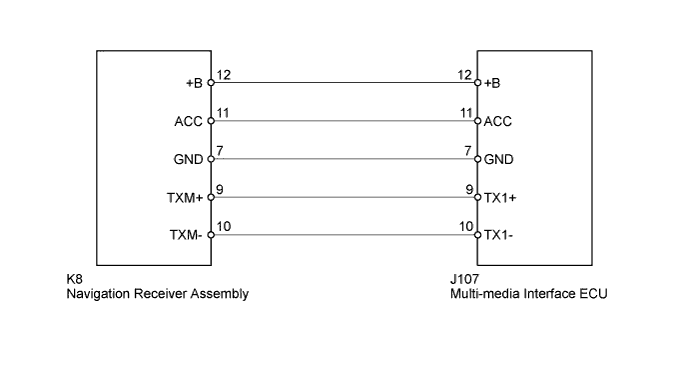
DTC B156B Multi-media Interface ECU Disconnected |
DTC B156E No Response from Multi-media Interface ECU |
| DTC No. | DTC Detection Condition | Trouble Area |
| B156B* | When either condition below is met:
|
|
| B156E | Within the time-out period, there was no response from the stereo component amplifier to the following requests from the master unit:
|
| 1.CHECK OPTIONAL COMPONENTS (INCLUDING ASSOCIATED WIRING) |
Check for optional components.
Check that optional components (including associated wiring) which generate radio waves are not installed.
| Result | Proceed to |
| Optional components (including associated wiring) are installed. | A |
| Optional components (including associated wiring) are not installed. | B |
|
| ||||
| A | |
 |
| 2.REMOVE OPTIONAL COMPONENTS (INCLUDING ASSOCIATED WIRING) |
Remove optional components (including associated wiring).
| NEXT | |
|
| 3.CHECK DTC |
Clear the DTCs (Click here).
Recheck for DTCs and check if the same trouble occurs again.
|
| ||||
| OK | ||
 | ||
| ||
| 4.CHECK HARNESS AND CONNECTOR (MULTI-MEDIA INTERFACE ECU POWER SOURCE) |
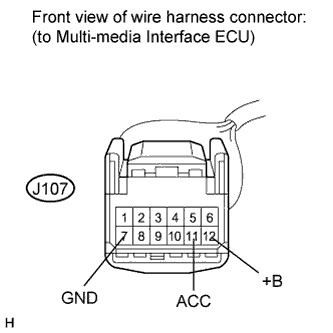 |
Disconnect the J107 multi-media interface ECU connector.
Measure the resistance according to the value(s) in the table below.
| Tester Connection | Condition | Specified Condition |
| J107-7 (GND) - Body ground | Always | Below 1 Ω |
Measure the voltage according to the value(s) in the table below.
| Tester Connection | Condition | Specified Condition |
| J107-12 (+B) - J107-7 (GND) | Always | 11 to 14 V |
| J107-11 (ACC) - J107-7 (GND) | Ignition switch ACC | 11 to 14 V |
|
| ||||
| OK | |
|
| 5.CHECK HARNESS AND CONNECTOR (MULTI-MEDIA INTERFACE ECU - NAVIGATION RECEIVER ASSEMBLY) |
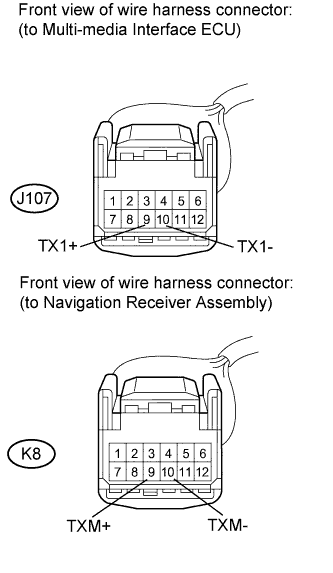 |
Disconnect the J107 multi-media interface ECU connector.
Disconnect the K8 navigation receiver assembly connector.
Measure the resistance according to the value(s) in the table below.
| Tester Connection | Condition | Specified Condition |
| J107-9 (TX1+) - K8-9 (TXM+) | Always | Below 1 Ω |
| J107-10 (TX1-) - K8-10 (TXM-) | Always | Below 1 Ω |
| J107-9 (TX1+) - Body ground | Always | 10 kΩ or higher |
| J107-10 (TX1-) - Body ground | Always | 10 kΩ or higher |
|
| ||||
| OK | |
|
| 6.REPLACE MULTI-MEDIA INTERFACE ECU |
Replace the multi-media interface ECU (Click here).
Clear the DTCs (Click here).
Recheck for DTCs and check if the same trouble occurs again.
|
| ||||
| OK | ||
| ||
| ||

