SUPPLEMENTAL RESTRAINT SYSTEMS FRONT PASSENGER AIRBAG ASSEMBLY REMOVAL
CAUTION / NOTICE / HINT
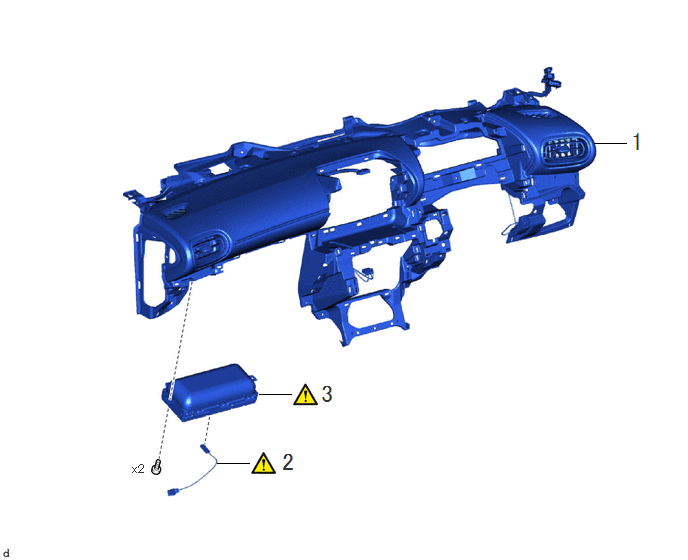
| Procedure | Part Name Code | 
|

|

|
|
|---|---|---|---|---|---|
| 1 | INSTRUMENT PANEL SUB-ASSEMBLY | 55302C | - | - | - |
| 2 | NO. 2 INSTRUMENT PANEL WIRE | 82142 | ( ) |
- | - |
| 3 | INSTRUMENT PANEL PASSENGER AIRBAG ASSEMBLY | 73960A | ()
|
- | - |
CAUTION / NOTICE / HINT
The necessary procedures (adjustment, calibration, initialization, or registration) that must be performed after parts are removed, installed, or replaced during the instrument panel passenger airbag assembly removal/installation are shown below.
| Replacement Part or Procedure | Necessary Procedures | Effect/Inoperative Function When Necessary Procedures are not Performed | Link |
|---|---|---|---|
| Auxiliary battery terminal is disconnected/reconnected | Memorize steering angle neutral point | Parking assist monitor system | ()
|
| Panoramic view monitor system | ()
|
- HINT:
-
When the cable is disconnected/reconnected to the auxiliary battery terminal, systems temporarily stop operating. However, each system has a function that completes learning the first time the system is used.
- ·
Learning completes when vehicle is driven
Effect/Inoperative Function When Necessary Procedures are not Performed Necessary Procedures Link Lane tracing assist system Drive the vehicle straight ahead at 35 km/h (22 mph) or more for 5 seconds or more. ( )
Pre-collision system Parking support brake system
·Learning completes when vehicle is operated normally
Effect/Inoperative Function When Necessary Procedures are not Performed Necessary Procedures Link Power door lock control system
·Back door opener
Perform door unlock operation with door control switch or electrical key transmitter sub-assembly switch. ( )
Power back door system Fully close the back door by hand.
- HINT:
-
Initialization is not necessary if the above procedures are performed while the back door is closed.
( )
Air conditioning system After the ignition switch is turned to ON, the servo motor standard position is recognized. -
PROCEDURE

 55302C
1.REMOVE INSTRUMENT PANEL SUB-ASSEMBLY
82142
2.REMOVE NO. 2 INSTRUMENT PANEL WIRE
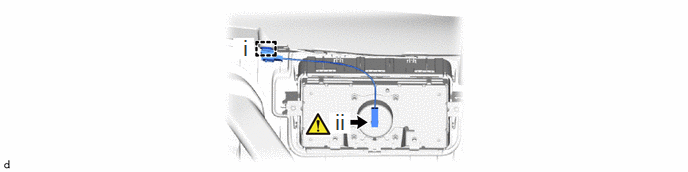
Disengage the clamp.
Disconnect the airbag connector.
- NOTICE:
-
When disconnecting any airbag connector, take care not to damage the airbag wire harness.
- HINT:
-
Refer to How to Connect or Disconnect Airbag Connector:
73960A
3.REMOVE INSTRUMENT PANEL PASSENGER AIRBAG ASSEMBLY
|
|
|
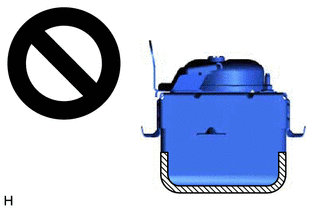
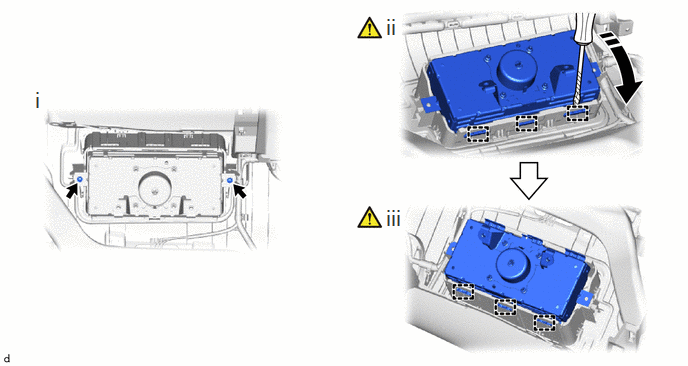
Remove the 2 screws.
Using a screwdriver, pry back the passenger airbag door retainer to disengage the 3 hooks as shown in the illustration.
- NOTICE:
-
Do not damage the deployment surface of the instrument panel passenger airbag assembly.
Disengage the 3 hooks to remove the instrument panel passenger airbag assembly from the instrument panel sub-assembly.