Home › Engine / Hybrid System › 1NZ-FE ENGINE CONTROL › SFI SYSTEM (for Sedan)

DTC    P0617    Starter Relay Circuit High


DESCRIPTION

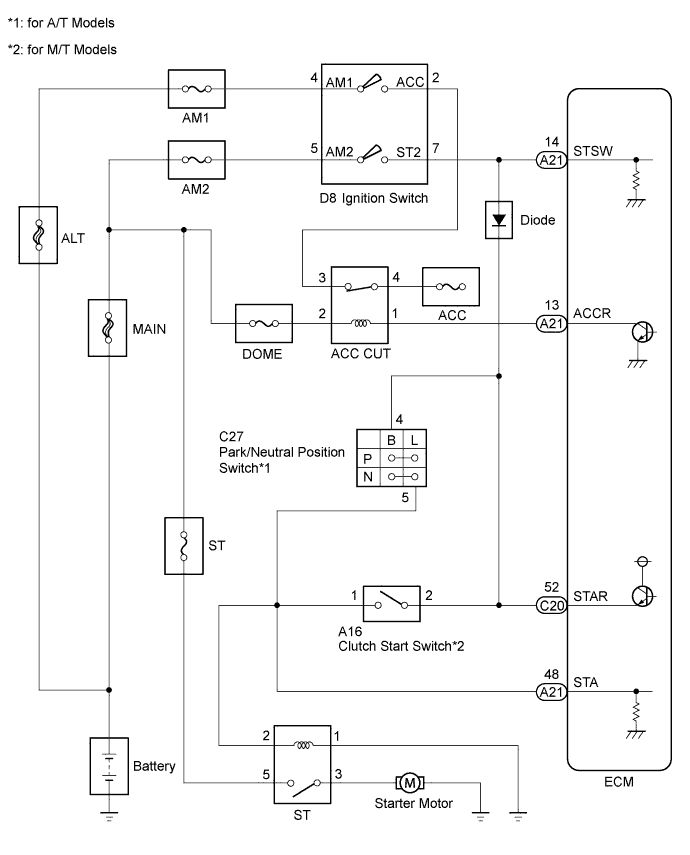
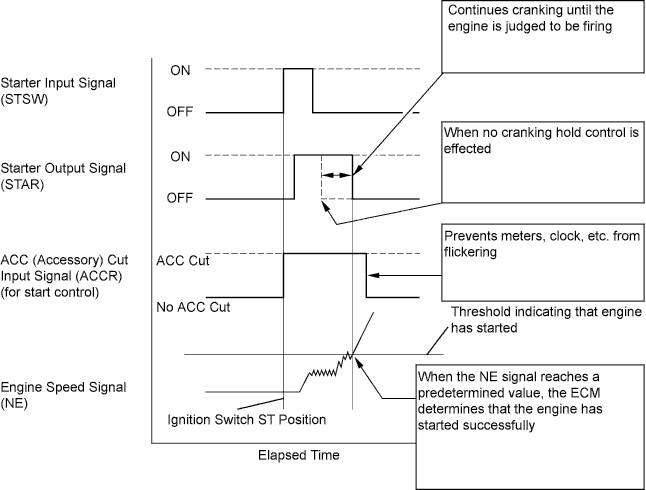
The cranking holding control system provides a current to the starter when the ECM detects the ignition switch's start signal (STSW). When the ECM judges that the engine has started, the system cuts the current to the starter. When the ECM receives the STSW signal, it turns on the ACC (Accessory) relay, which prevents flickering of the combination meter, clock and audio system. Also, the ECM sends a signal to the ECM's STAR terminal. Then the STAR output signal travels through the Park/Neutral Position (PNP) switch to the ST relay, causing the starter to activate. When the engine is cranking, the starter operation signal is sent to the ECM's STA terminal.

A103821E16

While the engine is being cranked, the positive battery voltage is applied to terminal STA of the ECM.
If the ECM detects the starter signal (STA) while the vehicle is being driven, it determines that there is a malfunction in the STA circuit. The ECM then illuminates the MIL and stores the DTC.
This monitor runs when the vehicle is driven at 20 km/h (12.43 mph) for over 20 seconds.

DTC No.
DTC Detection Condition
Trouble Area
P0617
When conditions (a), (b) and (c) met for 20 seconds (1 trip detection logic):
  1. (a) Vehicle speed 20 km/h (12.43 mph) or more
  2. (b) Engine speed 1000 rpm or more
  3. (c) STA signal ON
  1. Park/Neutral Position (PNP) switch (A/T*)
  2. Clutch start switch (M/T*)
  3. Starter relay circuit
  4. Ignition switch
  5. ECM
*: A/T denotes Automatic Transaxle models and M/T denotes Manual Transaxle models.

CONFIRMATION DRIVING PATTERN


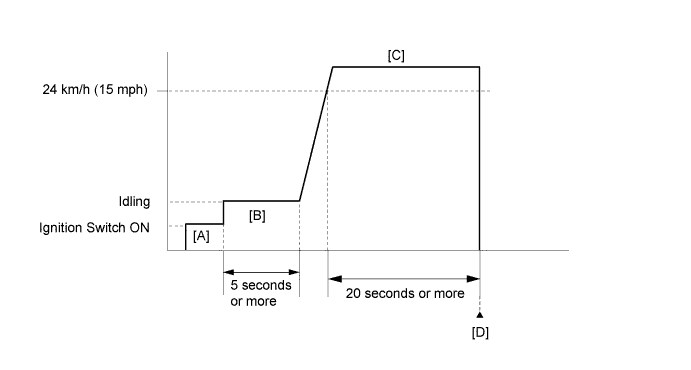
A231469E04

  1. Connect the Techstream to the DLC3.
  2. Turn the ignition switch to ON and turn the Techstream on.
  3. Clear DTCs (even if no DTCs are stored, perform the clear DTC operation).
  4. Turn the ignition switch off and wait for at least 30 seconds.
  5. Turn the ignition switch to ON and turn the Techstream on [A].
  6. Idle the engine for 5 seconds or more [B].
  7. Drive the vehicle at 24 km/h (15 mph) or more for 20 seconds or more [C].

    CAUTION:
    When performing the confirmation driving pattern, obey all speed limits and traffic laws.

  8. Enter the following menus: Powertrain / Engine and ECT / Trouble Codes [D].
  9. Read pending DTCs.

    HINT:
    1. If a pending DTC is output, the system is malfunctioning.
    2. If a pending DTC is not output, perform the following procedure.

  10. Enter the following menus: Powertrain / Engine and ECT / Utility / All Readiness.
  11. Input the DTC: P0617.
  12. Check the DTC judgment result.

    Techstream Display
    Description
    NORMAL
    1. DTC judgment completed
    2. System normal
    ABNORMAL
    1. DTC judgment completed
    2. System abnormal
    INCOMPLETE
    1. DTC judgment not completed
    2. Perform driving pattern after confirming DTC enabling conditions
    N/A
    1. Unable to perform DTC judgment
    2. Number of DTCs which do not fulfill DTC preconditions has reached ECU memory limit

    HINT:
    1. If the judgment result shows NORMAL, the system is normal.
    2. If the judgment result shows ABNORMAL, the system has a malfunction.
    3. If the judgment result shows INCOMPLETE or N/A, perform steps [C] and [D] again and, if necessary, extend the driving time.


WIRING DIAGRAM


A259948E02


INSPECTION PROCEDURE

NOTICE:
Inspect the fuses for circuits related to this system before performing the following inspection procedure.

HINT:
  1. The following troubleshooting flowchart is based on the premise that the engine is cranked normally.
    If the engine will not crank, proceed to the problem symptoms table (Click here).
  2. Read freeze frame data using the Techstream. The ECM records vehicle and driving condition information as freeze frame data the moment a DTC is stored. When troubleshooting, freeze frame data can help determine if the vehicle was moving or stationary, if the engine was warmed up or not, if the air fuel ratio was lean or rich, and other data from the time the malfunction occurred.

1.READ VALUE USING TECHSTREAM (STARTER SIGNAL)
  1. Connect the Techstream to the DLC3.

  1. Turn the ignition switch to ON.

  1. Turn the Techstream on.

  1. Enter the following menus: Powertrain / Engine and ECT / Data List / Starter Signal.

  1. Check the value displayed on the Techstream when the ignition switch is turned to the ON and START positions.

    OK:

    Ignition Switch Positions
    Starter Signal
    ON
    OFF
    START
    ON


NG
Go to step 2
OK

CHECK FOR INTERMITTENT PROBLEMS (Click here)  

2.INSPECT PARK / NEUTRAL POSITION SWITCH (A/T) OR CLUTCH START SWITCH (M/T)
A107908E01
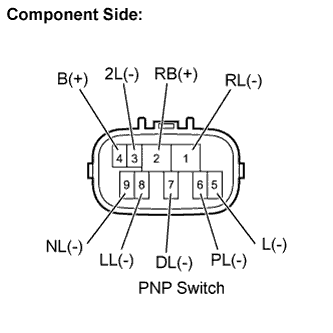
  1. Inspect the Park/Neutral Position (PNP) switch (for A/T models).

    1. Disconnect the C27 PNP switch connector.

    2. Check the resistance when the transmission gear selector lever is moved to each position.

      Standard resistance:
      Tester Connections
      Gear Selector
      Lever Positions
      Specified Conditions
      2 - 6, 4 - 5
      P
      Below 1 Ω
      1 - 2
      R
      2 - 9, 4 - 5
      N
      2 - 7
      D
      2 - 3
      2
      2 - 8
      L
      4 -5
      Except P and N
      10 kΩ or higher
      2 - 5
      All shift lever positions

    3. Reconnect the PNP switch connector.


    A082259E23
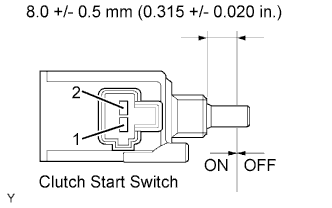
  1. Inspect the clutch start switch (for M/T models).

    1. Disconnect the A16 clutch start switch connector.

    2. Check the resistance when the clutch start switch is ON and OFF.

      Standard resistance:
      Tester Connections
      Switch Positions
      Specified Conditions
      1 - 2
      ON (pushed)
      Below 1 Ω
      1 - 2
      OFF (free)
      10 kΩ or higher

      Result 
      Result
      Proceed to
      NG
      A
      OK
      B

    3. Reconnect the clutch start switch connector.


B
Go to step 5
A


3.REPLACE PARK / NEUTRAL POSITION SWITCH (A/T) OR CLUTCH START SWITCH (M/T)
  1. Replace the PNP switch (for A/T models) (Click here).

  1. Replace the clutch start switch (for M/T models) (Click here).


NEXT


4.READ VALUE USING TECHSTREAM (STARTER SIGNAL)
  1. Connect the Techstream to the DLC3.

  1. Turn the ignition switch to ON.

  1. Turn the Techstream on.

  1. Enter the following menus: Powertrain / Engine and ECT / Data List / Starter Signal.

  1. Check the value displayed on the Techstream when the ignition switch is turned to the ON and START positions.

    OK:

    Ignition Switch Positions
    Starter Signal
    ON
    OFF
    START
    ON


NG
Go to step 5
OK

END 

5.INSPECT IGNITION SWITCH
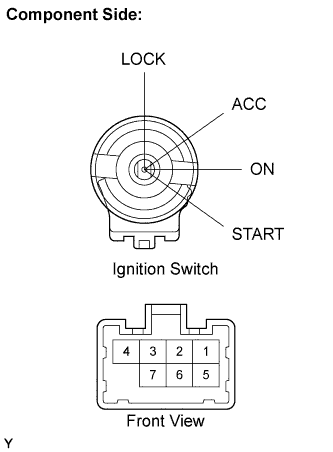
A107906E02
  1. Disconnect the D8 ignition switch connector.

  1. Check the resistance.

    Standard resistance:
    Tester Connections
    Ignition Switch Positions
    Specified Conditions
    All Terminals
    LOCK
    10 kΩ or higher
    2-4
    ACC
    Below 1 Ω
    1-4, 1-6, 2-4, 3-4, 5-6
    ON
    Below 1 Ω
    4-7, 5-7
    10 kΩ or higher
    1-4, 3-4, 5-6, 5-7
    START
    Below 1 Ω

    Result 
    Result
    Proceed to
    NG
    A
    OK
    B

  1. Reconnect the ignition switch connector.


B
Go to step 7
A


6.REPLACE IGNITION SWITCH
  1. Replace the ignition switch (Click here).


NEXT


7.READ VALUE USING TECHSTREAM (STARTER SIGNAL)
  1. Connect the Techstream to the DLC3.

  1. Turn the ignition switch to ON.

  1. Turn the Techstream on.

  1. Enter the following menus: Powertrain / Engine and ECT / Data List / Starter Signal.

  1. Check the value displayed on the Techstream when the ignition switch is turned to the ON and START positions.

    OK:

    Ignition Switch Positions
    Starter Signal
    ON
    OFF
    START
    ON


NG
Go to step 8
OK

END 

8.REPAIR OR REPLACE HARNESS OR CONNECTOR (IGNITION SWITCH - PNP SWITCH OR CLUTCH START SWITCH - ECM)

NEXT


9.CHECK WHETHER DTC OUTPUT RECURS (DTC P0617)
  1. Connect the Techstream to the DLC3.

  1. Turn the ignition switch to ON.

  1. Turn the Techstream on.

  1. Clear DTCs (Click here).

  1. Drive the vehicle in accordance with the driving pattern described in the Confirmation Driving Pattern.

  1. Read DTCs.

    Result 
    Display (DTC Output)
    Proceed To
    P0617
    A
    No output
    B


B
END
A

REPLACE ECM (Click here)