SUPPORT PLATE
REMOVAL
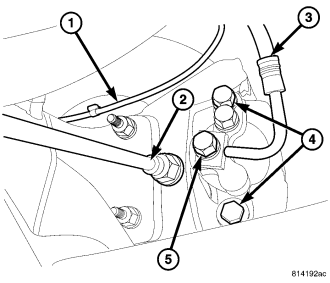
1. Remove wheel and tire assembly.
2. Remove the disc brake caliper slide bolts (4) (Refer to 5 - BRAKES/HYDRAULIC/MECHANICAL/DISC BRAKE CALIPERS - REMOVAL).
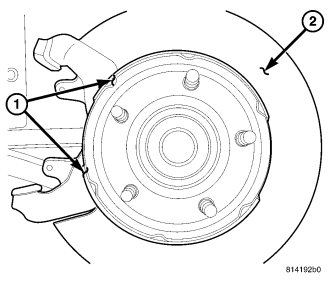
3. Remove the rotor (Refer to 5 - BRAKES/HYDRAULIC/MECHANICAL/ROTORS - REMOVAL).
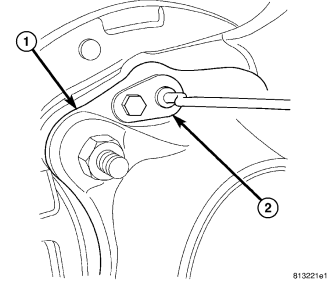
4. Remove the wheel speed sensor (2).
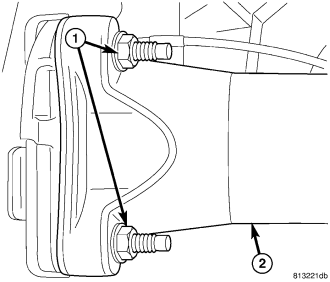
5. Remove the axle flange nuts (1).
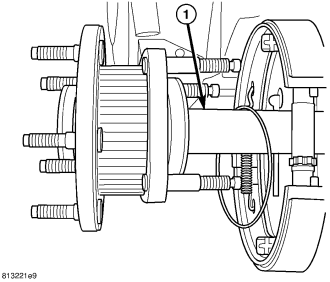
6. Remove the axle shaft (1) (Refer to 3 - DIFFERENTIAL & DRIVELINE/REAR AXLE - C213R/AXLE SHAFTS - REMOVAL).
7. Remove the park brake shoes (1) (Refer to 5 - BRAKES/PARKING BRAKE/SHOES - REMOVAL).
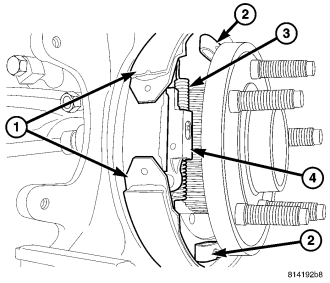
8. Remove the parking brake cable from the brake actuator lever (4).
9. Remove the support plate from the axle tube.
INSTALLATION
1. Install support plate on axle flange. Tighten attaching bolts (3) to 115 N·m (85 ft. lbs.).
2. Install parking brake cable in the brake actuator lever (4).
3. Install the park brake shoes (1) (Refer to 5 - BRAKES/PARKING BRAKE/SHOES - INSTALLATION).
4. Install axle shaft (1), (Refer to 3 - DIFFERENTIAL & DRIVELINE/REAR AXLE - C213R/AXLE SHAFTS - INSTALLATION).
5. Install the axle shaft flange nuts (1).
6. Install the wheel speed sensor (2).
7. Adjust brake shoes to drum with brake gauge (Refer to 5 - BRAKES/PARKING BRAKE/SHOES - ADJUSTMENTS).
8. Install the rotor (Refer to 5 - BRAKES/HYDRAULIC/MECHANICAL/ROTORS - INSTALLATION).
9. Install the caliper and the slide bolts (4) (Refer to 5 - BRAKES/HYDRAULIC/MECHANICAL/DISC BRAKE CALIPERS - INSTALLATION).
10. Install the wheel and tire assembly (Refer to 22 - TIRES/WHEELS/WHEELS - STANDARD PROCEDURE).