BRAKE CONTROL / DYNAMIC CONTROL SYSTEMS VEHICLE STABILITY CONTROL SYSTEM Slip Indicator Light Remains ON
DESCRIPTION
The slip indicator light blinks during VSC or TRC operation. When the system fails, the slip indicator light comes on to warn the driver.
WIRING DIAGRAM
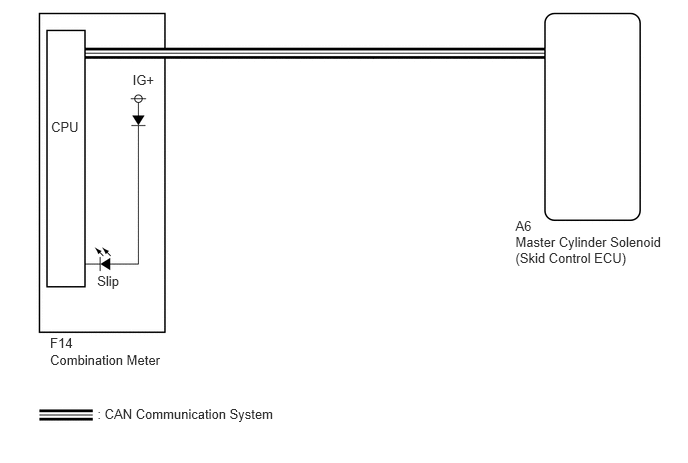
CAUTION / NOTICE / HINT
- NOTICE:
-
When replacing the master cylinder solenoid, perform calibration (See page Brake>BRAKE CONTROL / DYNAMIC CONTROL SYSTEMS>VEHICLE STABILITY CONTROL SYSTEM>CALIBRATION).
PROCEDURE
Check for DTCs (See page Brake>BRAKE CONTROL / DYNAMIC CONTROL SYSTEMS>VEHICLE STABILITY CONTROL SYSTEM>DTC CHECK / CLEAR).
| Result | Proceed to |
|---|---|
| DTC is not output | A |
| DTC is output | B |
A
B
OK
NG
(See pagePower Source / Network>NETWORKING>CAN COMMUNICATION SYSTEM>HOW TO PROCEED WITH TROUBLESHOOTING)
Turn the ignition switch off.
Connect the intelligent tester to the DLC3.
Turn the ignition switch to ON.
Turn the intelligent tester on.
Enter the following menus: Chassis / ABS/VSC/TRC / Data List.
| Tester Display | Measurement Item/Range | Normal Condition | Diagnostic Note |
|---|---|---|---|
| Slip Indicator Light | Slip indicator light/ ON or OFF | ON: Indicator light on
OFF: Indicator light off |
- |
When performing the Slip Indicator Light Active Test, check Slip Indicator Light in the Data List (See page Brake>BRAKE CONTROL / DYNAMIC CONTROL SYSTEMS>VEHICLE STABILITY CONTROL SYSTEM>DATA LIST / ACTIVE TEST).
| Tester Display | Test Part | Control Range | Diagnostic Note |
|---|---|---|---|
| Slip Indicator Light | Slip Indicator Light | Indicator light ON/OFF | Observe the combination meter. |
| Result | Proceed to | |
|---|---|---|
| Data List Display | Data List Display when Performing Active Test ON/OFF Operation | |
| ON | Does not change between ON and OFF | A |
| Changes between ON and OFF | B | |
| OFF | Does not change between ON and OFF | A |
| Changes between ON and OFF | B | |
A
B
(See pageVehicle Interior>METER / GAUGE / DISPLAY>METER / GAUGE SYSTEM>HOW TO PROCEED WITH TROUBLESHOOTING)