1GD-FTV ENGINE CONTROL ECM INSTALLATION
PROCEDURE

 89668
1.INSTALL NO. 2 ECM BRACKET
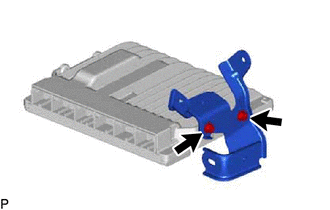
for LHD:
Install the No. 2 ECM bracket to the ECM with the 2 screws.
- Torque:
- 4.5 N*m (46 kgf*cm, 40 in.*lbf)
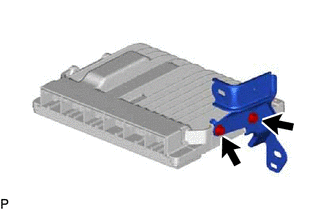
for RHD:
Install the No. 2 ECM bracket to the ECM with the 2 screws.
- Torque:
- 4.5 N*m (46 kgf*cm, 40 in.*lbf)
89667E
2.INSTALL NO. 1 ECM BRACKET
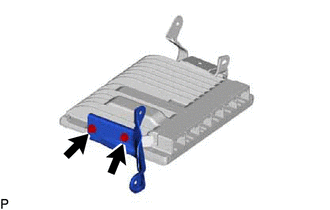
for LHD:
Install the No. 1 ECM bracket to the ECM with the 2 screws.
- Torque:
- 4.5 N*m (46 kgf*cm, 40 in.*lbf)
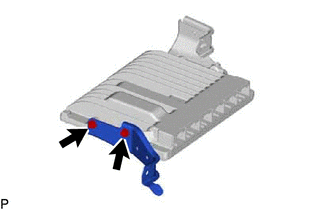
for RHD:
Install the No. 1 ECM bracket to the ECM with the 2 screws.
- Torque:
- 4.5 N*m (46 kgf*cm, 40 in.*lbf)
89661
3.INSTALL ECM
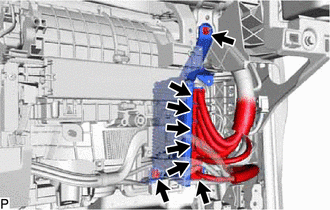
for LHD:
Install the ECM with the bolt and nut.
- Torque:
- 10 N*m (102 kgf*cm, 7 ft.*lbf)
Connect the 6 connectors to the ECM.
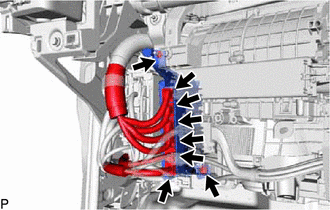
for RHD:
Install the ECM with the bolt and nut.
- Torque:
- 10 N*m (102 kgf*cm, 7 ft.*lbf)
Connect the 6 connectors to the ECM.
55320
4.INSTALL LOWER NO. 2 INSTRUMENT PANEL ASSEMBLY
5.CONNECT CABLE TO NEGATIVE BATTERY TERMINAL
6. INITIALIZATION AFTER RECONNECTING BATTERY TERMINAL
Click hereGeneral>SETUP>WHEN DISCONNECTING OR RECONNECTING BATTERY TERMINAL>WORK PROCEDURE
- HINT:
-
When disconnecting and reconnecting the battery, there is an automatic learning function that completes learning when the respective system is used.
-
Click hereGeneral>SETUP>WHEN DISCONNECTING OR RECONNECTING BATTERY TERMINAL>AUTOMATIC LEARNING CHART
7.PERFORM REGISTRATION
w/ Urea SCR System:
Click hereEngine / Hybrid System>1GD-FTV (ENGINE CONTROL)>ECD SYSTEM (w/ Urea SCR System)>REGISTRATION
w/ EGR Cooler:
Click hereEngine / Hybrid System>1GD-FTV (ENGINE CONTROL)>ECD SYSTEM (w/ EGR Cooler)>REGISTRATION
w/o EGR Cooler:
Click hereEngine / Hybrid System>1GD-FTV (ENGINE CONTROL)>ECD SYSTEM (w/o EGR Cooler)>REGISTRATION