B15D5 Rear Seat Entertainment System Disconnected
Diagnostic trouble codes · Vehicles built from Jan 2012
DESCRIPTION
The multi-media module receiver assembly and television display assembly are connected by the MOST communication line.When a MOST communication error occurs between the multi-media module receiver assembly and television display assembly, these DTCs will be stored.
| DTC Code |
DTC Detection Condition |
Trouble Area |
| B15D5 |
A device that is listed in the MOST network connected device record of the master unit is missing. |
|
- HINT:
- For the MOST network, the multi-media module receiver assembly is the master unit.
WIRING DIAGRAM
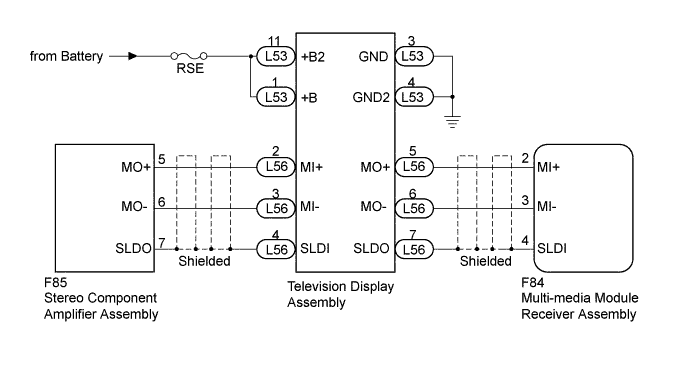

INSPECTION PROCEDURE
- NOTICE:
- Inspect the fuses for circuits related to this system before performing the following inspection procedure.
| 1. CHECK OPTIONAL COMPONENTS (INCLUDING ASSOCIATED WIRING) |

Check for optional components.
Check that optional components (including associated wiring) which generate radio waves are not installed.
Result Result
Proceed to
Optional components (including associated wiring) are installed.
A
Optional components (including associated wiring) are not installed.
B
- HINT:
- Electrical noise from radio waves generated by optional components or the wiring for those components may affect MOST communication.
- This DTC may be stored when a MOST communication error occurs due to electrical noise.
- Electrical noise from radio waves generated by optional components or the wiring for those components may affect MOST communication.
|
|
||||

| A | |
 |
| 2. REMOVE OPTIONAL COMPONENTS (INCLUDING ASSOCIATED WIRING) |
Remove optional components (including associated wiring).
- NOTICE:
- Do not remove optional components or associated wiring without the permission of the customer.
| NEXT | |
|
| 3. CLEAR DTC |
Clear the DTCs (Click here).
| NEXT | |
|
| 4. CHECK DTC |
Recheck for DTCs and check if the same DTC is output again (Click here).
- OK:
- No DTCs are output.
|
|
||||
| OK | ||
 |
||
| ||
| 5. CHECK HARNESS AND CONNECTOR (TELEVISION DISPLAY ASSEMBLY - BATTERY AND BODY GROUND) |
Disconnect the television display assembly connector.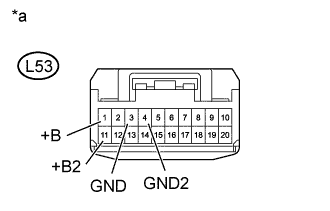
Measure the resistance according to the value(s) in the table below.
- Standard Resistance:
Tester Connection
Condition
Specified Condition
L53-3 (GND) - Body ground
Always
Below 1 Ω
L53-4 (GND2) - Body ground
Always
Below 1 Ω
Measure the voltage according to the value(s) in the table below.
- Standard Voltage:
Tester Connection
Condition
Specified Condition
L53-11 (+B2) - L53-3 (GND)
Always
11 to 14 V
L53-1 (+B) - L53-3 (GND)
Always
11 to 14 V
| *a |
Front view of wire harness connector (to Television Display Assembly) |
|
|
||||

| OK | |
|
| 6. CHECK HARNESS AND CONNECTOR (TELEVISION DISPLAY ASSEMBLY - STEREO COMPONENT AMPLIFIER ASSEMBLY) |
Disconnect the L56 television display assembly connector.
Disconnect the F85 stereo component amplifier assembly connector.
Measure the resistance according to the value(s) in the table below.
- Standard Resistance:
Tester Connection
Condition
Specified Condition
L56-2 (MI+) - F85-5 (MO+)
Always
Below 1 Ω
L56-3 (MI-) - F85-6 (MO-)
Always
Below 1 Ω
L56-4 (SLDI) - F85-7 (SLDO)
Always
Below 1 Ω
L56-2 (MI+) - Body ground
Always
10 kΩ or higher
L56-3 (MI-) - Body ground
Always
10 kΩ or higher
L56-4 (SLDI) - Body ground
Always
10 kΩ or higher
|
|
||||
| OK | |
|
| 7. CHECK HARNESS AND CONNECTOR (TELEVISION DISPLAY ASSEMBLY - MULTI-MEDIA MODULE RECEIVER ASSEMBLY) |
Disconnect the L56 television display assembly connector.
Disconnect the F84 multi-media module receiver assembly connector.
Measure the resistance according to the value(s) in the table below.
- Standard Resistance:
Tester Connection
Condition
Specified Condition
L56-5 (MO+) - F84-2 (MI+)
Always
Below 1 Ω
L56-6 (MO-) - F84-3 (MI-)
Always
Below 1 Ω
L56-7 (SLDO) - F84-4 (SLDI)
Always
Below 1 Ω
L56-5 (MO+) - Body ground
Always
10 kΩ or higher
L56-6 (MO-) - Body ground
Always
10 kΩ or higher
L56-7 (SLDO) - Body ground
Always
10 kΩ or higher
|
|
||||
| OK | |
|
| 8. REPLACE TELEVISION DISPLAY ASSEMBLY |
Replace the television display assembly (Click here).
| NEXT | |
|
| 9. CLEAR DTC |
Clear the DTCs (Click here).
| NEXT | |
|
| 10. CHECK DTC |
Recheck for DTCs and check if the same DTC is output again (Click here).
- OK:
- No DTCs are output.
|
|
||||
| OK | ||
|
||
| ||