AUDIO / VIDEO REAR SEAT ENTERTAINMENT SYSTEM B1577 GVIF Disconnected (from EMV/MM Integrated Device to RSE)
DESCRIPTION
The multi-media module receiver assembly and multi-display controller sub-assembly are connected by GVIF cable.
When a GVIF cable error occurs between the multi-media module receiver assembly and multi-display controller sub-assembly, this DTCs will be stored.
| DTC Code | DTC Detection Condition | Trouble Area |
|---|---|---|
| B1577 | GVIF disconnected (from multi-media module receiver assembly to multi-display controller sub-assembly) | ·
Harness and connector (GVIF cable) ·
Multi-display controller sub-assembly ·
Multi-media module receiver assembly |
WIRING DIAGRAM
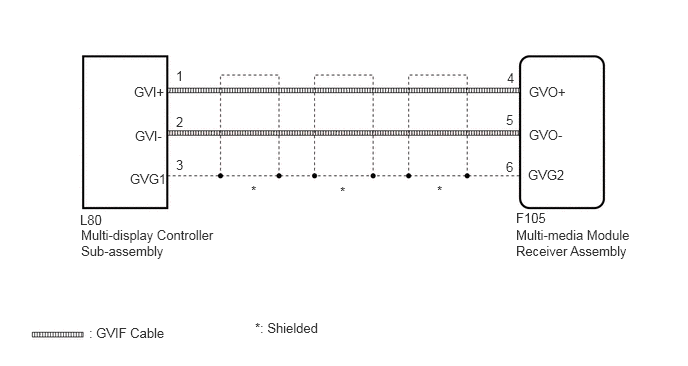
PROCEDURE
Clear the DTCs (See page Audio / Visual / Telematics>AUDIO / VIDEO>REAR SEAT ENTERTAINMENT SYSTEM>DTC CHECK / CLEAR).
NEXT
Recheck for DTCs and check if the same DTC is output again (See page Audio / Visual / Telematics>AUDIO / VIDEO>REAR SEAT ENTERTAINMENT SYSTEM>DTC CHECK / CLEAR).
- OK:
No DTCs are output.
OK
(See pageGeneral>INTRODUCTION>HOW TO TROUBLESHOOT ECU CONTROLLED SYSTEMS>HOW TO PROCEED WITH TROUBLESHOOTING)
NG
Check if the GVIF cable connectors between the multi-media module receiver assembly and the multi-display controller sub-assembly have any connection problems (See page General>INTRODUCTION>HOW TO TROUBLESHOOT ECU CONTROLLED SYSTEMS>ELECTRONIC CIRCUIT INSPECTION PROCEDURE).
- OK:
There are no connection problems.
OK
NG
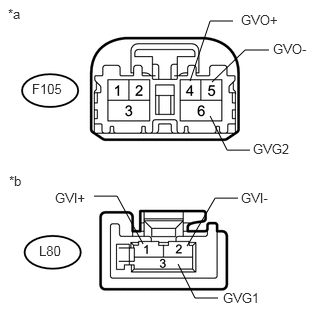
Remove the GVIF cable from the multi-media module receiver assembly and multi-display controller sub-assembly.
Measure the resistance according to the value(s) in the table below.
- Standard Resistance:
Tester Connection Condition Specified Condition F105-4 (GVO+) - L80-1 (GVI+) Always Below 1 Ω F105-5 (GVO-) - L80-2 (GVI-) Always Below 1 Ω F105-6 (GVG2) - L80-3 (GVG1) Always Below 1 Ω F105-4 (GVO+) or L80-1 (GVI+) - Body ground Always 10 kΩ or higher F105-5 (GVO-) or L80-2 (GVI-) - Body ground Always 10 kΩ or higher F105-6 (GVG2) or L80-3 (GVG1) - Body ground Always 10 kΩ or higher
| *a | GVIF Cable
(to Multi-media Module Receiver Assembly) |
| *b | GVIF Cable
(to Multi-display Controller Sub-assembly) |
OK
NG
Replace the multi-display controller sub-assembly with a new or known good one (See page Audio / Visual / Telematics>AUDIO / VIDEO>REAR SEAT ENTERTAINMENT ECU>REMOVAL).
NEXT
Clear the DTCs (See page Audio / Visual / Telematics>AUDIO / VIDEO>REAR SEAT ENTERTAINMENT SYSTEM>DTC CHECK / CLEAR).
NEXT
Recheck for DTCs and check if the same DTC is output again (See page Audio / Visual / Telematics>AUDIO / VIDEO>REAR SEAT ENTERTAINMENT SYSTEM>DTC CHECK / CLEAR).
- OK:
No DTCs are output.
OK
NG