AUDIO / VIDEO REAR SEAT ENTERTAINMENT ECU REMOVAL
PROCEDURE

 1. PRECAUTION
- NOTICE:
-
After turning the ignition switch off, waiting time may be required before disconnecting the cable from the battery terminal. Therefore, make sure to read the disconnecting the cable from the battery terminal notice before proceeding with work (See page General>INTRODUCTION>REPAIR INSTRUCTION>PRECAUTION).
2.DISCONNECT CABLE FROM NEGATIVE BATTERY TERMINAL
- CAUTION:
-
Wait at least 90 seconds after disconnecting the cable from the negative (-) battery terminal to disable the SRS system.
- NOTICE:
-
When disconnecting the cable, some systems need to be initialized after the cable is reconnected (See page General>INTRODUCTION>REPAIR INSTRUCTION>INITIALIZATION).
3.REMOVE FRONT SEAT ASSEMBLY RH
for Manual Seat (See page Vehicle Interior>SEAT>FRONT SEAT ASSEMBLY (for Manual Seat)>REMOVAL).
for Power Seat (See page Vehicle Interior>SEAT>FRONT SEAT ASSEMBLY (for Power Seat)>REMOVAL).
55317A
4.REMOVE INSTRUMENT SIDE PANEL RH
67913B
5.REMOVE FRONT DOOR SCUFF PLATE RH
62111C
6.REMOVE COWL SIDE TRIM BOARD RH
58510D
7.REMOVE FRONT FLOOR CARPET ASSEMBLY
Pull back the carpet far enough so that the selector can be removed. For further details, refer to the removal procedure (See page Audio / Visual / Telematics>AUDIO / VIDEO>STEREO COMPONENT AMPLIFIER>REMOVAL).
86104
8.REMOVE MULTI-DISPLAY CONTROLLER SUB-ASSEMBLY
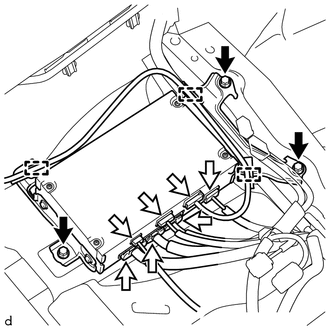
Disconnect the connectors and detach the 3 clamps.
Remove the 3 bolts and multi-display controller sub-assembly.
86117C
9.REMOVE NO. 2 MULTI-DISPLAY CONTROLLER BRACKET
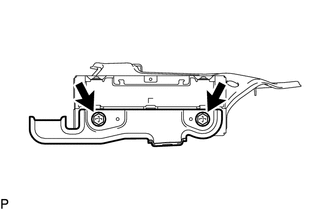
Remove the 2 bolts and bracket.
86117E
10.REMOVE NO. 3 MULTI-DISPLAY CONTROLLER BRACKET
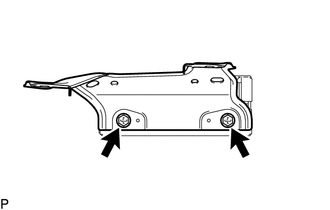
Remove the 2 bolts and bracket.
11.REMOVE FRONT CONSOLE BOX
w/o Cool Box (See page Vehicle Interior>INTERIOR PANELS / TRIM>FRONT CONSOLE BOX(w/ Cool Box)>REMOVAL)
w/ Cool Box (See page Vehicle Interior>INTERIOR PANELS / TRIM>FRONT CONSOLE BOX(w/o Cool Box)>REMOVAL)
86842A
12.REMOVE NO. 1 NAVIGATION WIRE
Detach the clamps.
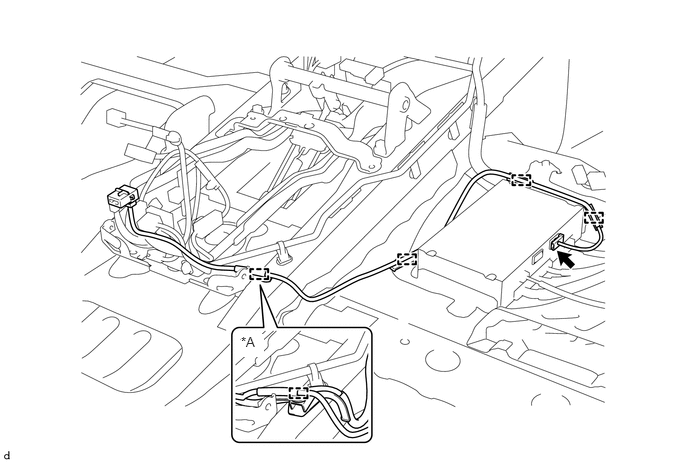
| *A | w/ DCM(Telematics Transceiver) | - | - |
Disconnect the connector and remove the No. 1 navigation wire.