NAVIGATION / MULTI INFO DISPLAY NAVIGATION SYSTEM B15C0 GPS Antenna Connection Malfunction(short) B15C1 GPS Antenna Connection Malfunction(break)
DESCRIPTION
These DTCs are stored when a malfunction occurs in the navigation antenna assembly*1 or telephone antenna assembly*2.
*1: w/o Heated Windshield Defroster System
*2: w/ Heated Windshield Defroster System
| DTC Code | DTC Detection Condition | Trouble Area |
|---|---|---|
| B15C0 | Navigation antenna error | w/o Heated Windshield Defroster System:
- Navigation antenna assembly - Multi-media module receiver assembly w/ Heated Windshield Defroster System and w/o Telematics Transceiver:
- Telephone antenna assembly - No. 4 antenna cord sub-assembly - No. 2 antenna cord sub-assembly - Antenna cord sub-assembly - Multi-media module receiver assembly w/ Heated Windshield Defroster System and w/ Telematics Transceiver:
- Telephone antenna assembly - No. 4 antenna cord sub-assembly - Antenna divider - Harness or connector - Multi-media module receiver assembly |
| B15C1 | Error of the power source to the navigation antenna |
WIRING DIAGRAM
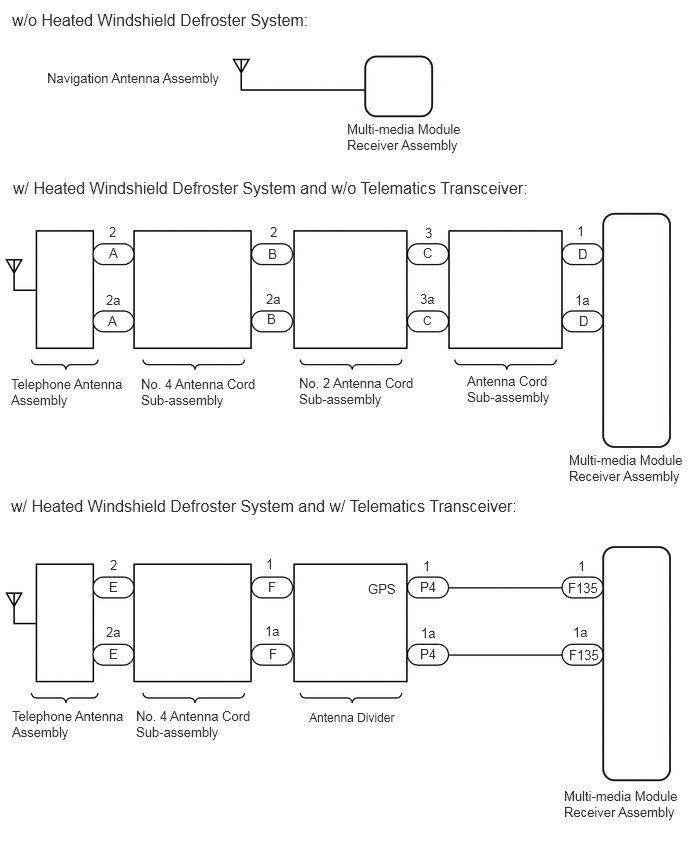
CAUTION / NOTICE / HINT
- NOTICE:
-
Depending on the parts that are replaced during vehicle inspection or maintenance, performing initialization, registration or calibration may be needed. Refer to Precaution for Navigation System.
-
Click hereAudio / Visual / Telematics>NAVIGATION / MULTI INFO DISPLAY>NAVIGATION SYSTEM>PRECAUTION
PROCEDURE
Choose the model to be inspected.
- Result:
Result Proceed to w/o Heated Windshield Defroster System A w/ Heated Windshield Defroster System and w/o Telematics Transceiver B w/ Heated Windshield Defroster System and w/ Telematics Transceiver C
A
B
C
Check if the navigation antenna assembly is securely connected to the multi-media module receiver assembly.
- OK:
Navigation antenna assembly is securely connected.
- Result:
Proceed to OK NG
OK
NG
Replace the navigation antenna assembly with a known good one.
- Result:
Proceed to NEXT
NEXT
Clear the DTCs.
Click hereAudio / Visual / Telematics>NAVIGATION / MULTI INFO DISPLAY>NAVIGATION SYSTEM>DTC CHECK / CLEAR
- Result:
Proceed to NEXT
NEXT
Recheck for DTCs and check if the same DTCs are output again.
Click hereAudio / Visual / Telematics>NAVIGATION / MULTI INFO DISPLAY>NAVIGATION SYSTEM>DTC CHECK / CLEAR
- OK:
No DTCs are output.
- Result:
Proceed to OK NG
OK
NG
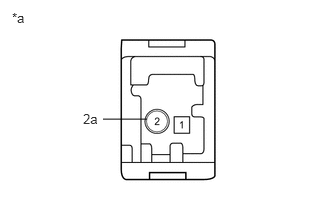
| *a | Telephone Antenna Assembly |
Remove the telephone antenna assembly.
Measure the resistance according to the value(s) in the table below.
- Standard Resistance:
Tester Connection Condition Specified Condition 2 - 2a Always 4 to 11 kΩ
- Result:
Proceed to OK NG
OK
NG
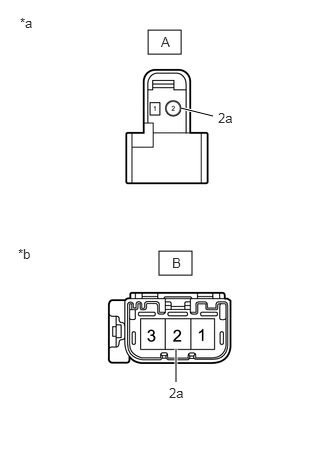
| *a | Front view of wire harness connector
(to Telephone Antenna Assembly) |
| *b | Front view of wire harness connector
(to No. 2 Antenna Cord Sub-assembly) |
Disconnect the No. 4 antenna cord sub-assembly from the telephone antenna assembly connector.
Disconnect the No. 4 antenna cord sub-assembly from the No. 2 antenna cord sub-assembly connector.
Measure the resistance according to the value(s) in the table below.
- Standard Resistance:
Tester Connection Condition Specified Condition A-2 - B-2 Always Below 1 Ω A-2a - B-2a Always Below 1 Ω A-2 - Body ground Always 10 kΩ or higher A-2a - Body ground Always 10 kΩ or higher
- Result:
Proceed to OK NG
OK
NG
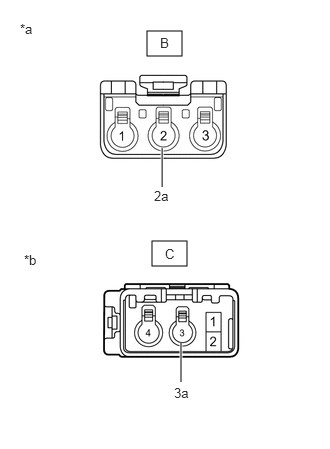
| *a | Front view of wire harness connector
(to No. 4 Antenna Cord Sub-assembly) |
| *b | Front view of wire harness connector
(to Antenna Cord Sub-assembly) |
Disconnect the No. 2 antenna cord sub-assembly from the No. 4 antenna cord sub-assembly connector.
Disconnect the No. 2 antenna cord sub-assembly from the antenna cord sub-assembly connector.
Measure the resistance according to the value(s) in the table below.
- Standard Resistance:
Tester Connection Condition Specified Condition B-2 - C-3 Always Below 1 Ω B-2a - C-3a Always Below 1 Ω B-2 - Body ground Always 10 kΩ or higher B-2a - Body ground Always 10 kΩ or higher
- Result:
Proceed to OK NG
OK
NG
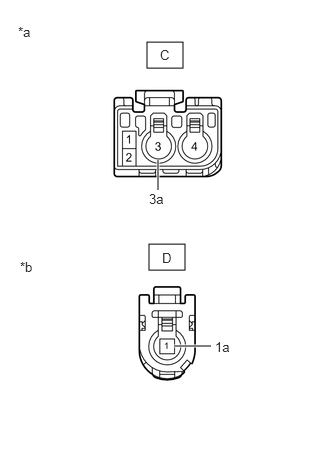
| *a | Front view of wire harness connector
(to No. 2 Antenna Cord Sub-assembly) |
| *b | Front view of wire harness connector
(to Multi-media Module Receiver Assembly) |
Disconnect the antenna cord sub-assembly from the No. 2 antenna cord sub-assembly connector.
Disconnect the antenna cord sub-assembly from the multi-media module receiver assembly connector.
Measure the resistance according to the value(s) in the table below.
- Standard Resistance:
Tester Connection Condition Specified Condition C-3 - D-1 Always Below 1 Ω C-3a - D-1a Always Below 1 Ω C-3a - Body ground Always 10 kΩ or higher C-3a - Body ground Always 10 kΩ or higher
- Result:
Proceed to OK NG
OK
NG
Replace the telephone antenna assembly with a new or known good one.
- Result:
Proceed to NEXT
NEXT
Clear the DTCs.
Click hereAudio / Visual / Telematics>NAVIGATION / MULTI INFO DISPLAY>NAVIGATION SYSTEM>DTC CHECK / CLEAR
- Result:
Proceed to NEXT
NEXT
Recheck for DTCs and check if the same DTCs are output again.
Click hereAudio / Visual / Telematics>NAVIGATION / MULTI INFO DISPLAY>NAVIGATION SYSTEM>DTC CHECK / CLEAR
- OK:
No DTCs are output.
- Result:
Proceed to OK NG
OK
NG
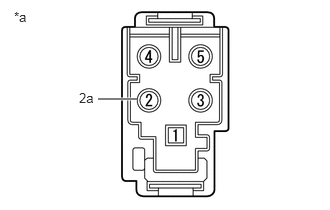
| *a | Telephone Antenna Assembly |
Remove the telephone antenna assembly.
Measure the resistance according to the value(s) in the table below.
- Standard Resistance:
Tester Connection Condition Specified Condition 2 - 2a Always 4 to 11 kΩ
- Result:
Proceed to OK NG
OK
NG
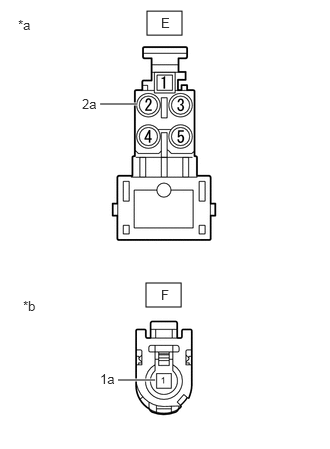
| *a | Front view of wire harness connector
(to Telephone Antenna Assembly) |
| *b | Front view of wire harness connector
(to Antenna Divider) |
Disconnect the No. 4 antenna cord sub-assembly from the telephone antenna assembly connector.
Disconnect the No. 4 antenna cord sub-assembly from the antenna divider connector.
Measure the resistance according to the value(s) in the table below.
- Standard Resistance:
Tester Connection Condition Specified Condition E-2 - F-1 Always Below 1 Ω E-2a - F-1a Always Below 1 Ω E-2 - Body ground Always 10 kΩ or higher E-2a - Body ground Always 10 kΩ or higher
- Result:
Proceed to OK NG
OK
NG
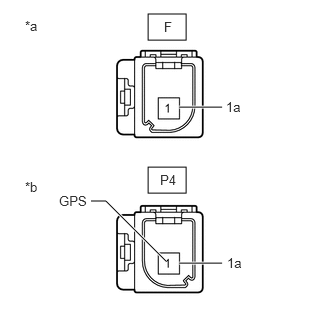
| *a | Front view of wire harness connector
(to No. 4 Antenna Cord Sub-assembly) |
| *b | Front view of wire harness connector
(to Vehicle Wire Harness) |
Disconnect the antenna divider from the No. 4 antenna cord sub-assembly connector.
Disconnect the antenna divider from the vehicle wire harness connector.
Measure the resistance according to the value(s) in the table below.
- Standard Resistance:
Tester Connection Condition Specified Condition F-1 - P4-1 (GPS) Always 10 kΩ or higher F-1 - F-1a Always 10 kΩ or higher P4-1 (GPS) - P4-1a Always 243 to 267 Ω F-1 or P4-1 - Body ground Always 10 kΩ or higher F-1a or P4-1a - Body ground Always 10 kΩ or higher
- Result:
Proceed to OK NG
OK
NG
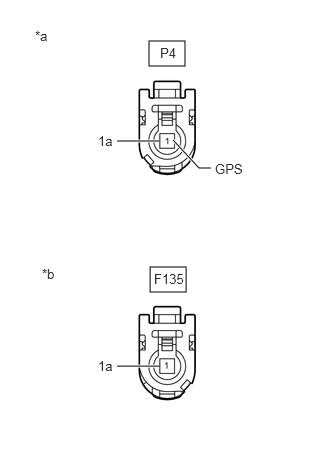
| *a | Front view of wire harness connector
(to Antenna Divider) |
| *b | Front view of wire harness connector
(to Multi-media Module Receiver Assembly) |
Disconnect the P4 antenna divider connector.
Disconnect the F135 multi-media module receiver assembly connector.
Measure the resistance according to the value(s) in the table below.
- Standard Resistance:
Tester Connection Condition Specified Condition P4-1 (GPS) - F135-1 Always Below 1 Ω P4-1a - F135-1a Always Below 1 Ω P4-1 (GPS) - Body ground Always 10 kΩ or higher P4-1a - Body ground Always 10 kΩ or higher
- Result:
Proceed to OK NG
OK
NG
Replace the telephone antenna assembly with a new or known good one.
Click hereAudio / Visual / Telematics>TELEMATICS>TELEPHONE ANTENNA>REMOVAL
Clear the DTCs.
Click hereAudio / Visual / Telematics>NAVIGATION / MULTI INFO DISPLAY>NAVIGATION SYSTEM>DTC CHECK / CLEAR
Check for DTCs.
Click hereAudio / Visual / Telematics>NAVIGATION / MULTI INFO DISPLAY>NAVIGATION SYSTEM>DTC CHECK / CLEAR
- OK:
No DTCs are output.
- Result:
Proceed to OK NG
OK
NG
Replace the antenna divider with a new or known good one.
Click hereAudio / Visual / Telematics>TELEMATICS>ANTENNA DIVIDER>REMOVAL
Clear the DTCs.
Click hereAudio / Visual / Telematics>NAVIGATION / MULTI INFO DISPLAY>NAVIGATION SYSTEM>DTC CHECK / CLEAR
Check for DTCs.
Click hereAudio / Visual / Telematics>NAVIGATION / MULTI INFO DISPLAY>NAVIGATION SYSTEM>DTC CHECK / CLEAR
- OK:
No DTCs are output.
- Result:
Proceed to OK NG
OK
NG