AUDIO / VIDEO AUDIO AND VISUAL SYSTEM(for Radio and Display Type, except 12.3 Inch Display) B157D DAB Tuner Antenna Disconnected
DESCRIPTION
This DTC is stored when a malfunction occurs in the DAB tuner antenna which is connected to the radio and display receiver assembly.
| DTC No. | Detection Item | DTC Detection Condition | Trouble Area | DTC Output from | Priority |
|---|---|---|---|---|---|
| B157D | DAB Tuner Antenna Disconnected | The DAB tuner antenna is not connected |
·
Quarter window assembly RH (window glass antenna wire and digital audio broadcasting antenna)
·
No. 3 antenna cord sub-assembly
·
No. 2 antenna cord sub-assembly
·
Antenna cord sub-assembly
·
Radio and display receiver assembly |
Navigation System | A |
WIRING DIAGRAM
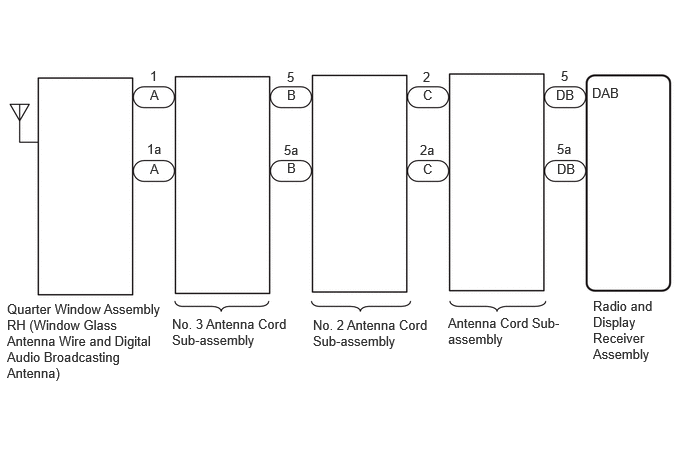
CAUTION / NOTICE / HINT
- HINT:
-
Depending on the parts that are replaced during vehicle inspection or maintenance, performing initialization, registration or calibration may be needed. Refer to Precaution for Audio and Visual System.
PROCEDURE
Check if the digital audio broadcasting antenna cable is securely connected to the radio and display receiver assembly.
- OK:
-
Digital audio broadcasting antenna cable is securely connected
- Result:
-
Proceed to OK NG
OK
NG
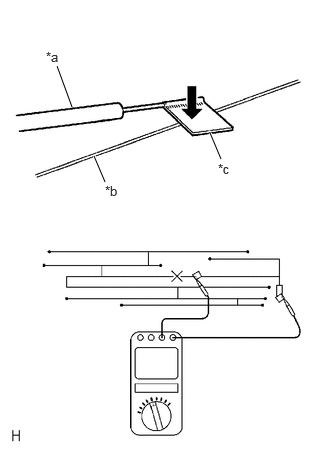
| *a | Tester Probe |
| *b | Antenna Wire |
| *c | Tin Foil |
Check for continuity in the window glass antenna wire.
- NOTICE:
-
When cleaning the glass, wipe it in the direction of the wire with a soft dry cloth. Take care not to damage the wire. Do not use detergents or glass cleaners with abrasive ingredients. When measuring resistance, wrap a piece of tin foil around the tip of each probe and press the foil against the wire with your finger as shown in the illustration.
- HINT:
-
Check for continuity at the center of each antenna wire as shown in the illustration.
- OK:
-
There is continuity in the window glass antenna wire.
- Result:
-
Proceed to OK NG
OK
NG
Pre-procedure1
Disconnect the antenna connector from the radio and display receiver assembly.
Disconnect the antenna connector from the No. 2 antenna cord sub-assembly.
Procedure1
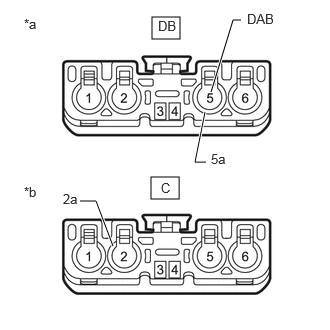
| *a | Front view of wire harness connector (to Radio and Display Receiver Assembly) |
| *b | Front view of wire harness connector (to No. 2 Antenna Cord Sub-assembly) |
Measure the resistance according to the value(s) in the table below.
- Standard Resistance:
-
Tester Connection Condition Specified Condition DB-5 (DAB) - C-2 Always Below 1 Ω DB-5a - C-2a Always Below 1 Ω DB-5 (DAB) - Body ground Always 10 kΩ or higher
- Result:
-
Proceed to OK NG
Post-procedure1
None
OK
NG
Click hereAudio / Visual / Telematics>AUDIO / VIDEO>RADIO ANTENNA CORD (for Instrument Panel)>REMOVAL
Pre-procedure1
Disconnect the antenna connector from the antenna cord sub-assembly.
Disconnect the antenna connector from the No. 3 antenna cord sub-assembly.
Procedure1
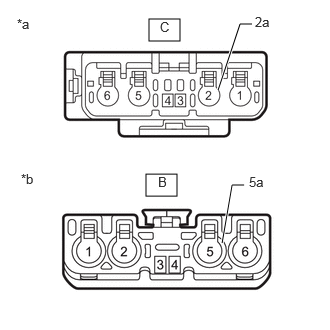
| *a | Front view of wire harness connector (to Antenna Cord Sub-assembly) |
| *b | Front view of wire harness connector (to No. 3 Antenna Cord Sub-Assembly) |
Measure the resistance according to the value(s) in the table below.
- Standard Resistance:
-
Tester Connection Condition Specified Condition C-2 - B-5 Always Below 1 Ω C-2a - B-5a Always Below 1 Ω C-2 - Body ground Always 10 kΩ or higher
- Result:
-
Proceed to OK NG
Post-procedure1
None
OK
NG
Pre-procedure1
Disconnect the antenna connector from the No. 2 antenna cord sub-assembly.
Disconnect the antenna connector from the quarter window assembly RH (window glass antenna wire and digital audio broadcasting antenna) .
Procedure1
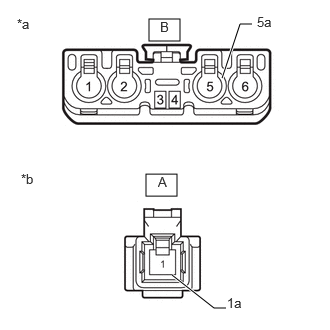
| *a | Front view of wire harness connector (to Antenna Cord Sub-assembly) |
| *b | Front view of wire harness connector (to Quarter Window Assembly RH (Window Glass Antenna Wire and Digital Audio Broadcasting Antenna)) |
Measure the resistance according to the value(s) in the table below.
- Standard Resistance:
-
Tester Connection Condition Specified Condition B-5 - A-1 Always Below 1 Ω B-5a - A-1a Always Below 1 Ω B-5 - Body ground Always 10 kΩ or higher
- Result:
-
Proceed to OK NG
Post-procedure1
None
OK
NG
Pre-procedure1
Replace the quarter window assembly RH (window glass antenna wire and digital audio broadcasting antenna) with a new or known good one.
- HINT:
-
Click hereVehicle Exterior>WINDOW / GLASS>QUARTER WINDOW GLASS>REMOVAL
Clear the DTCs.
- Body Electrical > Navigation System > Clear DTCs
- 50002 212
Procedure1
Recheck for DTCs and check that no DTCs are output.
- Body Electrical > Navigation System > Trouble Codes
- 50001 212
- Result:
-
Result Proceed to DTCs are not output A DTCs are output B
Post-procedure1
None
A
B
Click hereAudio / Visual / Telematics>AUDIO / VIDEO>RADIO RECEIVER (for Radio and Display Type)>REMOVAL