| NG |  |
| GO TO POWER DOOR LOCK CONTROL SYSTEM (Proceed to Problem Symptoms Table) (Click here) |
SMART KEY SYSTEM (for Entry Function) > All Door Entry Lock/Unlock Functions do not Operate, but Wireless Functions Operate |
| 1.CHECK POWER DOOR LOCK OPERATION |
When the door control switch on the master switch assembly is operated, check that the doors unlock and lock according to switch operation (Click here).
|
| ||||
| OK | |
 |
| 2.READ VALUE USING TECHSTREAM (ENTRY CANCEL FUNCTION) |
Connect the Techstream to the DLC3.
Turn the power switch on (IG).
Turn the Techstream on.
Enter the following menus: Body Electrical / Smart Key / Data List.
Read the Data List according to the display on the Techstream.
| Tester Display | Measurement Item/Range | Normal Condition | Diagnostic Note |
| Auto Entry Cancel SW | Entry function cancel / ON or OFF | Mode status displayed | - |
| Result | Proceed to |
| Entry function cancel is OFF. | A |
| Entry function cancel is ON. | B |
|
| ||||
| A | |
|
| 3.CHECK WAVE ENVIRONMENT |
Move the key as described below and perform the operation inspection.
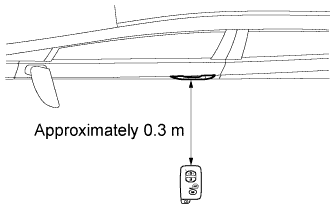 |
Bring the key near the driver door outside handle assembly, and perform a front driver door entry lock and unlock operation check.
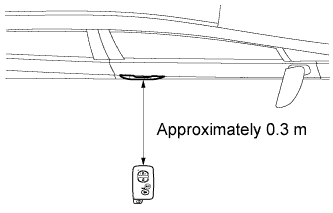 |
Bring the key near the front passenger door outside handle assembly, and perform a front passenger door entry lock and unlock operation check.*
*: w/ Entry System Back Door Open Function
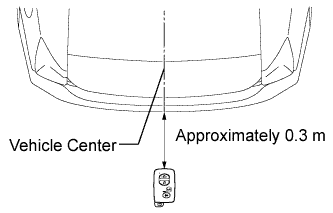 |
Bring the key near the outside electrical key oscillator (for rear side), and perform an entry back door open function check.*
*: w/ Entry System Back Door Open Function
| Result | Proceed to |
| Entry function does not operate for all doors. | A |
| Entry function operates for all doors. | B |
| Entry function operates for an individual door. | C |
| Result | Proceed to |
| Entry function does not operate for driver door. | A |
| Entry function operates for driver door. | B |
|
| ||||
|
| ||||
| A | |
|
| 4.SYSTEM CHECK |
Check the vehicle specification.
| Result | Proceed to |
| w/ Entry System Back Door Open Function | A |
| w/o Entry System Back Door Open Function | B |
|
| ||||
| A | |
|
| 5.PERFORM KEY DIAGNOSTIC MODE INSPECTION |
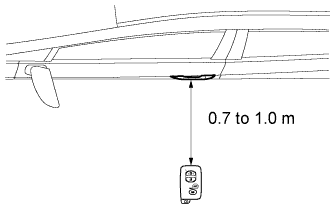 |
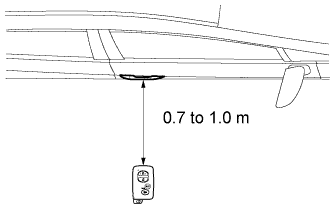
Diagnostic mode inspection (door electrical key oscillator (for driver side))
Connect the Techstream to the DLC3.
Turn the power switch on (IG).
Turn the Techstream on.
Enter the following menus: Body Electrical / Smart Key / Utility / Key Communication Check / Overhead + Driver Side.
When the key is in the position shown in the illustration, check that the wireless door lock buzzer sounds.
 |
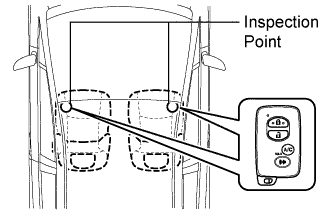
Diagnostic mode inspection (door electrical key oscillator (for front passenger side))
Connect the Techstream to the DLC3.
Turn the power switch on (IG).
Turn the Techstream on.
Enter the following menus: Body Electrical / Smart Key / Utility / Key Communication Check / Overhead + Passenger Side.
When the key is in the position shown in the illustration, check that the wireless door lock buzzer sounds.
 |
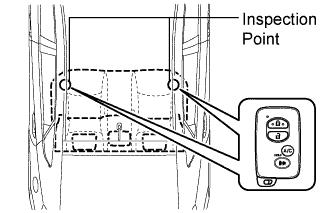
Diagnostic mode inspection (indoor electrical key oscillator (for front floor))
Connect the Techstream to the DLC3.
Turn the power switch on (IG).
Turn the Techstream on.
Enter the following menus: Body Electrical / Smart Key / Utility / Key Communication Check / Overhead + Front Room.
When the key is in the position shown in the illustration, check that the wireless door lock buzzer sounds.
 |
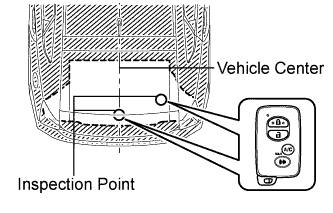
Diagnostic mode inspection (indoor electrical key oscillator (for center floor))
Connect the Techstream to the DLC3.
Turn the power switch on (IG).
Turn the Techstream on.
Enter the following menus: Body Electrical / Smart Key / Utility / Key Communication Check / Overhead + Rear Room.
When the key is in the position shown in the illustration, check that the wireless door lock buzzer sounds.
 |
Diagnostic mode inspection (indoor electrical key oscillator (for rear floor))
Connect the Techstream to the DLC3.
Turn the power switch on (IG).
Turn the Techstream on.
Enter the following menus: Body Electrical / Smart Key / Utility / Key Communication Check / Overhead + Back Door (inside).
When the key is in the position shown in the illustration, check that the wireless door lock buzzer sounds.
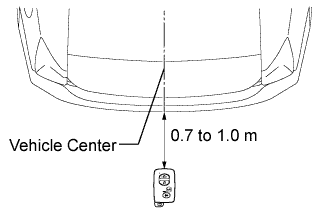 |
Diagnostic mode inspection (outside electrical key oscillator (for rear side))
Connect the Techstream to the DLC3.
Turn the power switch on (IG).
Turn the Techstream on.
Enter the following menus: Body Electrical / Smart Key / Utility / Key Communication Check / Overhead + Back Door (outside).
When the key is in the position shown in the illustration, check that the wireless door lock buzzer sounds.
| Result | Proceed to |
| Wireless door lock buzzer does not sound for all electrical key oscillators. | A |
| Wireless door lock buzzer does not sound only for either door electrical key oscillator. | B |
| Wireless door lock buzzer does not sound only for one indoor electrical key oscillator. | C |
| Wireless door lock buzzer does not sound only for outside electrical key oscillator (for rear side). | D |
| Wireless door lock buzzer sounds for all electrical key oscillators. | E |
|
| ||||
|
| ||||
|
| ||||
|
| ||||
| A | |
|
| 6.CHECK ELECTRICAL KEY TRANSMITTER |
Check if another registered key is available.
| Result | Proceed to |
| Another registered key is not available. | A |
| Another registered key is available. | B |
|
| ||||
| A | |
|
| 7.REGISTER ELECTRICAL KEY TRANSMITTER |
Register a new key (Click here).
| NEXT | |
|
| 8.CHECK ELECTRICAL KEY TRANSMITTER (OPERATION) |
Using the key registered in the previous step or another registered key, check that the entry function operates normally (Click here).
|
| ||||
| OK | ||
 | ||
| ||
| 9.PERFORM KEY DIAGNOSTIC MODE INSPECTION |
|
Diagnostic mode inspection (door electrical key oscillator (for driver side))
Connect the Techstream to the DLC3.
Turn the power switch on (IG).
Turn the Techstream on.
Enter the following menus: Body Electrical / Smart Key / Utility / Key Communication Check / Overhead + Driver Side.
When the key is in the position shown in the illustration, check that the wireless door lock buzzer sounds.
|
Diagnostic mode inspection (indoor electrical key oscillator (for front floor))
Connect the Techstream to the DLC3.
Turn the power switch on (IG).
Turn the Techstream on.
Enter the following menus: Body Electrical / Smart Key / Utility / Key Communication Check / Overhead + Front Room.
When the key is in the position shown in the illustration, check that the wireless door lock buzzer sounds.
|
Diagnostic mode inspection (indoor electrical key oscillator (for center floor))
Connect the Techstream to the DLC3.
Turn the power switch on (IG).
Turn the Techstream on.
Enter the following menus: Body Electrical / Smart Key / Utility / Key Communication Check / Overhead + Rear Room.
When the key is in the position shown in the illustration, check that the wireless door lock buzzer sounds.
|
Diagnostic mode inspection (indoor electrical key oscillator (for rear floor))
Connect the Techstream to the DLC3.
Turn the power switch on (IG).
Turn the Techstream on.
Enter the following menus: Body Electrical / Smart Key / Utility / Key Communication Check / Overhead + Back Door (inside).
When the key is in the position shown in the illustration, check that the wireless door lock buzzer sounds.
| Result | Proceed to |
| Wireless door lock buzzer does not sound for all electrical key oscillators. | A |
| Wireless door lock buzzer does not sound only for driver door electrical key oscillator. | B |
| Wireless door lock buzzer does not sound only for one indoor electrical key oscillator. | C |
| Wireless door lock buzzer sounds for all electrical key oscillators. | D |
|
| ||||
|
| ||||
|
| ||||
| A | |
|
| 10.CHECK ELECTRICAL KEY TRANSMITTER |
Check if another registered key is available.
| Result | Proceed to |
| Another registered key is not available. | A |
| Another registered key is available. | B |
|
| ||||
| A | |
|
| 11.REGISTER ELECTRICAL KEY TRANSMITTER |
Register a new key (Click here).
| NEXT | |
|
| 12.CHECK ELECTRICAL KEY TRANSMITTER (OPERATION) |
Using the key registered in the previous step or another registered key, check that the entry function operates normally (Click here).
|
| ||||
| OK | ||
| ||
| ||
