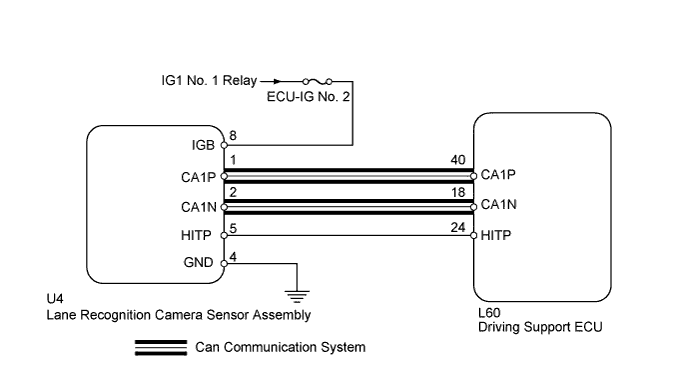
DTC U1119 Lost Communication with Object Recognition ECU (CAN) |
| DTC Code | DTC Detection Condition | Trouble Area |
| U1119 | When vehicle speed is 50 km/h (31 mph) or more with lane-keeping main switch is on, communication stop from lane recognition camera sensor to driving support ECU continues for 1 second or more |
|
| 1.CHECK DTC OUTPUT |
Using the Techstream, enter the following menus: Body Electrical / Pre-Collision 2 / Trouble Codes.
Check for DTCs (Click here).
| Result | Proceed to |
| DTC U1119 is output | A |
| DTC other than U1119 is output | B |
|
| ||||
| A | |
 |
| 2.READ VALUE USING TECHSTREAM |
Connect the Techstream to the DLC3.
Turn the power switch on (IG).
Turn the Techstream on.
Enter the following menus: Body Electrical / Pre-Collision 2/ Data List / Recog ECU H Temp Hist.
Confirm the judgment history.
| Tester Display | Measurement Item/Range | Normal Condition | Diagnostic Note |
| Recog ECU H Temp Hist | Lane recognition ECU temperature condition history/ ON or OFF | ON: History exists OFF: No history | - |
| Result | Proceed to |
| ON is displayed | A |
| OFF is displayed | B |
|
| ||||
| A | |
|
| 3.CHECK HARNESS OR CONNECTOR (DRIVING SUPPORT ECU - LANE RECOGNITION CAMERA SENSOR) |
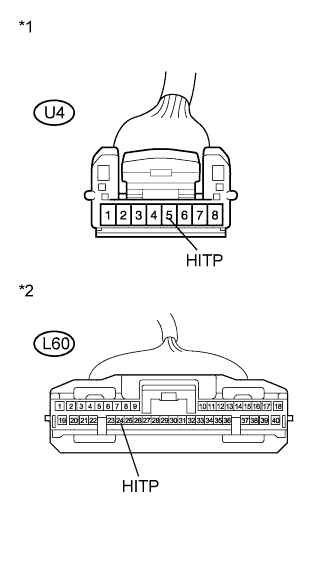 |
Disconnect the driving support ECU connector and lane recognition camera sensor connector.
Measure the resistance according to the value(s) in the table below.
| Tester Condition | Condition | Specified Condition |
| U4-5 (HITP) - L60-24 (HITP) | Always | Below 1 Ω |
| U4-5 (HITP) or L60-24 (HITP) - Body ground | Always | 10 kΩ or higher |
| *1 | Front view of wire harness connector (to Lane Recognition Camera Sensor Assembly) |
| *2 | Front view of wire harness connector (to Driving Support ECU) |
Reconnect the connectors.
|
| ||||
| OK | ||
 | ||
| ||
| 4.REPAIR OR REPLACE HARNESS OR CONNECTOR (DRIVING SUPPORT ECU - LANE RECOGNITION CAMERA SENSOR) |
Repair or replace harness or connector.
| NEXT | |
|
| 5.CHECK DTC OUTPUT |
Using the Techstream, enter the following menus: Body Electrical / Pre-Collision 2 / Trouble Codes.
Clear the DTC (Click here).
Turn the power switch off.
Start the engine.
Drive the vehicle and operate lane keeping assist control.
Check for DTCs (Click here).
| Result | Proceed to |
| DTC U1119 is not output | A |
| DTC U1119 is output | B |
|
| ||||
| A | ||
| ||
| ||
| 6.CHECK CAN COMMUNICATION SYSTEM |
Check CAN communication system (Click here).
|
| ||||
| OK | |
|
| 7.REPLACE LANE RECOGNITION CAMERA SENSOR ASSEMBLY |
Replace lane recognition camera sensor assembly (Click here).
Adjust the lane recognition camera sensor assembly (Click here).
| NEXT | |
|
| 8.CHECK DTC OUTPUT |
Using the Techstream, enter the following menus: Body Electrical / Pre-Collision 2 / Trouble Codes.
Clear the DTCs (Click here).
Turn the power switch off.
Turn the power switch on (IG).
Drive the vehicle and operate lane keeping assist control.
Recheck for DTCs.
|
| ||||
| OK | ||
| ||
| ||

