BRAKE CONTROL / DYNAMIC CONTROL SYSTEMS VEHICLE STABILITY CONTROL SYSTEM C1370/73 Engine or Transmission System Matching Error
DESCRIPTION
This DTC is set by the skid control ECU when the ECM is replaced with one that has different engine and transmission information than the information stored in the skid control ECU.
This DTC is also set when the skid control ECU is replaced with one that has different engine and transmission information than the information stored in the ECM.
The ECM determines the transmission information according to whether or not there is a connection at a certain ECM terminal and sends its stored engine and transmission information.
| DTC Code | DTC Detection Condition | Trouble Area |
|---|---|---|
| C1370/73 | Information relating to engine, transmission, drivetrain or destination stored in ECM does not match information stored in skid control ECU. | ·
Harness or connector ·
VSC actuator (skid control ECU) ·
ECM |
WIRING DIAGRAM
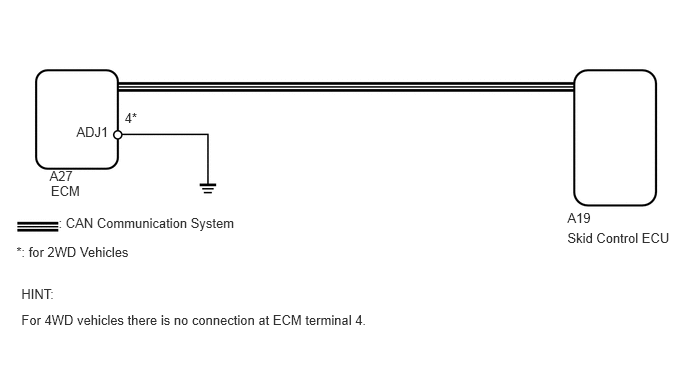
CAUTION / NOTICE / HINT
- NOTICE:
- ·
When replacing the VSC actuator assembly, perform zero point calibration (See page Brake>BRAKE CONTROL / DYNAMIC CONTROL SYSTEMS>VEHICLE STABILITY CONTROL SYSTEM>CALIBRATION).
·for 3UR-FE:
If the ECM has been replaced, it is necessary to register the Vehicle Identification Number (VIN) (See page Engine / Hybrid System>3UR-FE ENGINE CONTROL>SFI SYSTEM>REGISTRATION).
·for 3UR-FBE:
If the ECM has been replaced, it is necessary to register the Vehicle Identification Number (VIN) (See page Engine / Hybrid System>3UR-FBE ENGINE CONTROL>SFI SYSTEM>REGISTRATION).
PROCEDURE
Turn the ignition switch off.
Connect the Techstream to the DLC3.
Turn the ignition switch to ON.
Turn the Techstream on.
Enter the following menus: Powertrain / Engine and ECT / Data List.
According to the display on the Techstream, use the Data List.
| Tester Display | Measurement Item/ Range | Normal Condition | Diagnostic Note |
|---|---|---|---|
| Engine Type | Engine type | Engine type information stored in currently installed ECM displayed | - |
Check that the installed engine type and the engine type information stored in the ECM match by reading the Data List.
- OK:
The installed engine type and engine type information stored in the ECM match.
| Result | Proceed to |
|---|---|
| OK (3UR-FE) | A |
| OK (3UR-FBE) | B |
| NG | C |
- HINT:
-
If replacing the ECM, refer to the procedures below.
for 3UR-FE: See page Engine / Hybrid System>3UR-FE ENGINE CONTROL>ECM>REMOVAL
for 3UR-FBE: See page Engine / Hybrid System>3UR-FBE ENGINE CONTROL>ECM>REMOVAL
A
B
C
Turn the ignition switch off.
Connect the Techstream to the DLC3.
Turn the ignition switch to ON.
Turn the Techstream on.
Enter the following menus: Powertrain / Engine and ECT / Data List.
According to the display on the Techstream, use the Data List.
| Tester Display | Measurement Item/Range | Normal Condition | Diagnostic Note |
|---|---|---|---|
| Vehicle Spec Signal 1 | Information indicating if vehicle is 2WD or 4WD/
ON or OFF |
ON: 2WD
OFF: 4WD |
- |
Check that the actual vehicle type and the information read from the Data List match.
| Result | Proceed to |
|---|---|
| Actual vehicle type and information read from Data List do not match | A |
| Actual vehicle type and information read from Data List match | B |
A
B
for 4WD:
Check that terminal 4 of the ECM for connector A27 does not have a wire harness connection and is not connected to ground.
- OK:
There is no wire harness connection (no pin).
for 2WD:
Check that terminal 4 of the ECM for connector A27 has a wire harness connection.
- OK:
There is a wire harness connection.
Disconnect the ECM connector.
Measure the resistance according to the value(s) in the table below.
- Standard Resistance:
Tester Connection Condition Specified Condition A27-4 (ADJ1) - Body ground Always Below 1 Ω
| Result | Proceed to |
|---|---|
| for 4WD: Terminal 4 of the ECM for connector A27 is connected to ground
for 2WD: Wire harness is open |
A |
| for 4WD: Terminal 4 of the ECM for connector A27 is not connected to ground
for 2WD: Wire harness is not open and is connected to ground |
B |
A
B
Repair or replace harness or connector.
NEXT
Turn the ignition switch off.
Connect the Techstream to the DLC3.
Turn the ignition switch to ON.
Turn the Techstream on.
Enter the following menus: Powertrain / Engine and ECT / Data List.
According to the display on the Techstream, use the Data List.
| Tester Display | Measurement Item/Range | Normal Condition | Diagnostic Note |
|---|---|---|---|
| Vehicle Spec Signal 1 | Information indicating if vehicle is 2WD or 4WD/
ON or OFF |
ON: 2WD
OFF: 4WD |
- |
Check that the actual vehicle type and the information read from the Data List match.
| Result | Proceed to |
|---|---|
| Actual vehicle type and information read from Data List do not match | A |
| Actual vehicle type and information read from Data List match | B |
A
B
Replace the ECM for 3UR-FE (See page Engine / Hybrid System>3UR-FE ENGINE CONTROL>ECM>REMOVAL) or 3UR-FBE (See page Engine / Hybrid System>3UR-FBE ENGINE CONTROL>ECM>REMOVAL).
NEXT
Clear the DTC (See page Brake>BRAKE CONTROL / DYNAMIC CONTROL SYSTEMS>VEHICLE STABILITY CONTROL SYSTEM>DTC CHECK / CLEAR).
Check if the same DTC is output (See page Brake>BRAKE CONTROL / DYNAMIC CONTROL SYSTEMS>VEHICLE STABILITY CONTROL SYSTEM>DTC CHECK / CLEAR).
| Result | Proceed to |
|---|---|
| DTC is output | A |
| DTC is not output | B |
A
B
Clear the DTC (See page Brake>BRAKE CONTROL / DYNAMIC CONTROL SYSTEMS>VEHICLE STABILITY CONTROL SYSTEM>DTC CHECK / CLEAR).
Check if the same DTC is output (See page Brake>BRAKE CONTROL / DYNAMIC CONTROL SYSTEMS>VEHICLE STABILITY CONTROL SYSTEM>DTC CHECK / CLEAR).
| Result | Proceed to |
|---|---|
| DTC is output | A |
| DTC is not output | B |
A
B
(See pageGeneral>INTRODUCTION>HOW TO TROUBLESHOOT ECU CONTROLLED SYSTEMS>HOW TO PROCEED WITH TROUBLESHOOTING)