1UR-FE ENGINE CONTROL ECM REMOVAL
PROCEDURE

 11209
1.REMOVE V-BANK COVER SUB-ASSEMBLY
17700
2.REMOVE AIR CLEANER ASSEMBLY
82664
3.DISCONNECT CONNECTOR HOLDER BLOCK
Remove the connector holder block cover.
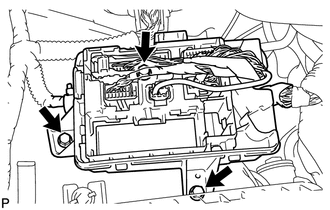
Remove the 3 bolts and move the connector holder block so that the ECM can be removed in the next step.
89661
4.REMOVE ECM
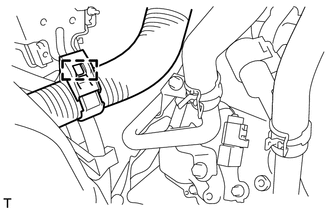
Disconnect the wire harness clamp.
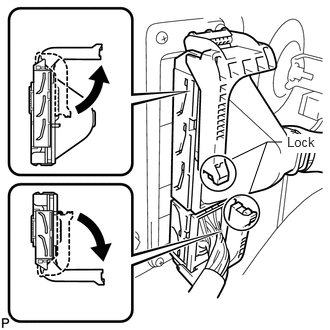
Raise the 2 levers while pushing the locks on the 2 levers shown in the illustration.
- NOTICE:
-
 2.417,1.656 2.781,1.479 2.781,1.479 2.594,2.021 false 2.781,1.479 2.938,1.479 false 2.99,1.396 3.375,1.594 0.385,0.198 10 true Lock
-
Make sure that the lock lever is raised 90° as shown in the illustration before disconnecting the connectors. Failure to do this may cause the connectors to break.
Disconnect the 2 connectors.
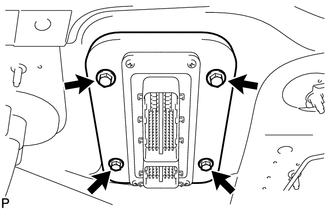
Remove the 4 bolts and ECM.
5.REMOVE GASKET
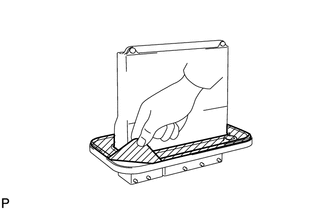
Peel off the rubber part of the gasket.
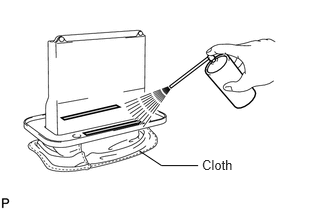
Spray gasket remover or equivalent on the remaining tape of the gasket.
- NOTICE:
-
When using gasket remover or equivalent, cover the ECM connector with a cloth.
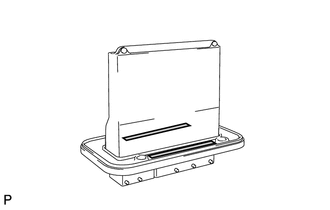
Remove the tape of the gasket without using bladed objects.