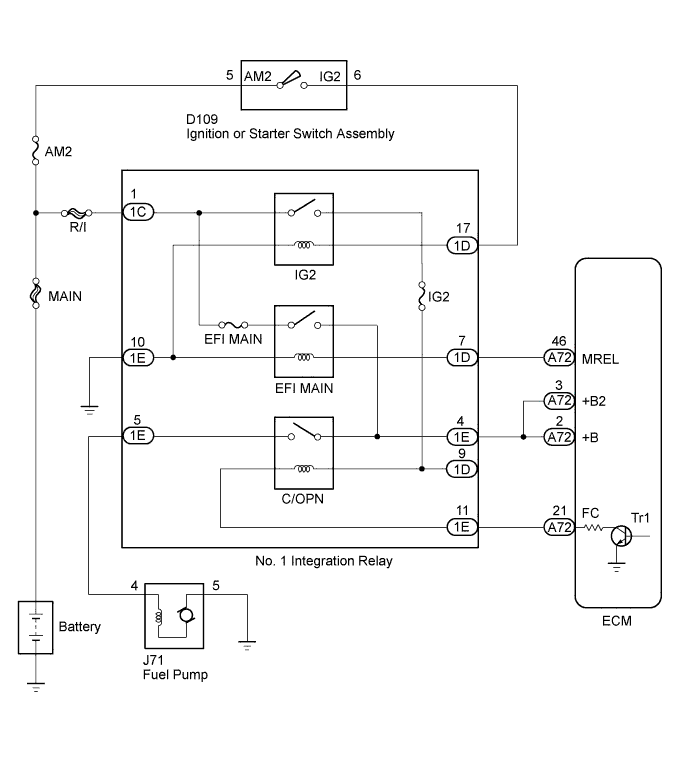
SFI SYSTEM (for Hatchback) > Fuel Pump Control Circuit |
| 1.PERFORM ACTIVE TEST USING TECHSTREAM (CONTROL THE FUEL PUMP/SPEED) |
Connect the Techstream to the DLC3.
Turn the ignition switch to ON.
Turn the Techstream on.
Enter the following menus: Powertrain / Engine and ECT / Active Test / Control the Fuel Pump/Speed.
Check whether the fuel pump operating sound occurs when performing the Active Test on the Techstream.
| Result | Proceed to |
| Fuel pump operating sound does not occur | A |
| Fuel pump operating sound occurs | B |
|
| ||||
| A | |
 |
| 2.INSPECT NO. 1 INTEGRATION RELAY (C/OPN RELAY) |
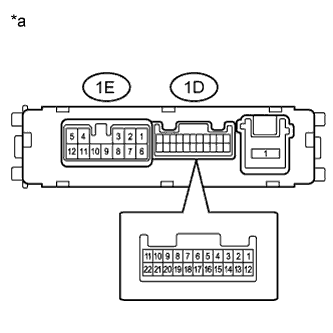 |
Remove the No. 1 integration relay.
Measure the resistance according to the value(s) in the table below.
| Tester Connection | Condition | Specified Condition |
| 1E-4 - 1E-5 | Battery voltage not applied to terminals 1D-9 and 1E-11 | 10 kΩ or higher |
| Battery voltage applied to terminals 1D-9 and 1E-11 | Below 1 Ω |
| *a | Component without harness connected (No. 1 Integration Relay Bottom View) |
|
| ||||
| OK | |
|
| 3.CHECK HARNESS AND CONNECTOR (NO. 1 INTEGRATION RELAY - ECM) |
Remove the No. 1 integration relay.
Disconnect the ECM connector.
Measure the resistance according to the value(s) in the table below.
| Tester Connection | Condition | Specified Condition |
| 1E-11 - A72-21 (FC) | Always | Below 1 Ω |
| 1E-11 or A72-21 (FC) - Body ground | Always | 10 kΩ or higher |
|
| ||||
| OK | |
|
| 4.CHECK HARNESS AND CONNECTOR (NO. 1 INTEGRATION RELAY - FUEL PUMP - BODY GROUND) |
Remove the No. 1 integration relay.
Disconnect the fuel pump connector.
Measure the resistance according to the value(s) in the table below.
| Tester Connection | Condition | Specified Condition |
| 1E-5 - J71-4 | Always | Below 1 Ω |
| J71-5 - Body ground | Always | Below 1 Ω |
| 1E-5 or J71-4 - Body ground | Always | 10 kΩ or higher |
|
| ||||
| OK | |
|
| 5.INSPECT FUEL PUMP |
Inspect fuel pump (Click here).
|
| ||||
| OK | ||
 | ||
| ||
| 6.READ VALUE USING TECHSTREAM (STARTER SIGNAL) |
Connect the Techstream to the DLC3.
Turn the ignition switch to ON.
Turn the Techstream on.
Enter the following menus: Powertrain / Engine and ECT / Data List / Starter Signal.
Check the result when the ignition switch is ON and the engine starts.
| Ignition Switch Position | Techstream Display (Starter Signal) |
| ON | OFF |
| START | ON |
|
| ||||
| OK | |
|
| 7.READ VALUE USING TECHSTREAM (ENGINE SPEED) |
Connect the Techstream to the DLC3.
Turn the ignition switch to ON.
Turn the Techstream on.
Enter the following menus: Powertrain / Engine and ECT / Data List / Engine Speed.
Read the values displayed on the Techstream while cranking.
|
| ||||
| OK | ||
| ||
| ||

