TELEMATICS TELEMATICS TRANSCEIVER INSTALLATION
PROCEDURE

 86740
1.INSTALL TELEPHONE TRANSCEIVER ASSEMBLY
86719
2.INSTALL TELEPHONE BRACKET
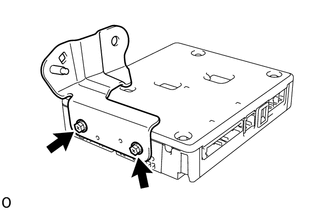
Install the telephone bracket with the 2 screws.
- Torque:
- 4.5 N*m (46 kgf*cm, 40 in.*lbf)
86705
3.INSTALL TELEPHONE ANTENNA CORD SUB-ASSEMBLY
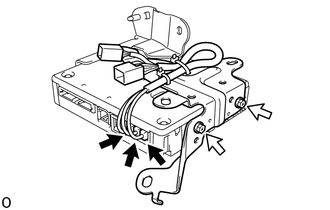

|
Connector |

|
Screw |
Install the telephone antenna cord sub-assembly with the 2 screws.
- Torque:
- 4.5 N*m (46 kgf*cm, 40 in.*lbf)
Connect the 3 connectors.
4.INSTALL TELEPHONE TRANSCEIVER ASSEMBLY WITH BRACKET
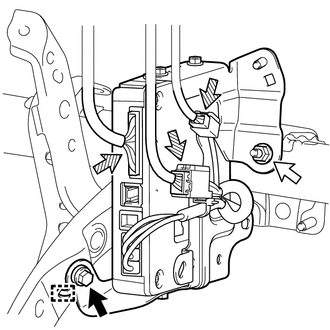
|
|
Bolt |
|
|
Nut |

|
Connector |
Connect the 3 connectors.
Attach the guide to temporarily install the telephone transceiver assembly with bracket to the vehicle.
Install the telephone transceiver assembly with bracket with the bolt and nut.
- Torque:
- for Bolt : 12.5 N*m (127 kgf*cm, 9 ft.*lbf)
- for Nut : 5.5 N*m (56 kgf*cm, 49 in.*lbf)
85970A
5.INSTALL DOUBLE LOCK DOOR CONTROL RELAY ASSEMBLY (w/ Double Locking System)
55550
6.INSTALL GLOVE COMPARTMENT DOOR ASSEMBLY
55461A
7.INSTALL INSTRUMENT PANEL ORNAMENT
55607
8.INSTALL NO. 2 INSTRUMENT PANEL UNDER COVER SUB-ASSEMBLY
55317A
9.INSTALL INSTRUMENT SIDE PANEL RH
62111C
10.INSTALL COWL SIDE TRIM BOARD RH
67910
11.INSTALL DOOR SCUFF PLATE ASSEMBLY RH
12.CONNECT CABLE TO NEGATIVE BATTERY TERMINAL
13. INITIALIZATION AFTER RECONNECTING BATTERY TERMINAL
Click hereGeneral>SETUP>WHEN DISCONNECTING OR RECONNECTING BATTERY TERMINAL>WORK PROCEDURE
- HINT:
-
When disconnecting and reconnecting the auxiliary battery, there is an automatic learning function that completes learning when the respective system is used.
-
Click hereGeneral>SETUP>WHEN DISCONNECTING OR RECONNECTING BATTERY TERMINAL>AUTOMATIC LEARNING CHART
14.CHECK SRS WARNING LIGHT
15.PERFORM REGISTRATION
Perform registration.
Click hereAudio / Visual / Telematics>TELEMATICS>TELEMATICS SYSTEM>REGISTRATION
- NOTICE:
-
When replacing the telephone transceiver assembly together with the mobilephone battery, perform registration.