NETWORKING NETWORK GATEWAY ECU(for RHD) REMOVAL
PROCEDURE

 1. PRECAUTION
- NOTICE:
-
After turning the ignition switch off, waiting time may be required before disconnecting the cable from the battery terminal. Therefore, make sure to read the disconnecting the cable from the battery terminal notice before proceeding with work (See page General>INTRODUCTION>REPAIR INSTRUCTION>PRECAUTION).
2.DISCONNECT CABLE FROM NEGATIVE BATTERY TERMINAL
- CAUTION:
-
Wait at least 90 seconds after disconnecting the cable from the negative (-) battery terminal to disable the SRS system.
- NOTICE:
-
When disconnecting the cable, some systems need to be initialized after the cable is reconnected (See page General>INTRODUCTION>REPAIR INSTRUCTION>INITIALIZATION).
55448A
3.REMOVE NO. 1 INSTRUMENT PANEL FINISH PANEL CUSHION
55402C
4.REMOVE LOWER INSTRUMENT PANEL PAD SUB-ASSEMBLY RH
67913B
5.REMOVE FRONT DOOR SCUFF PLATE RH
55317A
6.REMOVE INSTRUMENT SIDE PANEL RH
55606
7.REMOVE NO. 1 INSTRUMENT PANEL UNDER COVER SUB-ASSEMBLY
62111C
8.REMOVE COWL SIDE TRIM BOARD RH
55474C
9.REMOVE NO. 1 INSTRUMENT CLUSTER FINISH PANEL GARNISH
55475A
10.REMOVE NO. 2 INSTRUMENT CLUSTER FINISH PANEL GARNISH
55432D
11.REMOVE LOWER NO. 1 INSTRUMENT PANEL FINISH PANEL
73900
12.REMOVE DRIVER SIDE KNEE AIRBAG ASSEMBLY
89111
13.REMOVE NETWORK GATEWAY ECU
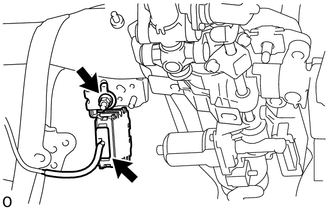
Disconnect the connector.
Remove the nut and network gateway ECU.