Home › Suspension › TIRE PRESSURE MONITORING › TIRE PRESSURE WARNING SYSTEM

DTC    C2175/75    Vehicle Speed or RSSI Signal Error

for Preparation Click here


DESCRIPTION

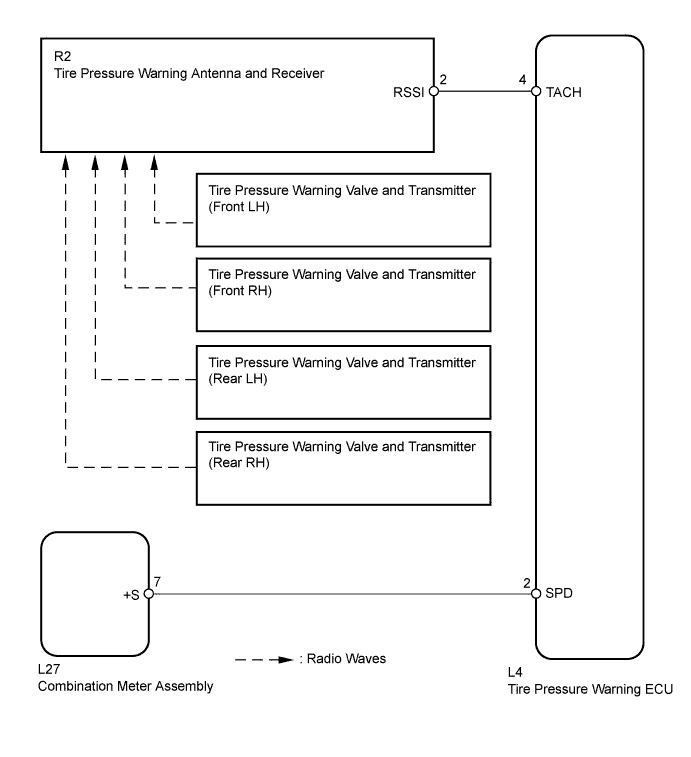
The tire pressure warning ECU receives a vehicle speed signal from the combination meter assembly and a RSSI signal from the tire pressure warning antenna and receiver. The tire pressure warning ECU uses these signals to detect DTCs C2121/21 to C2124/24 (No Signal from Transmitter) and DTC C2177/77 (Initialization not Completed).

DTC No.
DTC Detection Condition
Trouble Area
C2175/75
After following condition (a) or (b) is met, the transmitter ID is not received from the tire pressure warning valve and transmitters for a total of 20 minutes:
(a) No vehicle speed signal for 15 minutes
(b) RSSI signal 49 mV or less, or 4.95 V or more twice continuously
  1. Combination meter assembly
  2. Tire pressure warning valve and transmitter
  3. Tire pressure warning antenna and receiver
  4. Wire harness or connector
  5. Tire pressure warning ECU

HINT:
This DTC is set at the same time as DTCs C2121/21 to C2124/24 are being set.


WIRING DIAGRAM


C210270E03


INSPECTION PROCEDURE

NOTICE:
  1. When replacing the tire pressure warning ECU, read the transmitter IDs stored in the old ECU using the Techstream and write them down before removal.
  2. It is necessary to perform initialization (Click here) after registration (Click here) of the transmitter IDs into the tire pressure warning ECU if the ECU has been replaced.

1.READ OUTPUT DTC (DTCs C2121/21 to C2124/24)
  1. Turn the power switch off.

  1. Connect the Techstream to the DLC3.

  1. Turn the power switch on (IG).

  1. Turn the Techstream on.

  1. Enter the following menus: Chassis / Tire Pressure Monitor / Trouble Codes.

  1. Read DTCs.

    Result:
    Result
    Proceed to
    DTCs C2121/21 to C2124/24 are not output
    A
    DTCs C2121/21 to C2124/24 are output
    B

    NOTICE:
    When DTCs C2121/21 to C2124/24 is output, troubleshoot that DTCs first. Then troubleshoot DTCs C2175/75.


B
GO TO DTCs C2121/21 to C2124/24 (Click here)
A


2.PERFORM SIGNAL CHECK (VEHICLE SPEED SIGNAL AND RSSI SIGNAL)
  1. Enter the signal check mode in Test Mode Procedure (Click here).

  1. Turn the power switch on (IG) and wait for 3 seconds or more to erase DTC C2196/96.

  1. Drive the vehicle at 20 km/h (12 mph) or more for 10 seconds to erase DTC C2191/91.

  1. Check for test mode DTCs.

    Result:
    Result
    Proceed to
    DTCs C2191/91 and C2196/96 are cleared
    A
    DTC C2191/91 is output
    B
    DTC C2196/96 is output
    C

    HINT:
    DTCs C2181/81 to C2184/84 (Transmitter ID not Received) are output at this time, but they are not related to this check.


B
GO TO DTC C2191/91 (Click here)

C
GO TO DTC C2196/96 (Click here)
A


3.RECONFIRM DTC OUTPUT (DTC C2175/75)
  1. Turn the power switch off.

  1. Connect the Techstream to the DLC3.

  1. Turn the power switch on (IG).

  1. Drive the vehicle at 50 km/h or more for at least 20 minutes.

  1. Turn the Techstream on.

  1. Enter the following menus: Chassis / Tire Pressure Monitor / Trouble Codes.

  1. Read DTCs.

    Result:
    Result
    Proceed to
    DTC C2175/75 is not output
    A
    DTC C2175/75 is output
    B

    HINT:
    If the DTC is not output, it can be determined that the system is functioning normally and that the DTC was stored due to radio wave interference.


B
REPLACE TIRE PRESSURE WARNING ECU (Click here)
A

USE SIMULATION METHOD TO CHECK (Click here)