DTC P0011 Camshaft Position "A" - Timing Over-Advanced or System Performance (Bank 1) |
DTC P0012 Camshaft Position "A" - Timing Over-Retarded (Bank 1) |
| DTC No. | DTC Detection Condition | Trouble Area |
| P0011 | Valve timing is not adjusted in valve timing advance range (1 trip detection logic) |
|
| P0012 | Valve timing is not adjusted in valve timing retard range (2 trip detection logic) |
| Related DTCs | P0011: Advanced Camshaft Timing P0012: Retarded Camshaft Timing |
| Required Sensors/Components (Main) | Camshaft timing oil control valve assembly Camshaft timing gear assembly |
| Required Sensors/Components (Related) | Crankshaft position sensor Camshaft position sensor Engine coolant temperature sensor |
| Frequency of Operation | Continuous |
| Duration | Within 10 seconds |
| MIL Operation | Advanced camshaft timing: Immediate Retarded camshaft timing: 2 driving cycles |
| Sequence of Operation | None |
| Monitor runs whenever following DTCs not present | P0010 (VVT Oil Control Valve) P0016 (VVT System - Misalignment) P0102, P0103 (Mass Air Flow Meter) P0115, P0117, P0118 (Engine Coolant Temperature Sensor) P0125 (Insufficient Engine Coolant Temperature for Closed Loop Fuel Control) P0335 (Crankshaft Position Sensor) P0340 (Camshaft Position Sensor) |
| Battery voltage | 11 V or more |
| Engine rpm | 550 to 4000 rpm |
| Engine coolant temperature | 70 to 100°C (158 to 212°F) |
| Both conditions are met: | - |
| Deviation of actual valve timing and target valve timing | More than 5°CA (Crankshaft Angle) for 5 seconds or more after the VVT hold duty ratio learned value reaches the upper or lower limit. |
| Valve timing | No change at advanced valve timing |
| Both conditions are met: | - |
| Deviation of actual valve timing and target valve timing | More than 5°CA (Crankshaft Angle) for 5 seconds or more after the VVT hold duty ratio learned value reaches the upper or lower limit. |
| Valve timing | No change at retarded valve timing |
| Techstream Display | Description |
| NORMAL |
|
| ABNORMAL |
|
| INCOMPLETE |
|
| N/A |
|
| 1.CHECK ANY OTHER DTCS OUTPUT (IN ADDITION TO DTC P0011 OR P0012) |
Connect the Techstream to the DLC3.
Turn the ignition switch to ON.
Turn the Techstream on.
Enter the following menus: Powertrain / Engine and ECT / Trouble Codes.
Read DTCs.
| Result | Proceed to |
| DTC P0011 or P0012 is output | A |
| DTC P0011 or P0012 and other DTCs are output | B |
|
| ||||
| A | |
 |
| 2.PERFORM ACTIVE TEST USING TECHSTREAM (OPERATE CAMSHAFT TIMING OIL CONTROL VALVE ASSEMBLY) |
Connect the Techstream to the DLC3.
Start the engine.
Turn the Techstream on.
Turn the A/C switch on.
Warm up the engine.
Enter the following menus: Powertrain / Engine and ECT / Active Test / Control the VVT Linear (Bank 1).
Check the engine speed while operating the camshaft timing oil control valve assembly using the Techstream.
| Techstream Operation | Specified Condition |
| 0% | Normal engine speed |
| 100% | Engine idles roughly or stalls |
|
| ||||
| OK | |
|
| 3.CHECK WHETHER DTC OUTPUT RECURS (DTC P0011 OR P0012) |
Connect the Techstream to the DLC3.
Turn the ignition switch to ON.
Turn the Techstream on.
Clear DTCs (Click here).
Turn the ignition switch off and wait for at least 30 seconds.
Turn the ignition switch to ON.
Turn the Techstream on.
Start the engine and warm it up.
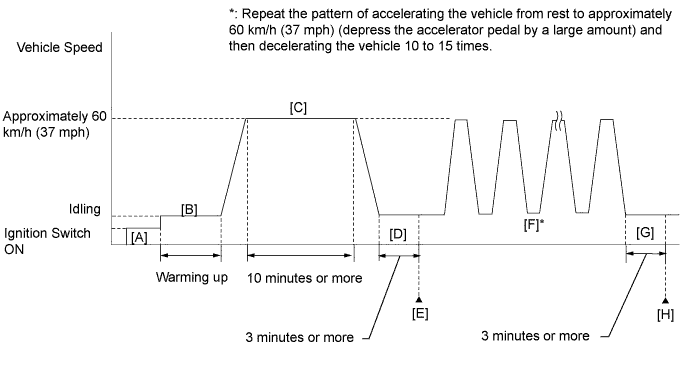
Drive the vehicle in accordance with the driving pattern described in the Confirmation Driving Pattern.
Enter the following menus: Powertrain / Engine and ECT / Trouble Codes / Pending.
Read pending DTCs.
| Result | Proceed to |
| DTC is not output | A |
| DTC P0011 or P0012 is output | B |
|
| ||||
| A | ||
 | ||
| ||
| 4.CHECK VALVE TIMING (CHECK FOR LOOSE AND JUMPED TEETH ON TIMING CHAIN) |
 |
Remove the cylinder head cover .
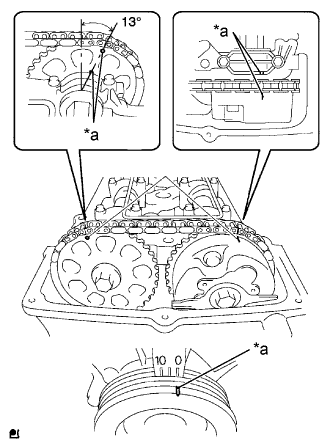
Turn the crankshaft pulley, and align its groove with the timing mark "0" on the timing chain cover.
Check that the timing marks on the camshaft timing gears are aligned as shown in the illustration.
| *a | Timing Mark |
|
| ||||
| OK | |
|
| 5.INSPECT CAMSHAFT TIMING OIL CONTROL VALVE ASSEMBLY |
Inspect the camshaft timing oil control valve assembly (Click here).
|
| ||||
| OK | |
|
| 6.INSPECT OIL CONTROL VALVE FILTER |
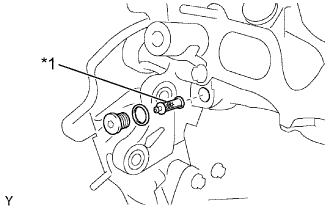 |
Remove the oil control valve filter .
Check that the filter is not clogged.
| *1 | Oil Control Valve Filter |
|
| ||||
| OK | |
|
| 7.REPLACE CAMSHAFT TIMING GEAR ASSEMBLY |
Replace the camshaft timing gear assembly .
| NEXT | |
|
| 8.CHECK WHETHER DTC OUTPUT RECURS (DTC P0011 OR P0012) |
Connect the Techstream to the DLC3.
Turn the ignition switch to ON.
Turn the Techstream on.
Clear DTCs (Click here).
Turn the ignition switch off and wait for at least 30 seconds.
Turn the ignition switch to ON.
Turn the Techstream on.
Start the engine and warm it up.
Drive the vehicle in accordance with the driving pattern described in the Confirmation Driving Pattern.
Enter the following menus: Powertrain / Engine and ECT / Trouble Codes / Pending.
Read pending DTCs.
| Result | Proceed to |
| DTC is not output | A |
| DTC P0011 or P0012 is output | B |
|
| ||||
| A | ||
| ||
| ||

