PARK ASSIST / MONITORING PANORAMIC VIEW MONITOR SYSTEM Image from Camera for Panoramic View Monitor is Abnormal
DESCRIPTION
The display signal from each camera is transmitted to the radio and display receiver assembly via the parking assist ECU.
WIRING DIAGRAM
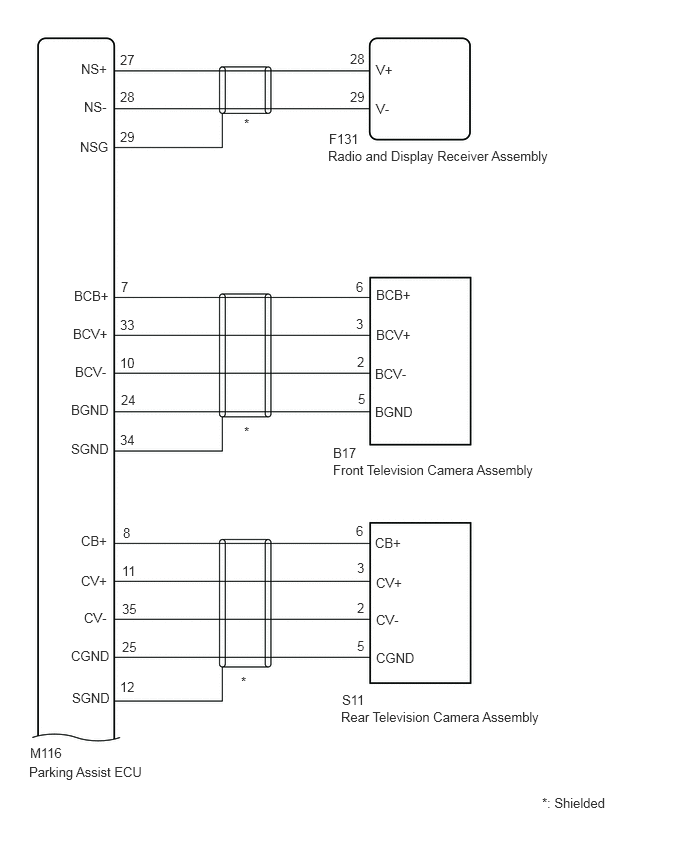
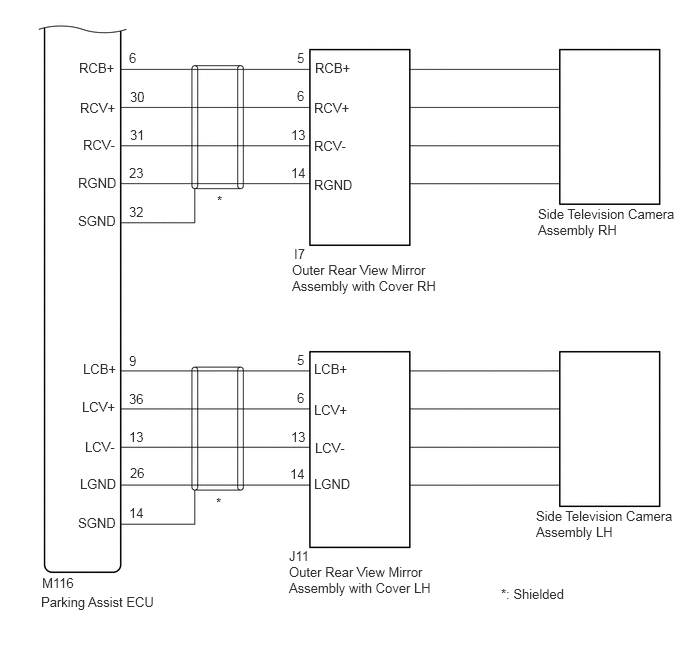
CAUTION / NOTICE / HINT
- NOTICE:
- ·
When "!" is displayed on the radio and display receiver assembly after the cable is disconnected from the negative (-) battery terminal, correct the steering angle neutral point.
Click hereAudio / Visual / Telematics>PARK ASSIST / MONITORING>PANORAMIC VIEW MONITOR SYSTEM>INITIALIZATION
·Depending on the parts that are replaced or operations that are performed during vehicle inspection or maintenance, calibration of other systems as well as the panoramic view monitor system may be needed.
Click hereAudio / Visual / Telematics>PARK ASSIST / MONITORING>PANORAMIC VIEW MONITOR SYSTEM>CALIBRATION
- HINT:
- Images may be unclear even in normal conditions if:·
Electrical devices are used in the cabin (noise may occur in the image).
·The camera lens is frosted over (the image immediately after turning the engine switch on (IG) may be blurred or darker than normal).
·The camera lens is dirty with snow, mud, etc.
·A strong beam of light, such as a sunbeam or headlight, hits the camera.
·It is too dark around the camera (at night, etc.).
·The ambient temperature around the camera is either too high or too low.
·The vehicle is tilted at a steep angle.
·The television camera assembly lens is scratched.
·The television camera assembly lens has drops of water on it or the humidity is high.
·When the camera is used under fluorescent lights, sodium lights, or mercury lights, etc., the lights and the illuminated area may appear to flicker.
PROCEDURE
Check if the same malfunction occurs when the panoramic view monitor screen is displayed.
- Result:
Result Proceed to Rear view screen is not displayed. A Front view screen is not displayed. B Left side monitor screen is not displayed. C Right side monitor screen is not displayed. D Panoramic view monitor screen is not displayed. E
A
B
C
D
E
Click hereAudio / Visual / Telematics>PARK ASSIST / MONITORING>PANORAMIC VIEW MONITOR SYSTEM>C1622
- Result:
Proceed to OK NG
OK
NG
Click hereAudio / Visual / Telematics>PARK ASSIST / MONITORING>PANORAMIC VIEW MONITOR SYSTEM>C1622
- Result:
Proceed to OK NG
OK
NG
Click hereAudio / Visual / Telematics>PARK ASSIST / MONITORING>PANORAMIC VIEW MONITOR SYSTEM>C1622
- Result:
Proceed to OK NG
OK
NG
Click hereAudio / Visual / Telematics>PARK ASSIST / MONITORING>PANORAMIC VIEW MONITOR SYSTEM>C1622
- Result:
Proceed to OK NG
OK
NG
Click hereAudio / Visual / Telematics>PARK ASSIST / MONITORING>PANORAMIC VIEW MONITOR SYSTEM>C1681
- Result:
Proceed to OK NG
OK
NG
Click hereAudio / Visual / Telematics>PARK ASSIST / MONITORING>PANORAMIC VIEW MONITOR SYSTEM>C1681
- Result:
Proceed to OK NG
OK
NG
Click hereAudio / Visual / Telematics>PARK ASSIST / MONITORING>PANORAMIC VIEW MONITOR SYSTEM>C1681
- Result:
Proceed to OK NG
OK
NG
Click hereAudio / Visual / Telematics>PARK ASSIST / MONITORING>PANORAMIC VIEW MONITOR SYSTEM>C1681
- Result:
Proceed to OK NG
OK
NG
Click hereAudio / Visual / Telematics>PARK ASSIST / MONITORING>TELEVISION CAMERA (for Front)>REMOVAL
Click hereAudio / Visual / Telematics>PARK ASSIST / MONITORING>PANORAMIC VIEW MONITOR SYSTEM>C1683
- Result:
Proceed to OK NG
OK
NG
Click hereAudio / Visual / Telematics>PARK ASSIST / MONITORING>PANORAMIC VIEW MONITOR SYSTEM>C1683
- Result:
Proceed to OK NG
OK
NG
Click hereAudio / Visual / Telematics>PARK ASSIST / MONITORING>PANORAMIC VIEW MONITOR SYSTEM>C1683
- Result:
Proceed to OK NG
OK
NG
Click hereAudio / Visual / Telematics>PARK ASSIST / MONITORING>PANORAMIC VIEW MONITOR SYSTEM>C1683
- Result:
Proceed to OK NG
OK
NG
Replace the side television camera assembly LH with a new or known good one.
Click hereAudio / Visual / Telematics>PARK ASSIST / MONITORING>TELEVISION CAMERA (for Side)>REMOVAL
Check if the same malfunction reoccurs when the side monitor screen is displayed.
- Result:
Result Proceed to Malfunction does not reoccur (returns to normal) A Malfunction reoccurs B
A
B
Click hereAudio / Visual / Telematics>PARK ASSIST / MONITORING>PANORAMIC VIEW MONITOR SYSTEM>C1686
- Result:
Proceed to OK NG
OK
NG
Click hereAudio / Visual / Telematics>PARK ASSIST / MONITORING>PANORAMIC VIEW MONITOR SYSTEM>C1686
- Result:
Proceed to OK NG
OK
NG
Click hereAudio / Visual / Telematics>PARK ASSIST / MONITORING>PANORAMIC VIEW MONITOR SYSTEM>C1686
- Result:
Proceed to OK NG
OK
NG
Click hereAudio / Visual / Telematics>PARK ASSIST / MONITORING>PANORAMIC VIEW MONITOR SYSTEM>C1686
- Result:
Proceed to OK NG
OK
NG
Replace the side television camera assembly RH with a new or known good one.
Click hereAudio / Visual / Telematics>PARK ASSIST / MONITORING>TELEVISION CAMERA (for Side)>REMOVAL
Check if the same malfunction reoccurs when the side monitor screen is displayed.
- Result:
Result Proceed to Malfunction does not reoccur (returns to normal) A Malfunction reoccurs B
A
B
Disconnect the M116 parking assist ECU connector.
Disconnect the F131 radio and display receiver assembly connector.
Measure the resistance according to the value(s) in the table below.
- Standard Resistance:
Tester Connection Condition Specified Condition M116-27 (NS+) - F131-28 (V+) Always Below 1 Ω M116-28 (NS-) - F131-29 (V-) Always Below 1 Ω M116-29 (NSG) - Body ground Always Below 1 Ω M116-27 (NS+) or F131-28 (V+) - Body ground Always 10 kΩ or higher M116-28 (NS-) or F131-29 (V-) - Body ground Always 10 kΩ or higher
- Result:
Proceed to OK NG
OK
Click hereAudio / Visual / Telematics>AUDIO / VIDEO>RADIO RECEIVER (for Radio and Display Type)>REMOVAL
NG