DIAGNOSIS SYSTEM
Troubleshooting · Vehicles built Aug 2009 – Oct 2010
Versions by build date: Jul 2007 – Jul 2009 Aug 2009 – Oct 2010 Nov 2010 – Jul 2011 Aug 2011 – Jul 2012 from Aug 2012
| BUS CHECK (COMMUNICATION MALFUNCTION ECU) |
- HINT:
- Only CAN communication system DTCs for each ECU can be displayed on the intelligent tester.
Select "Bus Check" from the "System Select" screen on the intelligent tester.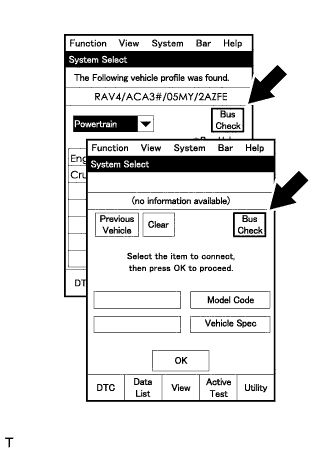

Select "Communication Malfunction DTC" from the "Bus Check" screen, and then select "Enter".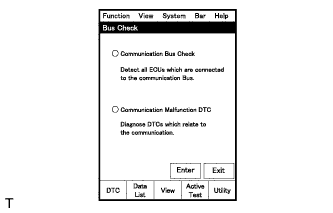
Select the system of the DTC to be checked and select "Details".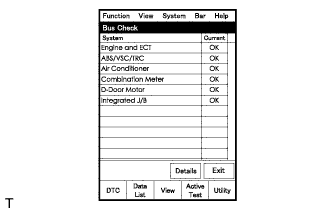
CAN communication system DTCs are displayed.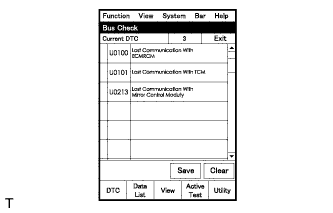
| BUS CHECK (COMMUNICATION BUS CHECK) |
- HINT:
- The ECUs and sensors that are properly connected to the CAN communication system can be displayed using the intelligent tester.
Select "Communication Bus Check" from the "Bus Check" screen.
The screen displays the ECUs and sensors that are properly connected to the CAN communication system.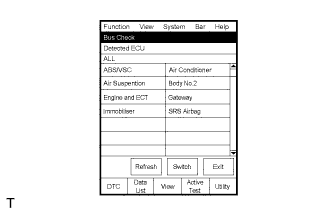
- HINT:
- If any properly connected ECUs or sensors are not displayed, there is a communication stop in the system (Click here).
-
The default item displayed in the combo box is "ALL". When checking the ECUs (sensors) connected to each bus, pull down the combo box and select the bus to be checked from the drop down list. The drop down list displays "ALL", "V Bus", and the names of the remaining buses.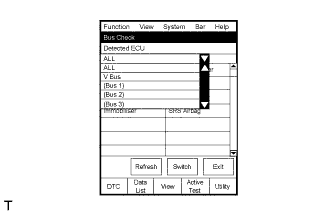
Combo Box
Display Content
ALL
All ECUs (sensors) connected to the CAN bus
V Bus
ECUs (sensors) connected to the V bus
Bus Name
ECUs (sensors) connected to the selected bus
- The connection status (shown below) is indicated by the background color displayed behind the system name.
ECU (Sensor) on V Bus
ECU (Sensor) with no Data Monitor HistoryBackground Color
Connection Status
White
Detected normally
Yellow
Could not be detected in the past, but is currently detected
Red
Detected in the past, but cannot be detected now
Not displayed
Has never been detected
ECU (Sensor) with no Data Monitor HistoryBackground Color
Connection Status
White
Detected normally
Yellow
Could not be detected in the past, but is currently detected
Red
Detected in the past, but cannot be detected now
Not displayed
Has never been detected
Background Color
Connection Status
White
Detected normally
Yellow
Could not be detected in the past, but is currently detected
Red
Detected in the past, but cannot be detected now
Red
Has never been detected but has connection history
Not displayed
Has never been detected and has no connection history
- If any properly connected ECUs or sensors are not displayed, there is a communication stop in the system (Click here).
"There is no system connected to the communication bus" is displayed if there are no ECUs or sensors connected to the CAN bus.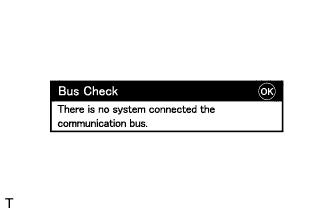
| CHECK INSTALLED SYSTEMS (ECUs AND SENSORS) THAT ADOPT CAN COMMUNICATION |
Systems (ECUs and sensors) that adopt CAN communication vary depending on the vehicle's optional settings. Check which systems (ECUs and sensors) are installed on the vehicle.
ECU/Sensor name
Check method
Skid control ECU
Installed on all vehicles
ECM
Installed on all vehicles
Yaw rate sensor
Installed on all vehicles
Steering angle sensor
Installed on all vehicles
| DTC TABLE BY ECU |
- HINT:
- In the CAN communication system, CAN communication system DTCs output by the ECU can be displayed by using the intelligent tester.
- If CAN communication system DTCs are output, trouble cannot be determined solely from the DTCs. Perform troubleshooting according to "How to Proceed with Troubleshooting" (Click here).
- In the CAN communication system, CAN communication system DTCs output by the ECU can be displayed by using the intelligent tester.
SKID CONTROL ECU
- HINT:
- DTC communication uses the SIL Line.
DTC No.
Detection Item
U0073/94
Control Module Communication Bus OFF
U0100/65
Lost Communication with ECM/PCM
U0123/62
Lost Communication with Yaw Rate Sensor Module
U0124/95
Lost Communication with Lateral Acceleration Sensor Module
U0126/63
Lost Communication with Steering Angle Sensor Module
YAW RATE SENSOR
- HINT:
- The yaw rate sensor is connected to the CAN communication system but CAN communication DTCs are not output.
- If "Yaw Rate/Deceleration Sensor" is not displayed on the "Communication Bus Check" screen on the intelligent tester, proceed to "Yaw Rate Sensor Communication Stop Mode." (Click here)
- The yaw rate sensor is connected to the CAN communication system but CAN communication DTCs are not output.
STEERING ANGLE SENSOR
- HINT:
- The steering sensor is connected to the CAN communication system but CAN communication DTCs are not output.
- If "Steering Angle Sensor" is not displayed on the "Communication Bus Check" screen on the intelligent tester, proceed to "Steering Angle Sensor Communication Stop Mode." (Click here)
- The steering sensor is connected to the CAN communication system but CAN communication DTCs are not output.
ECM
- HINT:
- The ECM is connected to the CAN communication system but CAN communication DTCs are not output.
- If "Engine" is not displayed on the "Communication Bus Check" screen on the intelligent tester, proceed to "ECM Communication Stop Mode." (Click here)
- The ECM is connected to the CAN communication system but CAN communication DTCs are not output.
| DTC COMBINATION TABLE |
| DTC |
Trouble Mode |
||||
| Output from |
Output DTC |
ECM Communication Stop Mode |
Skid Control ECU Communication Stop Mode |
Yaw Rate Sensor Communication Stop Mode |
Steering Angle Sensor Communication Stop Mode |
| Skid Control ECU |
U0073/94 |
X |
X |
X |
X |
| U0100/65 |
○ |
X |
X |
X |
|
| U0123/62 |
X |
X |
○ |
X |
|
| U0124/95 |
X |
X |
○ |
X |
|
| U0126/63 |
X |
X |
X |
○ |
|
- HINT:
- ○: It is necessary to check for the trouble mode.
- X: Not output
- ○: It is necessary to check for the trouble mode.
Perform troubleshooting according to the combination of DTCs output.
- HINT:
- Skid Control ECU Communication Stop Mode: (Click here)
- ECM Communication Stop Mode: (Click here)
- Yaw Rate Sensor Communication Stop Mode: (Click here)
- Steering Angle Sensor Communication Stop Mode: (Click here)
- Skid Control ECU Communication Stop Mode: (Click here)