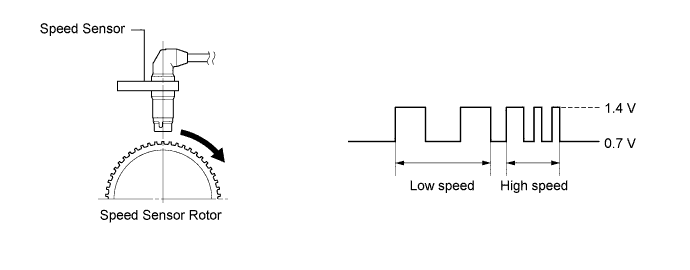
DTC C1401 Front Speed Sensor RH Malfunction |
DTC C1402 Front Speed Sensor LH Malfunction |
| DTC Code | DTC Detection Condition | Trouble Area |
| C1401 C1402 | Any of the following is detected:
|
|
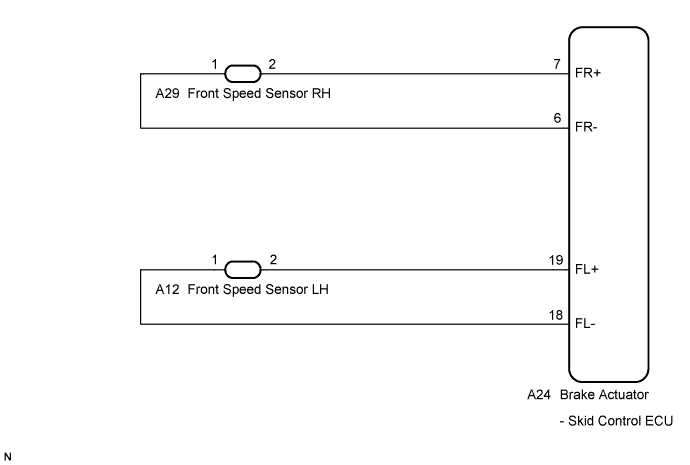
| 1.CHECK FRONT SPEED SENSOR INSTALLATION |
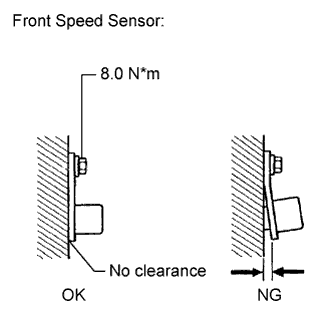 |
Check the speed sensor installation.
|
| ||||
| OK | |
 |
| 2.CHECK FRONT SPEED SENSOR TIP |
Remove the front speed sensor (Click here).
Check the speed sensor tip.
|
| ||||
| OK | |
|
| 3.CHECK FRONT SPEED SENSOR ROTOR |
Remove the front speed sensor rotor (Click here).
Check the speed sensor rotor.
|
| ||||
| OK | |
|
| 4.READ VALUE ON TECHSTREAM (FRONT SPEED SENSOR) |
Install the front speed sensor and the front speed sensor rotor.
Connect Techstream to the DLC3.
Start the engine.
Select the Data List mode on Techstream (Click here).
| Tester Display | Measurement Item/Range | Normal Condition | Diagnostic Note |
| FR Wheel Speed | FR wheel speed sensor reading / min.: 0 km/h (0 mph), max.: 326 km/h (202 mph) | Actual wheel speed | Similar speed as indicated on speedometer |
| FL Wheel Speed | FL wheel speed sensor reading /min.: 0 km/h (0 mph), max.: 326 km/h (202 mph) | Actual wheel speed | Similar speed as indicated on speedometer |
Check that there is no difference between the speed value output from the speed sensor displayed on Techstream and the speed value displayed on the speedometer when driving the vehicle.
|
| ||||
| OK | ||
 | ||
| ||
| 5.REPLACE FRONT SPEED SENSOR |
Turn the ignition switch off.
Replace the front speed sensor (Click here).
| NEXT | |
|
| 6.RECONFIRM DTC |
Clear the DTCs (Click here).
Start the engine.
Drive the vehicle at a speed of 40 km/h (25 mph) or more for at least 60 seconds.
Check if the same DTC is recorded (Click here).
| Result | Proceed to |
| DTCs (C1401 and C1402) are not output | A |
| DTCs (C1401 and/or C1402) are output | B |
|
| ||||
| A | ||
| ||
| ||

