NAVIGATION / MULTI INFO DISPLAY NAVIGATION SYSTEM B15C3 Speaker Output Short
DESCRIPTION
This DTC is stored when a malfunction occurs in the speakers.
| DTC No. | Detection Item | DTC Detection Condition | Trouble Area | DTC Output from | Priority |
|---|---|---|---|---|---|
| B15C3 | Speaker Output Short | A short is detected in the speaker output circuit | ·
Harness or connector ·
Speakers ·
Stereo component amplifier ·
Telematics transceiver* |
Navigation System | A |
*: w/ Telematics Transceiver (for TOYOTA Connect)
WIRING DIAGRAM
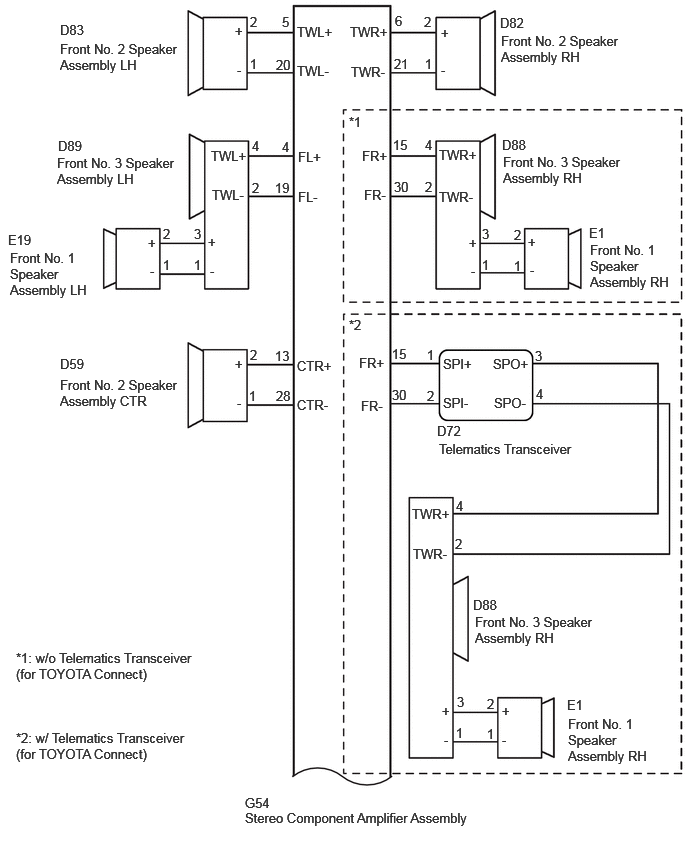
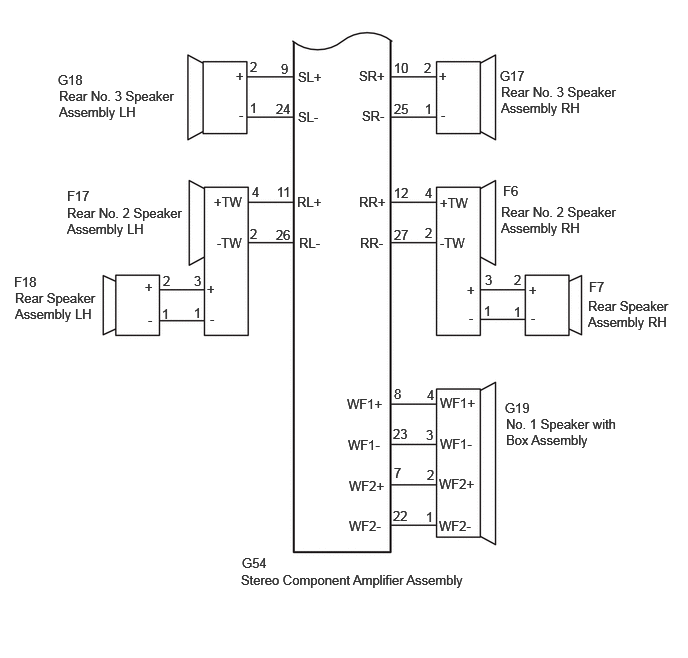
CAUTION / NOTICE / HINT
- NOTICE:
-
Depending on the parts that are replaced during vehicle inspection or maintenance, performing initialization, registration or calibration may be needed. Refer to Precaution for Navigation System.
-
Click hereAudio / Visual / Telematics>NAVIGATION / MULTI INFO DISPLAY>NAVIGATION SYSTEM>PRECAUTION
PROCEDURE
Pre-procedure1
Clear the DTCs.
- Body Electrical > Navigation System > Clear DTCs
- 50002 212
Procedure1
Recheck for DTCs and check that no DTCs are output.
- Body Electrical > Navigation System > Trouble Codes
- 50001 212
- Result:
Result Proceed to DTCs are not output A DTCs are output B
Post-procedure1
None
A
Click hereGeneral>INTRODUCTION>HOW TO TROUBLESHOOT ECU CONTROLLED SYSTEMS>HOW TO PROCEED WITH TROUBLESHOOTING
B
Pre-procedure1
*: w/ Telematics Transceiver (for TOYOTA Connect)
Disconnect the G54 stereo component amplifier assembly connector.
Disconnect the E1 and E19 front No. 1 speaker assembly connectors.
Disconnect the D82, D83 and D59 front No. 2 speaker assembly connectors.
Disconnect the D88 and D89 front No. 3 speaker assembly connectors.
Disconnect the F7 and F18 rear speaker assembly connectors.
Disconnect the F6 and F17 rear No. 2 speaker assembly connectors.
Disconnect the G17 and G18 rear No. 3 speaker assembly connectors.
Disconnect the G19 No. 1 speaker with box assembly connector.
Disconnect the D72 telematics transceiver connector.*
Procedure1
Measure the resistance according to the value(s) in the table below.
- Standard Resistance:
Tester Connection Condition Specified Condition *: w/ Telematics Transceiver (for TOYOTA Connect)
Click Location & Routing(G54,D88,D89,D72,F6,F17)Location & Routingewd_type=routing;type=c,c,c,c,c,c;code=G54,D88,D89,D72,F6,F17
Click Connector(G54)Body>Floor Wire / No. 3 Floor Wire>Stereo Component Amplifier Assemblyewd_type=component;type=c;code=G54;pinno=15,30,4,19,6,21,5,20,13,28,12,27,11,26,10,25,9,24,8,23,7,22
Click Connector(D88)Instrument Panel>Instrument Panel Wire>Front No. 3 Speaker Assembly RHewd_type=component;type=c;code=D88;pinno=3,1
Click Connector(D89)Instrument Panel>Instrument Panel Wire>Front No. 3 Speaker Assembly LHewd_type=component;type=c;code=D89;pinno=3,1
Click Connector(D72)Instrument Panel>Instrument Panel Wire>Telematics Transceiverewd_type=component;type=c;code=D72;pinno=3,4
Click Connector(F6)Body>No. 1 Rear Door Wire / No. 2 Rear Door Wire>Rear No. 2 Speaker Assembly RHewd_type=component;type=c;code=F6;pinno=3,1
Click Connector(F17)Body>No. 1 Rear Door Wire / No. 2 Rear Door Wire>Rear No. 2 Speaker Assembly LHewd_type=component;type=c;code=F17;pinno=3,1
G54-15 (FR+) - Body ground Always 10 kΩ or higher G54-30 (FR-) - Body ground Always 10 kΩ or higher D88-3 (+) - Body ground Always 10 kΩ or higher D88-1 (-) - Body ground Always 10 kΩ or higher G54-4 (FL+) - Body ground Always 10 kΩ or higher G54-19 (FL-) - Body ground Always 10 kΩ or higher D89-3 (+) - Body ground Always 10 kΩ or higher D89-1 (-) - Body ground Always 10 kΩ or higher G54-6 (TWR+) - Body ground Always 10 kΩ or higher G54-21 (TWR-) - Body ground Always 10 kΩ or higher G54-5 (TWL+) - Body ground Always 10 kΩ or higher G54-20 (TWL-) - Body ground Always 10 kΩ or higher D72-3 (SPO+) - Body ground* Always 10 kΩ or higher D72-4 (SPO-) - Body ground* Always 10 kΩ or higher G54-13 (CTR+) - Body ground Always 10 kΩ or higher G54-28 (CTR-) - Body ground Always 10 kΩ or higher G54-12 (RR+) - Body ground Always 10 kΩ or higher G54-27 (RR-) - Body ground Always 10 kΩ or higher F6-3 (+) - Body ground Always 10 kΩ or higher F6-1 (-) - Body ground Always 10 kΩ or higher G54-11 (RL+) - Body ground Always 10 kΩ or higher G54-26 (RL-) - Body ground Always 10 kΩ or higher F17-3 (+) - Body ground Always 10 kΩ or higher F17-1 (-) - Body ground Always 10 kΩ or higher G54-10 (SR+) - Body ground Always 10 kΩ or higher G54-25 (SR-) - Body ground Always 10 kΩ or higher G54-9 (SL+) - Body ground Always 10 kΩ or higher G54-24 (SL-) - Body ground Always 10 kΩ or higher G54-8 (WF1+) - Body ground Always 10 kΩ or higher G54-23 (WF1-) - Body ground Always 10 kΩ or higher G54-7 (WF2+) - Body ground Always 10 kΩ or higher G54-22 (WF2-) - Body ground Always 10 kΩ or higher
- Result:
Proceed to OK NG
Post-procedure1
None
OK
NG
Click hereAudio / Visual / Telematics>AUDIO / VIDEO>FRONT DOOR SPEAKER>INSPECTION
- Result:
Proceed to OK NG
OK
NG
Click hereAudio / Visual / Telematics>AUDIO / VIDEO>INSTRUMENT PANEL SPEAKER>INSPECTION
- Result:
Proceed to OK NG
OK
NG
Click hereAudio / Visual / Telematics>AUDIO / VIDEO>REAR DOOR SPEAKER>INSPECTION
- Result:
Proceed to OK NG
OK
NG
Click hereAudio / Visual / Telematics>AUDIO / VIDEO>REAR PACKAGE TRAY SPEAKER>INSPECTION
- Result:
Proceed to OK NG
OK
NG
Click hereAudio / Visual / Telematics>AUDIO / VIDEO>REAR PACKAGE TRAY SPEAKER>INSPECTION
- Result:
Proceed to OK NG
OK
NG
Check the vehicle type.
- Result:
Result Proceed to w/ Telematics Transceiver (for TOYOTA Connect) A w/o Telematics Transceiver (for TOYOTA Connect) B
A
B
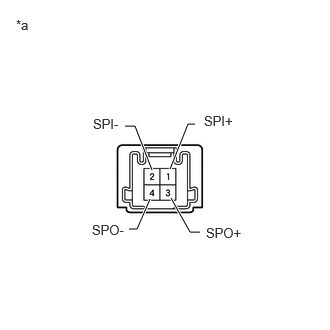
| *a | Component without harness connected
(Telematics Transceiver) |
Remove the telematics transceiver.
Measure the resistance according to the value(s) in the table below.
- Standard Resistance:
Tester Connection Condition Specified Condition 3 (SPO+) - 1 (SPI+) Always Below 1 Ω 4 (SPO-) - 2 (SPI-) Always Below 1 Ω 1 (SPI+) - 2 (SPI-) Always 10 kΩ or higher 3 (SPO+) - 4 (SPO-) Always 10 kΩ or higher
- Result:
Proceed to OK NG
OK
NG
Pre-procedure1
Replace the front No. 3 speaker assembly with a new or known good one.
- HINT:
-
Click hereAudio / Visual / Telematics>AUDIO / VIDEO>PILLAR SPEAKER>REMOVAL
Clear the DTCs.
- Body Electrical > Navigation System > Clear DTCs
- 50002 212
Procedure1
Recheck for DTCs and check that no DTCs are output.
- Body Electrical > Navigation System > Trouble Codes
- 50001 212
- Result:
Result Proceed to DTCs are not output A DTCs are output B
Post-procedure1
None
A
B
Pre-procedure1
Replace the rear No. 2 speaker assembly with a new or known good one.
Clear the DTCs.
- Body Electrical > Navigation System > Clear DTCs
- 50002 212
Procedure1
Recheck for DTCs and check that no DTCs are output.
- Body Electrical > Navigation System > Trouble Codes
- 50001 212
- Result:
Result Proceed to DTCs are not output A DTCs are output B
Post-procedure1
None
A
B