DIAGNOSIS SYSTEM
Troubleshooting · Vehicles built Nov 2005 – Dec 2006
Versions by build date: Nov 2005 – Dec 2006 Jan 2007 – Jul 2007 Aug 2007 – Jul 2008 from Aug 2008
| DIAGNOSIS |
- w/o Multi-information display:
If the skid control ECU detects a malfunction, the ABS, VSC and Brake warning lights and the Slip and downhill assist control indicator lights come on in accordance with the trouble area to warn the driver.
- w/ Multi-information display:
If the skid control ECU detects a malfunction, the ABS and BRAKE warning lights and the master caution, SLIP and Downhill assist control indicator lights come on and the multi-information display warning messages in accordance with the trouble area to warn the driver.
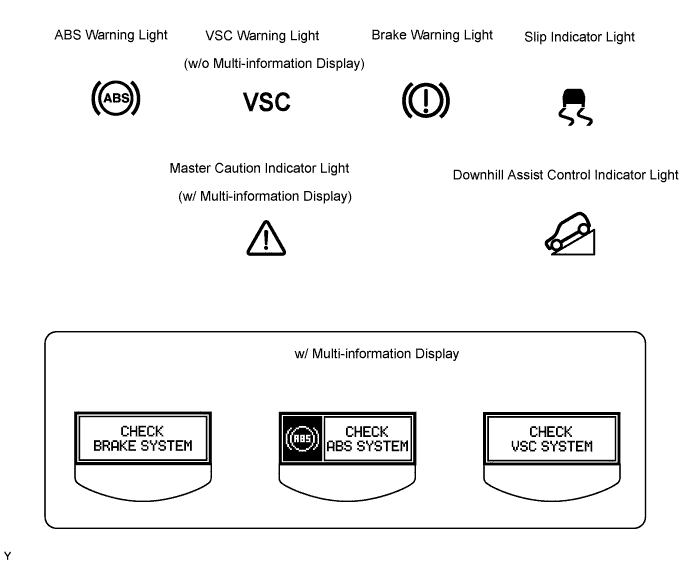

| Item / Trouble Area |
ABS |
EBD |
BA (Brake Assist) |
TRC |
VSC |
Downhill Assist Control*3 |
Hill-start Assist Control*4 |
| ABS warning light*1 ABS warning light and warning message*2 |
○ |
○ |
○ |
- |
- |
- |
- |
| Brake warning light*1 Brake warning light and warning message*2 |
- |
○ |
○*5 |
- |
- |
- |
- |
| VSC warning light*1 Master caution indicator light and warning message*2 |
○ |
○ |
○ |
○ |
○ |
○ |
○ |
| Slip indicator light |
○ |
○ |
○ |
○ |
○ |
○ |
○ |
| Downhill assist control indicator light*3 |
● (Downhill assist control switch ON) |
● (Downhill assist control switch ON) |
● (Downhill assist control switch ON) |
● (Downhill assist control switch ON) |
● (Downhill assist control switch ON) |
● (Downhill assist control switch ON) |
● (Downhill assist control switch ON) |
- ○: Light ON
- ●: Light ON (Blinking)
- -: Light OFF
- HINT:
- *1: w/o Multi-information display
- *2: w/ Multi-information display
- *3: w/ Downhill assist control
- *4: w/ Hill-start assist control
- *5: w/ 16-inch disc
- The DTCs can be read by connecting SST (09843-18040) between the TC and CG terminals of the DLC3 and observing the blinking pattern of the ABS warning light and VSC warning light*1 or the multi-information display*2, or by using the intelligent tester (Click here).
- This system has a sensor signal check function (Click here).
- *1: w/o Multi-information display
| CHECK WARNING LIGHT AND INDICATOR LIGHT |
Release the parking brake lever.
- NOTICE:
- Before releasing the parking brake lever, set chocks to hold the vehicle for safety.
- HINT:
- When the parking brake is applied or the brake fluid level is low, the brake warning light comes on.
When the ignition switch is turned on (IG), check that the ABS, VSC (w/o Multi-information display) and Brake warning lights and the master caution (w/ Multi-information display), Slip and downhill assist control indicator lights come on and go off in about 3 seconds.
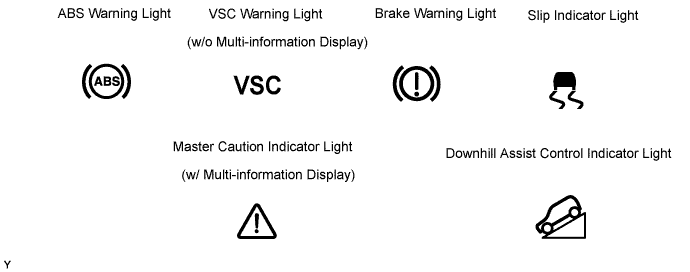
- HINT:
- If the warning lights do not illuminate, confirm whether the bulbs have burned out, and also check for CAN communication system DTCs, since the skid control ECU and combination meter are connected by the CAN communication line.
- If the warning light remains on, perform relevant troubleshooting procedures. The relevant troubleshooting procedures are in the sections listed in the table below.
Section Title
See procedure
ABS Warning Light Remains ON
Click here
VSC Warning Light Remains ON
Click here
Brake Warning Light Remains ON
Click here
Slip Indicator Light Remains ON
Click here
Downhill Assist Control Indicator Light Remains ON
Click here