AXLE AND DIFFERENTIAL REAR AXLE HUB(for AWD) ON-VEHICLE INSPECTION
CAUTION / NOTICE / HINT
The necessary procedures (adjustment, calibration, initialization, or registration) that must be performed after parts are removed and installed, or replaced during the rear axle hub on-vehicle inspection are shown below.
| Replacement Part or Procedure | Necessary Procedures | Effect/Inoperative Function When Necessary Procedures are not Performed | Link |
|---|---|---|---|
| Auxiliary battery terminal is disconnected/reconnected | Parking assist monitor system | Memorize steering angle neutral point | ( ) |
| Panoramic view monitor system | ()
|
- HINT:
- When the cable is disconnected/reconnected to the auxiliary battery terminal, systems temporarily stop operating. However, each system has a function that completes learning the first time the system is used.·
Learning completes when vehicle is driven
Effect/Inoperative Function When Necessary Procedures are not Performed Necessary Procedures Link Lane tracing assist system Drive the vehicle straight ahead at 35 km/h (22 mph) or more for 5 seconds or more. ( )
Pre-collision system Parking support brake system
·Learning completes when vehicle is operated normally
Effect/Inoperative Function When Necessary Procedures are not Performed Necessary Procedures Link Power door lock control system
·Back door opener
Perform door unlock operation with door control switch or electrical key transmitter sub-assembly switch. ( )
Power back door system Fully close the back door by hand.
- HINT:
-
Initialization is not necessary if the above procedures are performed while the back door is closed.
( )
Air conditioning system After the ignition switch is turned to ON, the servo motor standard position is recognized. -
·Use the same procedure for the RH side and LH side.
·The following procedure is for the LH side.
PROCEDURE

 1. PRECAUTION
- NOTICE:
-
After turning the ignition switch off, waiting time may be required before disconnecting the cable from the negative (-) auxiliary battery terminal.
-
Click hereGeneral>SETUP>WHEN DISCONNECTING OR RECONNECTING BATTERY TERMINAL>BEFORE DISCONNECTING BATTERY
2. DISABLE BRAKE CONTROL
- HINT:
-
Click hereBrake>BRAKE (FRONT)>FRONT BRAKE>REMOVAL
46310B
3.REMOVE PARKING BRAKE ACTUATOR ASSEMBLY
4.SEPARATE REAR DISC BRAKE CALIPER ASSEMBLY
42431
5.REMOVE REAR DISC
- HINT:
6.INSPECT REAR AXLE HUB BEARING LOOSENESS
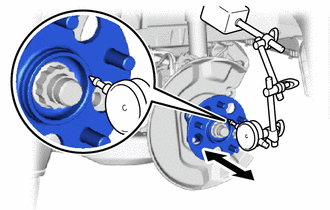
Using a dial indicator with magnetic base, check for looseness near the center of the rear axle hub and bearing assembly.
- Maximum Looseness:
0.05 mm (0.00197 in.)
- NOTICE:
- ·
Ensure that the dial indicator is set perpendicular to the measurement surface.
·Keep the magnet of the dial indicator away from the rear axle hub and bearing assembly.
If the looseness exceeds the maximum, replace the rear axle hub and bearing assembly.
7.INSPECT REAR AXLE HUB RUNOUT
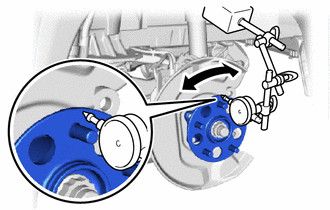
Using a dial indicator with magnetic base, check for runout on the surface of the rear axle hub and bearing assembly outside the rear axle hub bolts.
- Maximum Runout:
0.07 mm (0.00276 in.)
- NOTICE:
- ·
Ensure that the dial indicator is set perpendicular to the measurement surface.
·Make sure to install the tip of the dial indicator towards the outside of the rear axle hub bolts.
·Keep the magnet of the dial indicator away from the rear axle hub and bearing assembly.
If the runout exceeds the maximum, replace the rear axle hub and bearing assembly.
42431
8.INSTALL REAR DISC
- HINT:
-
Click hereBrake>BRAKE (REAR)>REAR BRAKE (for 2WD)>INSTALLATION
9.INSTALL REAR DISC BRAKE CALIPER ASSEMBLY
46310B
10.INSTALL PARKING BRAKE ACTUATOR ASSEMBLY
11.CONNECT CABLE TO NEGATIVE AUXILIARY BATTERY TERMINAL
- HINT:
-
Click hereBrake>BRAKE (REAR)>REAR BRAKE (for 2WD)>INSTALLATION
12. INITIALIZATION AFTER RECONNECTING AUXILIARY BATTERY TERMINAL
- HINT:
-
Click hereGeneral>SETUP>WHEN DISCONNECTING OR RECONNECTING BATTERY TERMINAL>WORK PROCEDURE
-
When disconnecting and reconnecting the auxiliary battery, there is an automatic learning function that completes learning when the respective system is used.
-
Click hereGeneral>SETUP>WHEN DISCONNECTING OR RECONNECTING BATTERY TERMINAL>AUTOMATIC LEARNING CHART