BRAKE CONTROL / DYNAMIC CONTROL SYSTEMS STEERING ANGLE SENSOR INSTALLATION
CAUTION / NOTICE / HINT
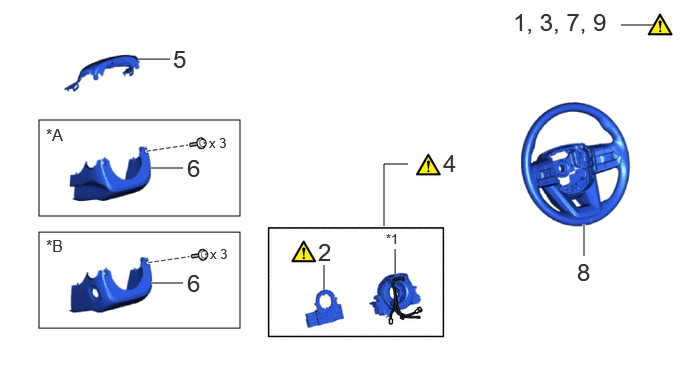
| Procedure | Part Name Code |

|

|

|
|
|---|---|---|---|---|---|
| 1 | INSPECT SPIRAL CABLE WITH SENSOR SUB-ASSEMBLY | - | ( ) |
- | - |
| 2 | STEERING SENSOR | 89245B | () |
- | - |
| 3 | PLACE FRONT WHEELS FACING STRAIGHT AHEAD | - | () |
- | - |
| 4 | SPIRAL CABLE WITH SENSOR SUB-ASSEMBLY | - | () |
- | |
| 5 | UPPER STEERING COLUMN COVER | 45286B | - | - | - |
| 6 | LOWER STEERING COLUMN COVER SUB-ASSEMBLY | 45204 | - | - | - |
| 7 | ADJUST SPIRAL CABLE SUB-ASSEMBLY | - | () |
- | - |
| 8 | STEERING WHEEL ASSEMBLY | 45100 | - | - | - |
| 9 | CHECK STEERING WHEEL CENTER POINT | - | () |
- | - |
| *A | for Manual Tilt and Manual Telescopic Steering Column | *B | for Power Tilt and Power Telescopic Steering Column |
| *1 | SPIRAL CABLE SUB-ASSEMBLY | - | - |
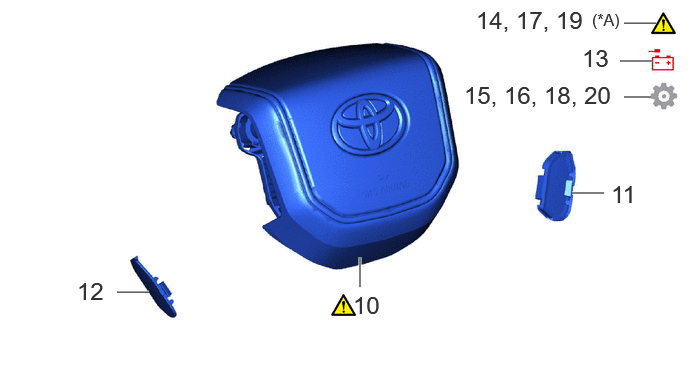
| Procedure | Part Name Code |
|
|
|
|
|---|---|---|---|---|---|
| 10 | HORN BUTTON ASSEMBLY | 45130 | - | - | - |
| 11 | LOWER NO. 2 STEERING WHEEL COVER | - | - | - | - |
| 12 | LOWER NO. 3 STEERING WHEEL COVER | - | - | - | - |
| 13 | CONNECT CABLE TO NEGATIVE BATTERY TERMINAL | - | () |
- | - |
| 14 | INSPECT HORN BUTTON ASSEMBLY | - | () |
- | - |
| 15 | UPDATE ECU SECURITY KEY | - | - | - | () |
| 16 | PERFORM DIAGNOSTIC SYSTEM CHECK | - | - | - | () |
| 17 | CHECK SRS WARNING LIGHT | - | () |
- | - |
| 18 | PERFORM INITIALIZATION AND CALIBRATION | - | - | - | () |
| 19 | CUSTOMIZE POWER TILT AND POWER TELESCOPIC STEERING COLUMN SYSTEM | - | - | - | () |
| 20 | INITIALIZATION AFTER RECONNECTING BATTERY TERMINAL | - | - | - | () |
| *A | for Power Tilt and Power Telescopic Steering Column | - | - |
CAUTION / NOTICE / HINT
- NOTICE:
-
·
A lock pin is installed to a new steering sensor. Do not remove the lock pin before the steering sensor is installed to the spiral cable sub-assembly.
·After performing the update ECU security key procedure, make sure to perform the initialization procedure for when the cable has been disconnected and reconnected to the negative (-) battery terminal.
PROCEDURE

 1.INSPECT SPIRAL CABLE SUB-ASSEMBLY
|
|
Click here() |
89245B 2.INSTALL STEERING SENSOR
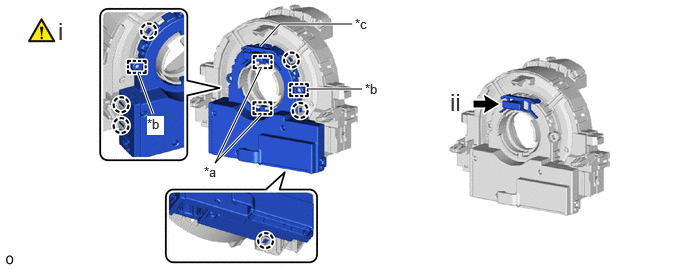
| *a | Guide | *b | Pin |
| *c | Lock Pin | - | - |
Align the 2 pins and 2 guides, and engage the 6 claws to install the steering sensor to the spiral cable sub-assembly.
- NOTICE:
-
·
Do not remove the lock pin before the steering sensor is installed to the spiral cable sub-assembly.
·Do not damage the claws or pins of the spiral cable sub-assembly or guides of the steering sensor.
·The spiral cable sub-assembly can be rotated up to 30° even when the interlock is engaged. Therefore, make sure that both guides are aligned properly when installing the steering sensor to the spiral cable sub-assembly.
Remove the lock pin from the steering sensor.
3.PLACE FRONT WHEELS FACING STRAIGHT AHEAD
4.INSTALL SPIRAL CABLE WITH SENSOR SUB-ASSEMBLY
45286B 5.INSTALL UPPER STEERING COLUMN COVER
45024 6.INSTALL LOWER STEERING COLUMN COVER SUB-ASSEMBLY
7.ADJUST SPIRAL CABLE SUB-ASSEMBLY
45100 8.INSTALL STEERING WHEEL ASSEMBLY
9.CHECK STEERING WHEEL CENTER POINT
45130 10.INSTALL HORN BUTTON ASSEMBLY
11.INSTALL LOWER NO. 2 STEERING WHEEL COVER
12.INSTALL LOWER NO. 3 STEERING WHEEL COVER
13.CONNECT CABLE TO NEGATIVE BATTERY TERMINAL
for 1GR-FE:
for V35A-FTS:
for F33A-FTV:
14.INSPECT HORN BUTTON ASSEMBLY
15. UPDATE ECU SECURITY KEY
16. PERFORM DIAGNOSTIC SYSTEM CHECK
17.CHECK SRS WARNING LIGHT
18.PERFORM INITIALIZATION AND CALIBRATION
for Panoramic View Monitor System Initialization:
Click hereAudio / Visual / Telematics>PARK ASSIST / MONITORING>PANORAMIC VIEW MONITOR SYSTEM>INITIALIZATION
for Parking Assist Monitor System Initialization:
Click hereAudio / Visual / Telematics>PARK ASSIST / MONITORING>PARKING ASSIST MONITOR SYSTEM>INITIALIZATION
for Panoramic View Monitor System Calibration:
Click hereAudio / Visual / Telematics>PARK ASSIST / MONITORING>PANORAMIC VIEW MONITOR SYSTEM>CALIBRATION
for Parking Assist Monitor System Calibration:
Click hereAudio / Visual / Telematics>PARK ASSIST / MONITORING>PARKING ASSIST MONITOR SYSTEM>CALIBRATION
19. CUSTOMIZE POWER TILT AND POWER TELESCOPIC STEERING COLUMN SYSTEM (for Power Tilt and Power Telescopic Steering Column)
|
|
Click here() |
20. INITIALIZATION AFTER RECONNECTING BATTERY TERMINAL
Click hereGeneral>SETUP>WHEN DISCONNECTING OR RECONNECTING BATTERY TERMINAL>WORK PROCEDURE
- HINT:
-
When disconnecting and reconnecting the battery, there is an automatic learning function that completes learning when the respective system is used.
-
Click hereGeneral>SETUP>WHEN DISCONNECTING OR RECONNECTING BATTERY TERMINAL>AUTOMATIC LEARNING CHART